
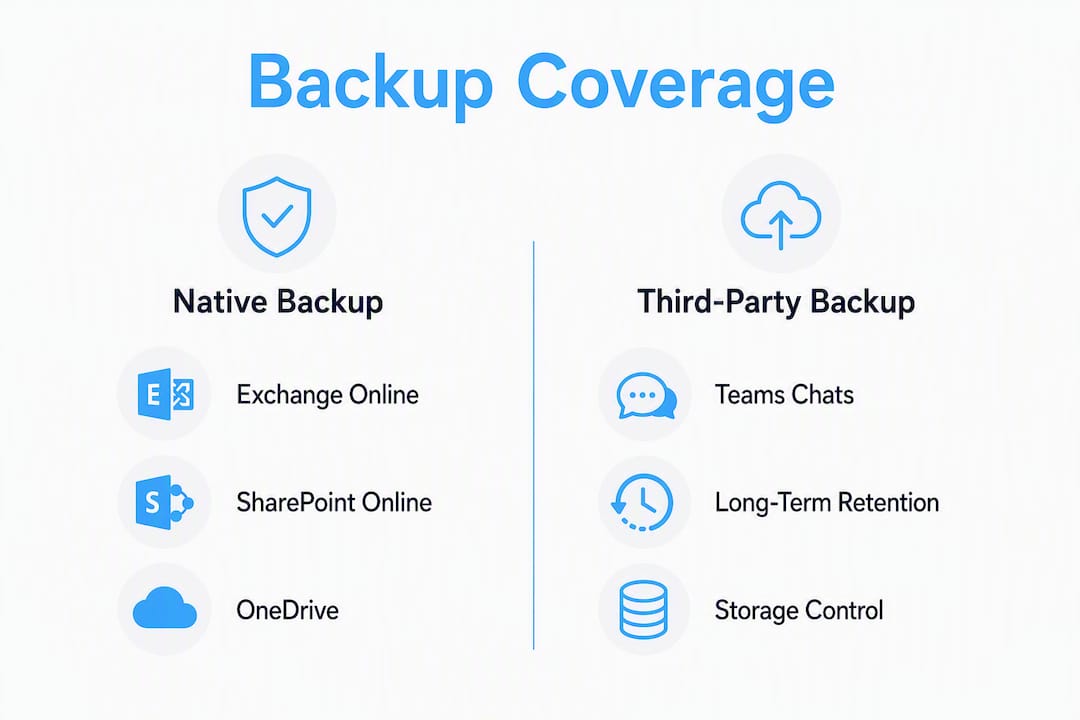
For most UK organisations, the right answer is a hybrid model: use Microsoft 365 Backup as your fast operational restore engine for Exchange Online, SharePoint Online and OneDrive for Business, then layer targeted third-party or managed backup coverage over the gaps.
Here is how the split works in practice:
- Native Microsoft 365 Backup handles Exchange, SharePoint and OneDrive restores with restore points taken approximately every 10 minutes, giving you rapid recovery from accidental deletion, ransomware or admin error.
- Third-party or managed backup covers the workloads Microsoft 365 Backup does not touch: Teams chats, Planner, Loop, Whiteboard, Stream and Power Platform, plus air-gapped or immutable copies for cyber insurance and compliance requirements.
- Microsoft Purview manages long-term legal retention and eDiscovery holds. It is not an operational restore tool and should never be treated as one.
Your immediate next step is to decide which pattern fits your organisation: native-first with scoped third-party coverage for the gaps, or a fully managed hybrid if your team lacks the capacity to run both layers internally.
Table of Contents
- What do Microsoft 365 Backup’s native capabilities actually cover?
- Why relying only on native retention puts you at risk
- What third-party backup solutions add to your protection
- How Microsoft 365 Backup Storage and ISV integrations work
- How should UK IT decision makers choose the right backup pattern?
- Recommended deployment patterns for UK SMEs
- Vendor-agnostic selection matrix for backup evaluation
- How to run restore tests that actually prove your backup works
- Key takeaways
- Why the “just use Microsoft” instinct is understandable but incomplete
- TTOY Digital’s managed Microsoft 365 backup service for UK small businesses
- Useful sources and further reading
- FAQ
What do Microsoft 365 Backup’s native capabilities actually cover?
Microsoft 365 Backup protects three workloads: Exchange Online mailboxes, SharePoint Online sites and OneDrive for Business accounts. That covers the majority of day-to-day data for most organisations, and the restore experience is genuinely fast compared with legacy approaches.
Restore points are taken frequently throughout the day. For SharePoint and OneDrive, granular restore is available for the initial days, after which weekly snapshots extend coverage for up to a year. Exchange Online retention runs for up to a year. Validate the current figures in Microsoft Learn before you build SLA commitments around them, as Microsoft updates these periodically.
The speed advantage comes from Microsoft 365 Backup Storage, the underlying platform. Because backups live within the same infrastructure, bulk restores avoid the API throttling that slowed older third-party approaches. Microsoft prices storage at $0.15 per GB per month at the time of publication, billed on a pay-as-you-go basis, which suits organisations that want predictable cost scaling.
| Workload | Restore granularity | Retention window |
|---|---|---|
| Exchange Online | Mailbox item, full mailbox | ~365 days |
| SharePoint Online | Site, item | weekly to 365 days |
| OneDrive for Business | Account, item | weekly to 365 days |
Policy design matters here. Admins can create multiple policies per workload, with an established upper limit., and each SharePoint site or OneDrive account can belong to only one policy. In a complex tenant with many departments or geographic divisions, that single-policy-per-site constraint can catch you out if you have not mapped your policy structure during discovery.
Restore speed is where native backup earns its place. Microsoft’s own documentation describes restoring clean copies in hours rather than weeks, which is a meaningful operational difference when a ransomware event or mass deletion hits a busy SharePoint site.
Why relying only on native retention puts you at risk
Native Microsoft 365 Backup is genuinely good at what it does. The problem is what it does not do, and the risk comes from assuming those gaps are covered elsewhere when they are not.
The unsupported workloads are a real operational blind spot:
- Teams chats, are not backed up by Microsoft 365 Backup. If a user account is deleted or a chat thread is lost, there is no native restore path.
The immutability gap is arguably more serious for compliance-conscious organisations. Microsoft 365 Backup stores copies within the tenant boundary, which means a compromised tenant, a rogue admin, or a Microsoft-side incident could affect both your live data and your backup simultaneously. That does not satisfy the classic 3-2-1 backup principle, and some cyber insurance underwriters now explicitly require an independent copy outside the primary cloud vendor.
The Purview confusion is worth addressing directly:
Microsoft Purview is a retention and legal-hold tool, not a backup solution for rapid operational restores. Relying on Purview alone after a mass deletion or ransomware event can mean recovery times measured in days, not hours.
Admins sometimes assume that a Purview retention policy is equivalent to a backup. It is not. Purview preserves content for legal and compliance purposes; it does not give you a point-in-time restore with a clean recovery interface. The two tools serve different purposes and should be budgeted and governed separately.
What third-party backup solutions add to your protection
Third-party backup tools fill the gaps that native Microsoft 365 Backup leaves open. The capability areas they typically cover are worth mapping against your own workload inventory before you shortlist vendors.

| Capability area | What third-party solutions typically provide |
|---|---|
| Teams chat capture | Full conversation history, including private chats and channel messages |
| Planner / Loop / Whiteboard / Stream | Backup and restore for workloads outside native coverage |
| Power Platform / Dataverse | Environment and flow backup, often with granular restore |
| Entra ID objects | User, group and policy object backup for identity recovery |
| Immutable / air-gapped copies | Copies stored outside the Microsoft tenant boundary |
| Cross-tenant restore | Restore data into a different tenant after a migration or incident |
| Long-term retention | Retention beyond 365 days for regulated industries |
| Multi-tenant console | Centralised management across multiple client or business unit tenants |
Vendors in this space, such as those offering Microsoft 365 backup and recovery with long-term retention and immutable storage, typically position their products around regulated industries where audit trails and immutability are non-negotiable. Others, like Veeam, advertise unlimited storage, choice of Azure region, and full Teams protection alongside Exchange, SharePoint and OneDrive coverage.
Storage control is a meaningful differentiator. With independent vendors, you can often choose the storage region (important for UK data residency under UK GDPR), manage your own encryption keys, and hold copies in an object store you control rather than one Microsoft manages. That independence is what satisfies the “air-gapped” requirement some cyber insurers specify.
On the operational side, look for centralised multi-tenant consoles if you manage several tenants or client environments. Delegated admin models, granular audit logs and restore fidelity validation (the ability to verify a restore completed correctly, not just that it ran) are the features that separate mature products from basic ones.
Pro Tip: Scope your third-party licence to only the workloads and users that native backup does not cover. Paying for full third-party coverage of Exchange, SharePoint and OneDrive when Microsoft 365 Backup already handles those workloads is a common and avoidable cost duplication.
How Microsoft 365 Backup Storage and ISV integrations work
Microsoft actively encourages ISVs to build on Microsoft 365 Backup Storage, the underlying platform that powers native backup. This matters for decision makers because it creates a third category of solution sitting between pure native and fully independent third-party.
Here is how the three models differ:
- Native Microsoft 365 Backup, uses the Backup Storage platform directly, managed through the Microsoft 365 admin centre. Fast, simple, but limited to the three supported workloads.
The practical consequence: if your cyber insurance policy or a UK GDPR data residency requirement demands an independent copy, a partner solution built on Microsoft 365 Backup Storage does not satisfy that requirement, even if it has a polished management interface. You need independently managed storage for that layer.
Restore speed parity is possible with partner-built solutions because they inherit the Backup Storage engine’s performance characteristics. Where you need both speed and independence, a hybrid of native (or partner-built) for operational restores plus independently stored copies for resilience is the architecture that covers both bases.
How should UK IT decision makers choose the right backup pattern?
Work through this in four steps before you talk to any vendor.
- Inventory your workloads. List every Microsoft 365 service your organisation actively uses: Exchange, SharePoint, OneDrive, Teams, Planner, Power Platform, Loop, Whiteboard, Stream, Entra ID. Mark which ones contain data you cannot afford to lose.
- Classify by criticality and compliance. Which workloads are subject to UK GDPR retention obligations, sector-specific rules (NHS data regulations, FCA requirements), or contractual SLAs? Those need documented RTO and RPO targets, not just a best-effort restore.
- Map your RTO/RPO requirements. Operational restores (accidental deletion, admin error) typically need RTO under four hours. Ransomware recovery may need a clean copy from 24–48 hours prior. Legal hold and eDiscovery have different timelines entirely.
- Identify unsupported workloads. Any workload from step 1 that Microsoft 365 Backup does not cover needs a third-party or managed solution.
When evaluating vendors or an MSP, ask these questions directly:
- Which workloads do you cover, and can you demonstrate a Teams chat restore?
- Where is backup data stored, and can I choose a UK region?
- Do you provide immutable copies independent of the Microsoft tenant?
- Can you restore across tenants, and have you done it in production?
- What are your audit log retention and export capabilities?
- Which certifications do you hold (ISO 27001, SOC 2, Cyber Essentials)?
- What does your SLA say about RTO and RPO, and how do you evidence it?
On cyber insurance: some underwriters now require an independent or immutable backup outside the primary cloud vendor as a policy condition. Check your exact policy language with your broker before assuming native backup satisfies the requirement.
Pro Tip: Ask vendors to scope a licence covering only your unsupported workloads and users. Many will price Teams-only or Power Platform-only coverage separately, which can cut third-party costs significantly when native backup handles the rest.
Recommended deployment patterns for UK SMEs
Four patterns cover most scenarios. The right one depends on your internal skills, compliance obligations and budget.
| Pattern | Best for | Pros | Cons |
|---|---|---|---|
| Native-first | SMEs with low compliance risk, Exchange/SharePoint/OneDrive focus | Fast restores, low admin overhead, pay-as-you-go cost | No Teams chat, no immutable copy, no cross-tenant restore |
| Hybrid (native + scoped third-party) | Most UK SMEs with Teams usage or compliance requirements | Covers all workloads, cost-efficient if scoped correctly | Two tools to manage, policy alignment needed |
| Third-party only | Organisations requiring full independence from Microsoft infrastructure | Air-gapped copies, single-vendor management, full workload coverage | Higher cost, potential restore speed trade-off vs native |
| Managed hybrid via MSP | SMEs without dedicated IT staff or with complex compliance needs | Outsourced expertise, restore testing included, compliance evidence provided | Monthly service cost, dependency on MSP quality |
A realistic phased timeline for a UK SME looks like this: spend the first two weeks on workload inventory and policy design, then run a two-week pilot covering your highest-priority workloads. In weeks five and six, run restore tests (single item, bulk, and Teams chat if applicable) and document the results. Full roll-out follows in weeks seven and eight, with a retention verification check at the 90-day mark.
The managed hybrid pattern suits small businesses particularly well when the alternative is a part-time IT generalist trying to maintain two backup platforms, test restores quarterly, and produce compliance evidence for auditors. The staffing cost of doing it properly in-house often exceeds the MSP fee.
Vendor-agnostic selection matrix for backup evaluation
Use this matrix in an RFP or internal scoring exercise. Score each dimension 1–5 and weight by your organisation’s priorities.
| Evaluation dimension | Pass threshold for UK compliance | Pass threshold for cyber insurance | Weight (compliance-heavy) | Weight (operational-focus) |
|---|---|---|---|---|
| Workload coverage | All active workloads covered | All active workloads covered | High | High |
| Retention and immutability | Immutable copy outside tenant | Independent copy outside Microsoft | Critical | High |
| Restore granularity | Item, mailbox and site restore | Item and bulk restore | High | Critical |
| Cross-tenant restore | Demonstrated in production | Demonstrated in production | Medium | Medium |
| Storage location and control | UK region, customer-managed keys | Independent of primary vendor | Critical | Medium |
| Pricing model | Per-user or per-GB with no hidden egress | Predictable at scale | Medium | High |
| Management console | Multi-tenant, audit log export | Delegated admin, alerting | High | High |
| Certifications | ISO 27001, Cyber Essentials, UK GDPR alignment | SOC 2 Type II minimum | Critical | Medium |
Treat the immutability and storage location rows as pass/fail for any organisation subject to UK GDPR data residency obligations or with a cyber insurance policy that specifies independent backup. A vendor that cannot demonstrate both should not progress to shortlist.
How to run restore tests that actually prove your backup works
A backup you have never tested is a backup you cannot trust. Run these tests on a scheduled basis, not just at deployment.
- Single-item restore test. Delete a test email from a mailbox and restore it from a restore point taken before the deletion. Record start time, finish time, item count and any errors. Acceptance criterion: restore completes within your documented RTO.
- Bulk mailbox restore. Simulate a full mailbox corruption by restoring an entire test mailbox to a point 48 hours prior. Record data volume, duration and verification steps (confirm item counts match expected state).
- SharePoint site restore. Restore a test SharePoint site to a point before a simulated mass deletion. Verify that document versions, permissions and metadata are intact.
- Teams chat recovery test. If your third-party solution covers Teams chats, restore a conversation thread and verify completeness. Document which message types (private chats, channel messages, attachments) were recovered.
- Cross-tenant restore test. If cross-tenant restore is a requirement, run a test restore into a sandbox tenant and document the process, duration and any data gaps.
Microsoft’s own documentation recommends including restore verification steps as part of your backup governance. For each test, record: test date, workload tested, restore point used, data volume, start and finish times, errors encountered, verification method and sign-off by the responsible admin.
Share results with your security team, legal counsel and any business owners whose data was tested. Auditors increasingly expect documented restore evidence, not just a policy document saying backups are in place.

Key takeaways
A hybrid approach combining Microsoft 365 Backup for fast operational restores with targeted third-party coverage for unsupported workloads and immutable copies is the most practical and cost-efficient model for UK organisations.
| Point | Details |
|---|---|
| Native covers three workloads | Microsoft 365 Backup protects Exchange, SharePoint and OneDrive with frequent restore points and retention up to one year. |
| Third-party fills the gaps | Teams chats, Planner, Loop, Power Platform and air-gapped copies require a separate solution outside the Microsoft tenant. |
| Purview is not a backup tool | Microsoft Purview handles legal retention and eDiscovery; it cannot replace point-in-time operational restores. |
| Test restores on a schedule | Documented restore tests with RTO evidence are expected by auditors and some cyber insurers. |
| TTOY Digital manages the hybrid | TTOY Digital offers managed Microsoft 365 backup integration, restore testing and compliance evidence for UK small businesses. |
Why the “just use Microsoft” instinct is understandable but incomplete
The temptation to rely entirely on Microsoft for backup is real. Microsoft 365 Backup is genuinely good, the admin experience is clean, and the restore speed is hard to argue with. For a small business that primarily uses Exchange, SharePoint and OneDrive, it covers the majority of the risk.
But the instinct breaks down at the edges, and those edges are where the expensive incidents happen. A Teams chat thread containing a client agreement that disappears after an accidental account deletion is not recoverable through native backup. A ransomware event that encrypts your tenant and your backup simultaneously because both live inside the same boundary is a scenario that has happened to real organisations. Cyber insurers have noticed.
The deeper issue is that many small businesses conflate “Microsoft is responsible for the platform” with “Microsoft is responsible for my data.” Microsoft’s shared responsibility model is explicit: Microsoft keeps the platform running, but you are responsible for protecting and recovering your data. That distinction is not a technicality. It is the reason backup exists as a category at all.
The hybrid model is not about distrust of Microsoft. It is about designing a recovery architecture that covers the scenarios Microsoft 365 Backup was not built to handle, without paying for full third-party coverage of workloads that native backup already handles well. Scope it correctly and the cost is reasonable. Skip it entirely and you are one Teams chat deletion away from finding out what you missed.
TTOY Digital’s managed Microsoft 365 backup service for UK small businesses
Small businesses that want the hybrid model without the overhead of managing two backup platforms can hand that to TTOY Digital. We scope third-party backup coverage to only the workloads Microsoft 365 Backup does not protect, integrate it with your existing Microsoft 365 setup, and run quarterly restore tests with documented RTO evidence you can show auditors or insurers.
Our Microsoft 365 services cover the full picture: migration, integration, managed monitoring and ongoing support. If you are starting from scratch or migrating from an older setup, our email migration guide walks through the pre-backup hygiene steps that make deployment cleaner.
To discuss a managed backup engagement, visit our services page and get in touch directly.
Useful sources and further reading
- Microsoft 365 Backup overview, Microsoft’s product page covering the core value proposition, restore speed claims and security boundary.
- Microsoft 365 Backup technical overview on Microsoft Learn, The authoritative technical reference for workload coverage, restore types and GCC availability.
- Backup view and edit policies on Microsoft Learn, Policy design limits including the 100-policy-per-workload cap and single-policy-per-site constraint.
- Microsoft 365 Backup on Microsoft Adoption, Adoption guidance, ISV integration notes, express restore point details and storage pricing reference.
FAQ
Does Microsoft 365 back up Teams chats automatically?
No. Microsoft 365 Backup does not cover Teams chats; a third-party backup solution is required to capture and restore Teams conversation history.
What is the difference between Microsoft Purview and Microsoft 365 Backup?
Purview is a retention and legal-hold tool designed for compliance and eDiscovery. Microsoft 365 Backup provides point-in-time operational restores and should be used for rapid recovery from deletion or ransomware.
Does native Microsoft 365 Backup satisfy UK GDPR data residency requirements?
Native backup stores data within the Microsoft tenant boundary. For organisations that require a copy held in a specific UK region under customer-managed keys, an independent third-party solution with configurable storage location is needed.
How often should restore tests be run?
Run documented restore tests at least quarterly, covering single-item, bulk and Teams chat recovery where applicable. Record start and finish times, data volumes and verification steps to provide audit evidence.
Can TTOY Digital manage Microsoft 365 backup for a small business?
Yes. TTOY Digital provides managed Microsoft 365 backup integration, including scoped third-party coverage for unsupported workloads, restore testing and compliance documentation for UK small businesses.



