
For most UK small businesses already using Microsoft 365, Teams Phone is the most practical path to replacing a traditional office phone system. It brings cloud PBX capabilities, including auto-attendants, call queues, and voicemail, directly into the Teams interface your team already uses every day.
Your immediate next step is straightforward:
- Confirm you have (or purchase) a Teams Phone add-on licence for each user who needs external calling
- Choose your PSTN connectivity option: Microsoft Calling Plans for simplicity, Operator Connect for a managed carrier experience, or Direct Routing if you have an existing carrier contract
- Assign phone numbers and enable Enterprise Voice in Teams Admin Center
- Plan your GDPR obligations before you switch on call recording
Pro Tip: If you have fewer than 20 users and no existing carrier contract, self-implementation is realistic. Beyond that, or if you need CRM integration, bring in an integrator from day one.
Table of Contents
- What does Teams Phone actually do?
- Why Teams Phone helps UK small businesses
- How do you connect Teams Phone to the UK phone network?
- Licensing, handsets, and what you’ll actually pay for
- Migration checklist and realistic timeline
- Integrating Teams Phone with your CRM and website
- Security, GDPR, and call recording in the UK
- How to choose an integrator for Teams Phone
- Key takeaways
- The route most UK small businesses should actually take
- TTOY Digital’s Teams Phone and CRM integration service
- Further reading and authoritative sources
- FAQ
What does Teams Phone actually do?
Teams Phone is a cloud-based replacement for an on-premises PBX. Native Teams calling only works between Teams users inside your organisation. The Phone add-on, combined with a PSTN connection, lets you call and receive calls from any landline or mobile, anywhere.
The features that matter most to small businesses:
- Auto-attendant: a virtual receptionist that routes callers without a human operator
- Call queues: hold callers in a queue and distribute them to available team members
- Call transfer and forwarding: move live calls between colleagues or to mobiles
- Cloud voicemail: transcribed and delivered to your inbox
- Caller ID policies: control what number external parties see
Teams Phone is mobile-first and platform-agnostic. The Teams app on Windows, Mac, iOS, or Android is your primary endpoint. Certified desk phones from manufacturers such as Yealink and Poly are supported if your team prefers physical handsets, but most small businesses find the softphone alone is sufficient.
Worth knowing: Auto-attendants, call queues, cloud voicemail, and caller ID policies all require the Teams Phone licence plus an active PSTN connection. Buying the licence alone is not enough.
Why Teams Phone helps UK small businesses
The single biggest practical benefit is fewer apps. Chat, video meetings, and voice calls all live in one place, which means your team stops switching between a softphone client, a video tool, and a messaging app. That friction adds up across a working week.

For sales and support teams, the integration with Microsoft 365 is where the real value sits. When a call comes in, your CRM can surface the caller’s contact record instantly. When a call ends, the outcome logs automatically. That context, available without anyone typing a note, is what separates a well-run small business from one that loses leads between the cracks.
Operationally, moving to cloud telephony removes on-premises hardware maintenance, simplifies scaling (adding a user is a licence assignment, not a wiring job), and gives you centralised admin through Teams Admin Center. For a business with remote or hybrid workers, that matters enormously in practice.
“One app for chat, meetings and voice reduces operational friction and improves context for sales and support teams.”: Microsoft Teams
A practical example: a website enquiry form submits, SmartFlowCRM creates a lead, and your sales rep clicks to call directly from the CRM record, with the call logged automatically. No copy-pasting numbers, no missed follow-ups.
How do you connect Teams Phone to the UK phone network?
Three options exist, and the right one depends on your situation.
| Connectivity option | Ease of setup | Cost shape | Control | Number porting | UK availability | Scalability |
|---|---|---|---|---|---|---|
| Microsoft Calling Plans | Easiest | Per user/month | Low | Supported | Available in UK | Good for small teams |
| Operator Connect | Moderate | Per user/month | Medium | Supported | Major UK carriers | Good to excellent |
| Direct Routing | Complex | Per trunk/month | High | Supported | Any SIP carrier | Excellent |
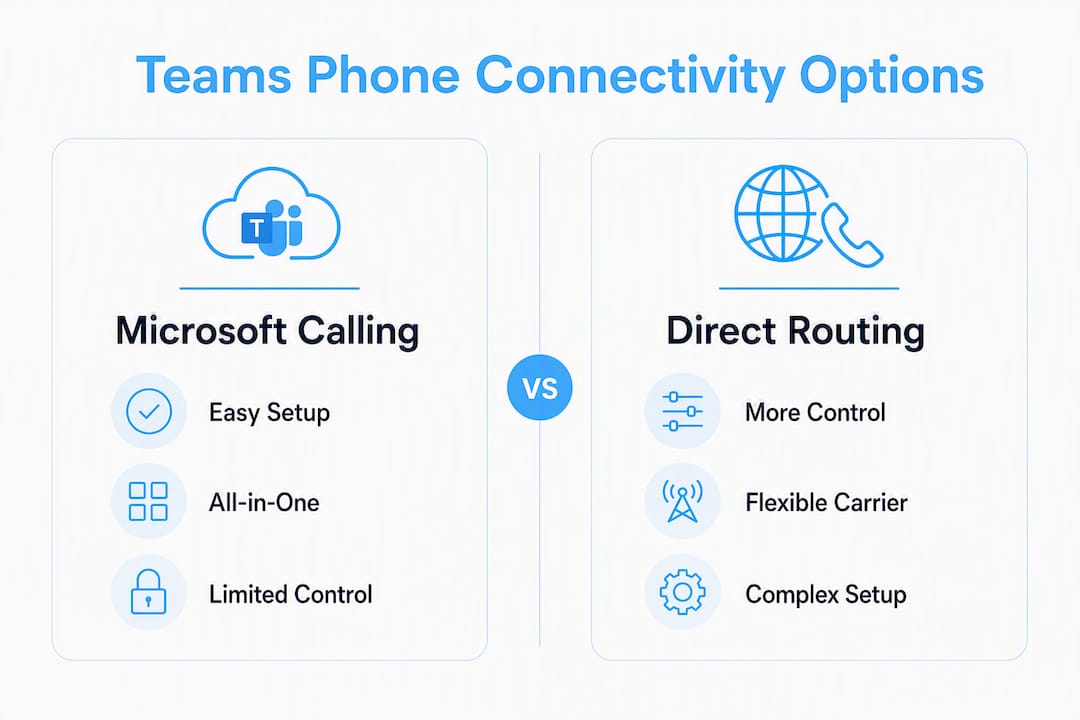
Microsoft Calling Plans are the simplest entry point. Microsoft handles everything: numbers, billing, and carrier infrastructure. The trade-off is less flexibility on pricing and no ability to bring your existing carrier.
Operator Connect sits in the middle. You choose a participating UK carrier (BT, Vodafone, and others are listed in the Teams Admin Center marketplace), and they manage the PSTN connection directly within Teams. You get more carrier choice without the technical complexity of Direct Routing.
Direct Routing connects Teams to any SIP-capable carrier via a Session Border Controller. It gives you full control, lets you keep an existing carrier contract, and supports complex call routing. The downside is that it requires more technical expertise to configure and maintain.
Pro Tip: For a single-site business with straightforward needs, start with Operator Connect. For multi-site businesses, special number requirements, or long-standing carrier contracts, Direct Routing is worth the added complexity.
Licensing, handsets, and what you’ll actually pay for
The cost of a Teams Phone deployment has three main components:
- Teams Phone add-on licence: a per-user monthly fee on top of your Microsoft 365 subscription
- PSTN connectivity: either a Microsoft Calling Plan (per user), an Operator Connect plan (carrier-priced), or Direct Routing trunk charges
- Optional hardware: Teams-certified desk phones if your team wants physical handsets
Before you budget, work through this checklist:
- Confirm whether your existing Microsoft 365 plan includes Teams Phone or requires a separate add-on
- Check whether you need user numbers (one per person) or service numbers (for auto-attendants and call queues)
- Clarify international calling charges, which are typically billed separately
- Ask about number porting fees, which vary by carrier and number type
- Factor in implementation and training costs if you are using an integrator
Most small businesses find that a softphone-only deployment (no desk phones) keeps costs predictable. If your team is desk-based and prefers physical handsets, certified devices from Yealink or Poly typically range from entry-level to premium, but prices are not publicly standardised, so request quotes directly from resellers.
Migration checklist and realistic timeline
Microsoft’s provisioning guidance outlines eight steps. Here is a practical, ordered version with realistic durations:
- Planning and licence review (1–2 weeks): audit current numbers, identify users, confirm Microsoft 365 licences, and choose your PSTN option
- Number acquisition or porting (2–4 weeks): request new numbers or submit porting orders; porting UK numbers can take 2–4 weeks depending on the carrier
- Emergency calling configuration (1 week): assign dynamic emergency calling locations to users and locations, a legal requirement in the UK
- Voice-enable users and assign numbers (1–3 days): assign Teams Phone licences, enable Enterprise Voice, and assign phone numbers via Teams Admin Center
- Auto-attendant and call queue setup (1–2 weeks): build menus, greetings, and routing logic
- Pilot with key users (1–2 weeks): run a parallel test with a small group before full cutover
- Full cutover and training (1 week): switch all users, run training sessions, and confirm voicemail and caller ID settings
- Review and optimise (ongoing): use Teams Admin Center call quality dashboards to monitor and adjust
Administration uses a policy-based model: voice policies apply at global, group, or user level via Teams Admin Center or PowerShell. This makes provisioning repeatable and auditable, which matters when you add new staff.
Microsoft FastTrack provides planning workshops and enablement support at no extra cost for eligible licensed customers.
Pro Tip: Gather number-porting documentation (your current carrier’s Letter of Authorisation requirements) before you start. Delays here are the single most common reason a migration runs over schedule.
Integrating Teams Phone with your CRM and website
Teams Phone events, including inbound calls, outbound calls, and call recordings, can be captured and pushed into a CRM for better lead handling. The practical patterns are:
- Screen-pop on inbound call: caller’s number matches a CRM contact, and the record opens automatically on the agent’s screen
- Click-to-call from CRM: sales rep clicks a number in SmartFlowCRM and Teams dials it immediately
- Call log linked to contact record: duration, outcome, and recording (where permitted) attach to the lead or customer record
- Webhook triggers: a missed call creates a follow-up task in the CRM automatically
Implementation uses Teams Graph APIs, Microsoft Power Automate, or a bespoke connector depending on your CRM. For SmartFlowCRM, TTOY Digital builds the connector logic so call events flow directly into your lead pipeline.
For teams running marketing automation, connecting call outcomes to campaign data closes the loop between digital marketing spend and actual conversations.
Security, GDPR, and call recording in the UK
Teams Phone can be used compliantly in the UK, but compliance does not happen automatically. You must configure it deliberately.
- Lawful basis for call recording: document whether you rely on consent, legitimate interests, or a contractual basis; the ICO expects this to be explicit
- Consent notifications: if you record calls, inform callers at the start; a Teams auto-attendant greeting is the standard mechanism
- Data retention policies: configure retention labels in Microsoft Purview to align with your data retention schedule
- Device security: use Microsoft Intune to enforce screen locks, encryption, and remote wipe on devices used for Teams calls
- Emergency calling locations: UK regulations require that emergency services can identify the location of a caller; configure dynamic emergency calling for each site and remote worker
Regulatory note: this article provides general guidance, not legal advice. Confirm your specific recording and data retention obligations with a qualified solicitor or data protection officer.
How to choose an integrator for Teams Phone
Choose a partner with demonstrable experience across Microsoft 365, PSTN connectivity, and CRM integration, not just one of the three. UK number-porting knowledge is non-negotiable.
A practical selection checklist:
- Microsoft 365 credentials or partner status
- Evidence of completed Teams Phone migrations with number porting
- Clear SLA for post-cutover support (response times, escalation paths)
- Experience with your chosen CRM, or willingness to build a connector
- Documented approach to GDPR and emergency calling configuration
Questions worth asking any prospective partner:
- Which PSTN option do you recommend for our size and carrier situation, and why?
- How do you handle number porting delays if our carrier is slow?
- What does your pilot process look like before full cutover?
- How do you configure emergency calling for remote workers?
- What does ongoing support cost after go-live?
Red flags to watch for: vague answers about number porting timelines, no PowerShell or Teams Admin Center experience, and no mention of emergency calling planning. Any partner who skips emergency calling in the scoping conversation is one to avoid.
Key takeaways
Teams Phone is the right choice for most UK small businesses on Microsoft 365, provided you pair the licence with the correct PSTN option and configure GDPR obligations before go-live.
| Point | Details |
|---|---|
| Licence and PSTN are both required | The Teams Phone add-on alone does not enable external calls; you also need a Calling Plan, Operator Connect, or Direct Routing trunk. |
| Operator Connect suits most small businesses | For single-site UK businesses without an existing carrier contract, Operator Connect balances simplicity and carrier choice. |
| Number porting typically takes a few weeks | Start porting documentation early; delays here are the most common cause of migration overruns. |
| GDPR and emergency calling are not optional | Configure lawful basis for recording, retention policies, and dynamic emergency calling locations before cutover. |
| TTOY Digital handles CRM integration | TTOY Digital connects Teams Phone to SmartFlowCRM so call events log automatically into your lead pipeline. |
The route most UK small businesses should actually take
Most guides treat Teams Phone as a standalone telephony decision. We think that misses the point. For a small business, the phone system only earns its keep when it feeds your CRM, your website enquiries, and your follow-up workflows. A call that is not logged is a lead that might as well not have happened.
Our honest view: for the majority of UK SMEs, Operator Connect is the right starting point. It is simpler than Direct Routing, gives you real carrier choice, and avoids locking you into Microsoft’s own calling plan pricing. Direct Routing makes sense when you have an existing carrier relationship worth keeping, or when your call routing requirements are genuinely complex.
Where we see businesses go wrong is in treating the migration as purely a technical project. The Teams Admin Center configuration is the easy part. Getting your team to actually use the system, connecting it to your CRM, and making sure your website enquiries route to the right person, that is where the value is, and that is where most DIY implementations stall.
TTOY Digital’s Teams Phone and CRM integration service
Getting Teams Phone live is one thing. Getting it to work with your website, your leads, and your sales process is another. TTOY Digital sets up the full stack: Teams Phone configuration, SmartFlowCRM integration so every call logs to the right contact, and the connector logic that links your website enquiry forms to your sales team’s call queue.
Our Microsoft 365 services cover licencing, migration, and ongoing managed support, so you are not left troubleshooting Teams Admin Center policies on your own after go-live. We also handle the GDPR configuration, emergency calling setup, and user training that most implementations skip.
If you want to see how this works in practice before committing, we offer an audit and pilot project scoped to your current setup. Get in touch with the TTOY Digital team to book your initial consultation.
Further reading and authoritative sources
- Microsoft Teams Phone overview, core features and small-business positioning
- Teams Phone features and licence requirements, full feature list and which licence each requires
- Setting up your phone system (Microsoft Learn), the official 8-step provisioning guide
- PSTN connectivity options explained, Calling Plans, Operator Connect, and Direct Routing compared
- Teams Phone licensing (Microsoft Learn), per-user licence assignment and Microsoft 365 Phone System application
- Microsoft FastTrack for Teams Phone, free planning and enablement workshops for licensed customers
- Cloud-based communication platform guide for small business, independent primer on cloud PBX migration considerations
FAQ
What licences do I need for Teams Phone in the UK?
You need a Microsoft 365 plan that includes Teams, plus a Teams Phone add-on licence for each user who needs external calling. You also need a PSTN connectivity option (Calling Plan, Operator Connect, or Direct Routing) before anyone can call a landline or mobile.
Can I keep my existing UK phone numbers when switching to Teams Phone?
Yes. Teams Phone supports number porting for both user and service numbers. The process typically takes 2–4 weeks depending on your current carrier, so start the paperwork early.
Is Teams Phone GDPR-compliant for call recording in the UK?
Teams Phone can be configured compliantly, but you must document your lawful basis for recording, notify callers, and set data retention policies in Microsoft Purview. Compliance is not automatic; it requires deliberate configuration.
How does Teams Phone integrate with a CRM like SmartFlowCRM?
Call events from Teams Phone can be pushed into SmartFlowCRM via Microsoft Graph APIs, Power Automate, or a custom connector. This enables screen-pops on inbound calls, click-to-call from contact records, and automatic call logging. TTOY Digital builds and manages this integration as part of its SmartFlowCRM setup service.
How long does a Teams Phone migration take for a small business?
A typical small-business migration takes a few weeks to a couple of months from planning to full cutover, with number porting (2–4 weeks) usually the longest single phase. A parallel pilot with key users before full cutover reduces the risk of disruption on go-live day.



