
The right way to replace a spreadsheet app is to match the workflow to one of four categories: cloud spreadsheets for simple, low-volume work; spreadsheet-database hybrids for relational data; no-code app builders for structured processes; or a bespoke web app or CRM when you need audit trails, integrations, or full control of your data. As a rule of thumb, small and simple stays on a cloud sheet, relational and process-driven moves to a database or no-code tool, and anything involving custom logic, integrations, or privacy needs a proper build. Start by mapping your single most painful workflow before you choose anything.
- Small and simple workflows benefit from cloud spreadsheets, which are effective when data volume is low and formula complexity is minimal.
- Relational data needs support from spreadsheet-database hybrids that enable linking records and maintaining consistency without manual copying.
- No-code app builders suit operational processes like form collection and approval workflows, especially when data must be collected from the field or online portals.
- Complex needs involving strict security, integrations, or detailed audit trails usually require a bespoke web app or CRM tailored to specific business workflows.
- Successful migration hinges on mapping workflows, limiting scope to core functions, conducting parallel runs, and training staff by role to ensure adoption and data accuracy.
Table of Contents
- Which app should replace your spreadsheet?
- How do you decide which option fits your business?
- What does a practical migration checklist look like?
- Why do spreadsheets break down as a business grows?
- What goes wrong during migration, and how do you avoid it?
- What does a successful spreadsheet replacement actually look like?
- How does a replacement app connect with your existing tools?
- How do you get staff to actually use the new system?
- When does a bespoke build or SmartFlowCRM actually make sense?
- Ready to replace your spreadsheet? Here’s what happens next
- Sources
- FAQ
Which app should replace your spreadsheet?
Not every spreadsheet needs replacing with the same thing, and that’s where most small firms go wrong. They hear “replace your spreadsheet” and jump straight to the most complex option available, when a simpler tool would have done the job in half the time.
Cloud spreadsheets (Google Sheets, Microsoft Excel Online) still make sense when your team is small, the data doesn’t need strict structure, and a handful of formulas cover everything you need. If three people update a shared sheet and nobody’s tripping over version conflicts, don’t touch it.
Spreadsheet-database hybrids step in once your data has real relationships. Customers link to orders, orders link to invoices, and you need those connections to stay consistent without someone manually copying figures between tabs. Tools in this camp support consistent computed fields and are increasingly built to be API-ready, which matters if you ever want another system to talk to your data. Price pressure across this category has pushed many smaller UK teams towards alternatives that offer more control over where data sits, particularly those firms wary of storing everything in a single US-hosted platform.
No-code app builders suit operational processes: think forms for site visits, client portals, or a simple approval workflow that currently limps along through email and a shared sheet nobody trusts. If your problem is “getting information from the field into a usable record,” this is usually the fit.
A bespoke web app or CRM earns its cost when you need:
- A genuine audit trail showing who changed what, and when
- Integrations with tools you already rely on, such as WhatsApp or accounting software
- Data sovereignty, meaning your records sit somewhere you control rather than a third-party’s shared infrastructure
- Logic too specific or too commercially sensitive to force into a generic template
The decision triggers worth watching are record count, how tangled your formulas have become, whether external systems need to plug in, and how seriously you take security and audit requirements. Once two or more of those start flashing red, a generic sheet or off-the-shelf app is rarely enough.
How do you decide which option fits your business?
Before you choose a tool, answer five questions honestly. How many people actually touch this data day to day? How many rows or records are you managing, roughly? How often does the data change, hourly or once a week? Who currently “owns” the formulas, and would the business survive if that person left tomorrow? And finally, does anything need to talk to another system, whether that’s your accounting software or a booking form on your website?
Once you’ve got those answers, scope the smallest useful version rather than trying to recreate every tab of your current spreadsheet.
- Cap your first build at a few screens covering a list view, a record detail view, create/edit forms, status changes, an activity log, and basic reporting.
- Limit user roles in version one to only those essential. Trying to model every permission variant on day one is how projects stall.
- Prioritise the core loop (the thing your business actually does day in, day out) over reporting, which can wait a fortnight.
- Decide early whether formulas need preserving exactly, or whether they can be rebuilt as computed fields. Some platforms support an XLSX round-trip that keeps Excel logic intact, which matters if your formulas are genuinely complex rather than just habitual.
Pro Tip: If nobody can explain what a formula actually does without opening the spreadsheet and scrolling for ten minutes, that’s your sign it needs rebuilding as an explicit rule, not copying across as-is.
For a scoped MVP, expect a build timeline measured in weeks rather than months, with cost varying hugely by complexity, integrations, and how many workflows you’re consolidating. Payback tends to show up fastest in businesses currently losing hours a week to manual reconciliation between sheets.
What does a practical migration checklist look like?
Migrating off a spreadsheet without a plan is how good ideas turn into abandoned pilot projects. Map the workflow before you map the fields. Sit down and trace exactly what happens from the moment data enters the sheet to the moment someone acts on it, separating the “core loop” (the daily operational task) from reporting (the monthly summary nobody checks until it’s needed).
Ops playbooks consistently recommend converting tribal knowledge and formulas into explicit, documented rules before scoping the build, rather than assuming the developer will simply intuit what “column J” is supposed to do.
Data migration works best in two passes:
- Pass one: import and validate a cleaned historic dataset, checking totals and record counts match the original sheet.
- Pass two: import only active, live records, so you’re not dragging years of dead rows into a fresh system.
- Parallel run: operate the spreadsheet and the new app side by side for a defined period, comparing outputs daily, so discrepancies surface before anyone depends on the new system alone.
Build role-based permissions and an audit trail in from day one, not as an afterthought. Without one, teams tend to quietly revert to the old spreadsheet the moment something looks unfamiliar, because there’s no visible history to trust.
Train by role rather than running one generic session for everyone, and set a hard cutover rule: the spreadsheet becomes read-only on a fixed date, no exceptions. Plan for two rounds of post-launch tweaks in the first month, because the first version never fits perfectly.
Verify success against a few concrete KPIs: does record count in the new system match the old sheet, are discrepancies during the parallel run trending to zero, and are staff logging into the app daily without being reminded?
Why do spreadsheets break down as a business grows?
Three problems tend to surface in roughly this order: scalability, security, and version control. A spreadsheet with a few hundred rows and two editors feels fine. The same file with several thousand rows, five people editing simultaneously, and formulas nested three layers deep becomes a genuine liability.
Industry analysts point out that spreadsheets lack the relational structure that databases have by design, which is why once you’re managing tens of thousands of rows with several concurrent editors, teams tend to hit what’s often called a scalability wall. Every added tab, every VLOOKUP referencing another VLOOKUP, adds fragility rather than capability.
Security is the quieter risk. A spreadsheet emailed as an attachment, or shared via a link with “anyone can edit” permissions, has no real access control. You can’t easily restrict a junior team member to viewing only their own records, and you can’t see who deleted a row last Tuesday.
Version control finishes the job. “Final_v3_ACTUAL.xlsx” is not a filing system, it’s a symptom. Once two people are editing offline copies and merging changes manually, you’ve lost any single source of truth, and mistakes creep in exactly where you can least afford them, usually in pricing or stock figures.
None of this means spreadsheets are a bad tool. They’re simply the wrong tool once your business outgrows the assumptions they were built on.
What goes wrong during migration, and how do you avoid it?
The most common failure isn’t a technical one. It’s overbuilding. Teams try to replicate every tab, every conditional format, and every ad hoc column someone added three years ago “just in case,” and the project balloons past its budget and timeline before it ever launches.
The fix is discipline: stick to the 5 to 10 screen MVP scope and resist adding “just one more field” until version two.
The second risk is staff quietly reverting to the old habit. If the spreadsheet still exists and still works, people will open it the moment the new app feels unfamiliar or slow. The mitigation is blunt but effective: make the sheet read-only on cutover day, and don’t extend the deadline out of sympathy for stragglers.
Data quality is the third trap. Migrating a messy sheet into a structured system exposes every inconsistency that formulas were quietly papering over, duplicate customer entries, inconsistent date formats, blank fields that should have been zero. Expect this and budget time for cleanup rather than treating it as a project derailment.
Finally, underestimating training causes slow adoption even when the build itself is solid. A system nobody understands gets blamed for problems that are really just unfamiliarity. Running a genuine parallel period, where staff see the new app and the old sheet agree, day after day, builds the trust that no amount of documentation manages on its own.
What does a successful spreadsheet replacement actually look like?
The pattern across successful projects is rarely dramatic. It’s usually a business that was running a core process, job tracking, stock control, client bookings, through a spreadsheet that had quietly become unmanageable, and moved to a scoped app that did less than the spreadsheet promised but did it reliably.
A trades or service business tracking jobs across a shared sheet, for instance, typically starts with duplicate entries, missed follow-ups, and no way to see who last updated a job’s status. Replacing that with a simple app covering job list, job detail, status changes, and a basic activity log, nothing more, tends to resolve the visible pain within the first few weeks, because the core loop finally has one version of the truth.
The businesses that struggle are usually the ones that tried to replace everything at once: the job tracker, the invoicing sheet, the stock sheet, and the marketing list, in a single build. Splitting these into separate, sequential MVPs almost always outperforms one large, delayed launch.
Firms managing customer relationships specifically often find the sheet was never really a spreadsheet problem, it was a CRM problem wearing a spreadsheet disguise. Once leads, follow-ups, and communication history move into a proper system, the fix tends to be less about the tool and more about finally having a record that survives a staff member’s laptop crashing.
How does a replacement app connect with your existing tools?
A spreadsheet’s biggest limitation, once you notice it, is that it talks to nothing. It doesn’t know when an invoice was paid in your accounting software, and it can’t tell you a customer replied on WhatsApp. Everything gets manually re-typed.
A proper replacement should connect to the systems you already depend on rather than becoming another island. That usually means integration with accounting platforms so invoice and payment status update without double entry, with email so correspondence attaches to the right customer record automatically, and, increasingly for UK small firms, with WhatsApp, since so much informal customer contact now happens there rather than by phone.
Microsoft 365 integration matters too, particularly for firms already running Outlook and shared drives, since a new app that ignores existing calendars and documents just creates a second silo instead of removing one.
The practical test is simple: if adopting the new app means someone still has to manually copy information into or out of another tool weekly, the integration work isn’t finished. A CRM data migration approach that accounts for these connections from the start avoids the classic mistake of building a beautiful app that solves nothing because it still requires two systems of record.
How do you get staff to actually use the new system?
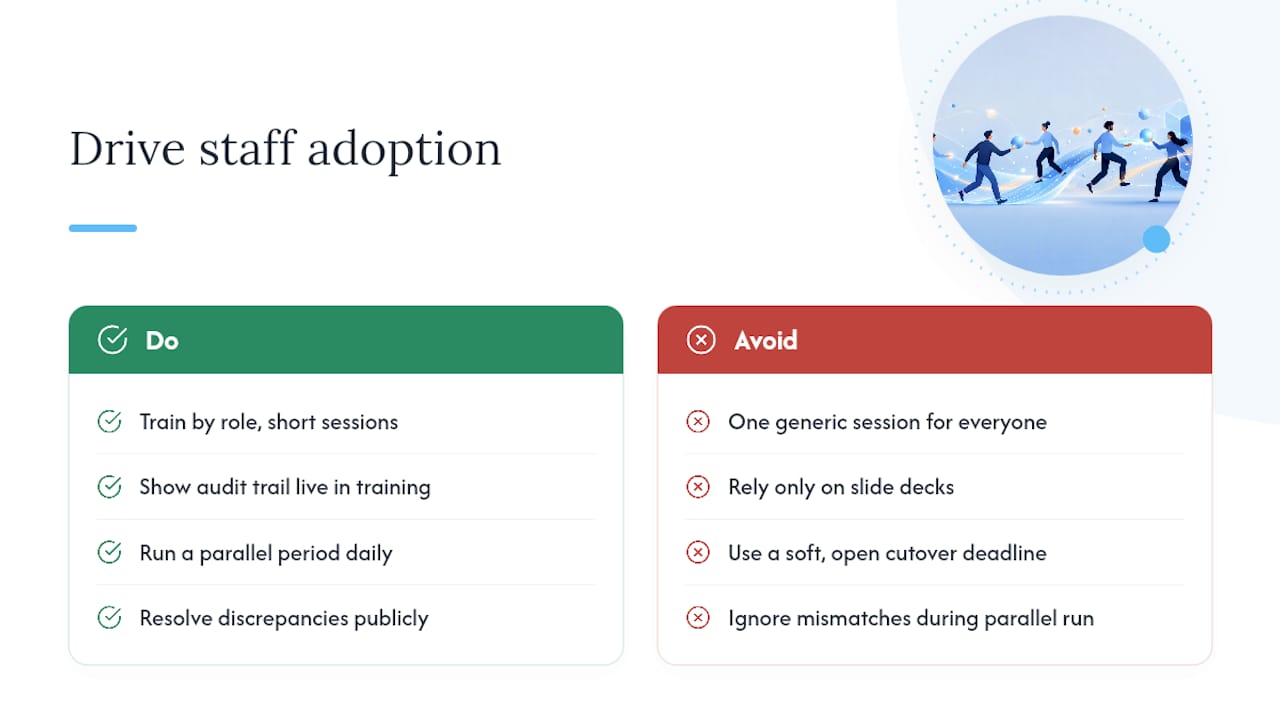
Training by role beats training everyone at once, every time. The person entering new records needs a different fifteen minutes than the person only checking a dashboard once a week, and lumping them into one generic session wastes both their time.
Change management for a spreadsheet replacement works best when it’s grounded in something staff can see, not just told. Showing the audit trail live during training, pointing to an actual entry and saying “this is who changed that record and when,” does more to build trust than any slide deck. It directly answers the unspoken worry behind most resistance: “what happens if this breaks or someone makes a mistake?”
The parallel run period doubles as informal training. When staff watch the spreadsheet and the new app agree, day after day, the switch stops feeling risky and starts feeling inevitable. That’s also the moment to surface any discrepancy and resolve it publicly, because a resolved discrepancy builds more confidence than a system that’s simply never been tested.
Set the cutover date early and hold it. A soft, “we’ll switch over when everyone’s comfortable,” deadline almost never arrives, because comfort with a new tool comes from using it under pressure, not from waiting for confidence to appear on its own.
Firms that outgrow spreadsheets in their marketing operations specifically face a similar adoption curve, and the same principle from automating manual marketing workflows applies here: people adopt tools that visibly save them time in the first week, not tools that promise to save time eventually.
When does a bespoke build or SmartFlowCRM actually make sense?
Here’s what we’ve noticed working with small businesses across Derbyshire, South Yorkshire, and Nottinghamshire: the spreadsheet rarely fails because it’s the wrong format. It fails because nobody owns it, and everybody’s afraid to change it in case something breaks. That fear is the real barrier, not the technology.
We approach every build the same way: discovery to understand the actual workflow, an MVP scoped to the screens that matter, a parallel run so nobody has to take a leap of faith, and support afterwards because the first version is never the last version. Where a business’s real pain is fragmented communication, leads coming in through WhatsApp, email, and a contact form that never talk to each other, SmartFlowCRM tends to fit better than a generic app, because it’s built specifically to pull those channels into one place rather than bolting messaging on as an afterthought. Where the need is more specific, tracking jobs, managing stock, running a booking process unique to the business, a bespoke web application usually wins, because nobody has to compromise the workflow to fit a template. Timing and cost vary considerably by complexity, and we’d rather scope it properly than quote a number that means nothing until we’ve seen the sheet.
— Chris
Ready to replace your spreadsheet? Here’s what happens next
If you’re staring at a spreadsheet held together with three tabs, a colour-coding system only one person understands, and a formula nobody dares touch, you don’t need a six-month transformation project. You need someone to look at it properly and tell you, honestly, whether a scoped app is worth building or whether a simpler fix would do the job.
A specialised digital agency can offer a free initial conversation and spreadsheet review, focusing on your actual needs rather than a generic sales pitch. We’ll talk through whether a bespoke web application fits your workflow, or whether SmartFlowCRM solves the communication chaos better than a custom build would. Expect the call itself to cover a rough scope, a realistic timeline, and a ballpark cost range, not a hard sell.
If your bigger issue is that customers can’t find you online in the first place, our local SEO work in Chesterfield often runs alongside these builds for firms tackling both problems at once. Book that first conversation, and bring the spreadsheet. We’d genuinely like to see it.
Sources
For readers who want to go deeper before committing to a build, the ops playbook on replacing a spreadsheet with a web app covers workflow mapping in more detail, while the 2026 landscape review of spreadsheet-database alternatives is useful if you’re still weighing off-the-shelf tools. On the AI side, agencies exploring automation more broadly may find AmmarAI’s work on AI for agency workflows a useful comparison point.
FAQ
What’s the difference between a spreadsheet-database hybrid and a no-code app builder?
A spreadsheet-database hybrid focuses on relational data, linking records like customers to orders, while a no-code app builder focuses on structured processes such as forms, portals, and workflow steps.
How long does a typical spreadsheet replacement project take?
A scoped MVP with 5 to 10 screens and 1 to 3 user roles typically builds in weeks rather than months, though timelines vary with integration complexity and how many workflows are being consolidated.
Do I need to keep my old spreadsheet after switching?
Keep it as a read-only archive during and immediately after the parallel run, then retain it for reference, but stop editing it once the new system is live to avoid two conflicting sources of truth.
Can a new app keep my existing Excel formulas?
Some platforms support an XLSX round-trip that preserves formula logic directly, while others translate formulas into computed fields; which route suits you depends on how complex and business-critical those formulas are.
Is SmartFlowCRM suitable for replacing a customer-tracking spreadsheet?
SmartFlowCRM is built for businesses whose real problem is fragmented communication across WhatsApp, email, and forms, making it a strong fit when a spreadsheet has effectively become an informal customer relationship system.



