
For most UK service-based small businesses, Keap is the stronger out-of-the-box choice if you want CRM, automation, invoicing and payments in one place without stitching tools together. HubSpot wins if you need a free starting point and a growth path into advanced marketing and reporting. If you want a UK-based implementation with local support, GBP billing and bespoke workflows, SmartFlowCRM from TTOY Digital is the recommended alternative.
- Solo owner or 2–10 person service business: Keap’s native quote-to-payment and tightly integrated automation make it the fastest path from lead to paid invoice.
- Growing marketing-led team: HubSpot’s free CRM entry point and modular hubs let you start at no cost and scale into advanced reporting and custom objects as the team grows.
- UK small business wanting local implementation: SmartFlowCRM (TTOY Digital) offers UK-hosted setup, VAT-aware billing and direct agency support, factors that US-centric reviews rarely mention but UK owners regularly feel the absence of.
Pro Tip: Before you sign up for anything, write down the three workflows that currently cost you the most time each week. The right CRM is the one that automates those three things without requiring a developer.
Table of Contents
- How do Keap, HubSpot and SmartFlowCRM compare side by side?
- How does pricing compare for UK small businesses in practice?
- What automation can you build out of the box?
- Which platform gives you the fastest time to value?
- Does each platform plug into your existing tools?
- What CRM features and reporting do you actually get?
- What support do you get, and how does UK availability work?
- Which CRM suits which UK business profile?
- Key takeaways
- A note on CRM choices from working with UK small businesses
- FAQ
How do Keap, HubSpot and SmartFlowCRM compare side by side?
The table below maps each platform against the dimensions that matter most to UK small businesses. If budget is your primary concern, focus on the starting price and UK VAT rows. If you are choosing for growth, the automation depth, custom objects and integrations columns carry more weight.
| Dimension | Keap (formerly Infusionsoft) | HubSpot | SmartFlowCRM (TTOY Digital) |
|---|---|---|---|
| Starting price / free plan / trial | Paid plans from approx. £40/mo (billed annually); 14-day free trial | Free CRM tier available; paid hubs from approx. £15/mo | Priced on implementation scope; contact TTOY Digital for a quote |
| Ease of setup & onboarding | Guided onboarding; moderate learning curve | Quick free signup; steeper curve at Professional tier | Fully managed setup by TTOY Digital team |
| Automation & workflow depth | Deep visual builder; triggers for purchases, forms, tags, appointments | Strong at Professional+; limited on free/Starter | Bespoke workflows built to your process |
| CRM feature set | Pipelines, contact management, tags, custom fields | Pipelines, custom objects, multi-pipeline, deal forecasting | Pipelines, lead management, WhatsApp + email unified inbox |
| Integrations / marketplace size | Smaller, SMB-focused marketplace | 1,000+ marketplace apps | Native integrations + Zapier; custom connectors available |
| Reporting & analytics | Standard reporting; limited advanced attribution | Custom objects, advanced attribution, forecasting | Reporting configured to client KPIs |
| Support quality & channels | Phone and chat; dedicated onboarding coach | Chat and email on free; phone on higher tiers | Direct UK agency support; named account contact |
| Best for / use case | Solo coaches, consultants, 2–10 person service teams | Marketing-led SMBs, growing teams needing scalability | UK SMEs wanting bespoke, locally supported CRM |
| UK availability / VAT & payments | Available in UK; USD billing default; Stripe supported | Available in UK; USD billing default; Stripe supported | UK-hosted; GBP billing; VAT-aware invoicing |
The rows where SmartFlowCRM stands apart most clearly are support quality and UK billing. Both Keap and HubSpot are US-headquartered products with UK availability rather than UK-native implementations, which shows up in billing currency and data-handling defaults.
How does pricing compare for UK small businesses in practice?
Pricing is where the Keap vs HubSpot CRM decision gets genuinely complicated, because neither platform charges a flat monthly fee that stays flat.
Keap’s paid plans start at approximately £40 per month (billed annually) for a single user with a limited contact count, and the price rises as contacts and users increase. There is no permanent free tier, though a 14-day trial is available. UK businesses should note that VAT is added to the subscription and billing defaults to USD. HubSpot offers a genuinely free CRM with basic contact management and deal pipelines, but the features most small businesses actually need, sequences, workflows, custom reporting, sit behind paid hubs that can reach several hundred pounds per month at Professional tier.
| Scenario | Keap estimate | HubSpot estimate | SmartFlowCRM |
|---|---|---|---|
| Solo operator (1 user) | Modest monthly fee typical for small CRM plans | Free basic plan or low-cost starter tier | Implementation fee + monthly retainer (quote-based) |
| Small team, active automation | Moderate monthly fee rising with contacts and users | Starter tier prices with basic automation | Quote-based; typically competitive for ongoing support |
| Mid-sized team, full automation + reporting | Higher monthly fee for full features | Higher-tier professional plans with full features | Quote-based; includes training and custom workflows |
A word on UK VAT: both Keap and HubSpot add VAT to UK business invoices at the standard rate, so the prices above are net. Neither platform bills in GBP by default, which means your monthly cost can shift slightly with exchange rates. SmartFlowCRM bills in GBP with VAT handled correctly from day one.
HubSpot’s modular approach can be cost-effective for teams that grow slowly from a free base, adding hubs as needed. However, the jump from Starter to Professional can be significant, and many small businesses may require advanced features sooner than anticipated.
What automation can you build out of the box?
Automation is the core reason most small businesses choose a CRM in the first place, and the gap between Keap and HubSpot here is real.
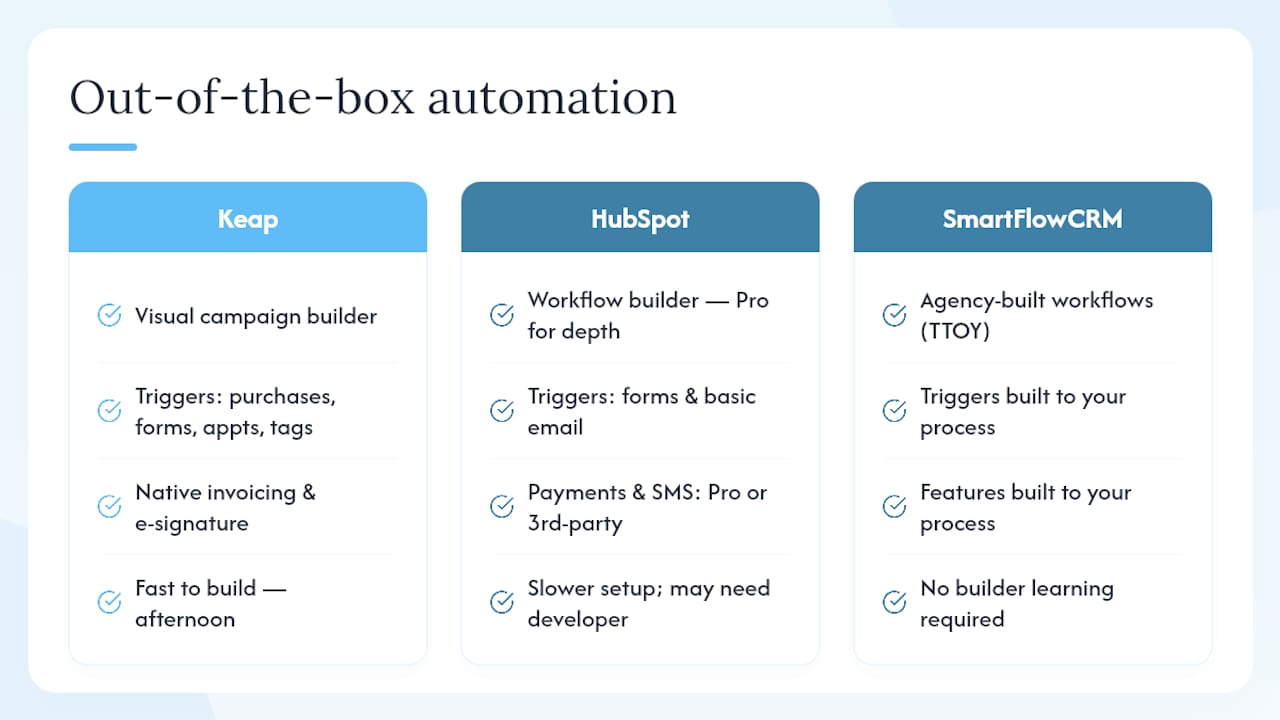
Keap’s visual campaign builder handles triggers for purchases, form fills, appointments and contact tags, and it can run an end-to-end lead-to-paid-client sequence without any third-party tools. A typical flow looks like this: a prospect fills in a contact form, Keap tags them, sends a personalised email sequence, books a discovery call via a calendar link, generates a quote, collects an e-signature and charges the card, all inside one platform. That kind of end-to-end funnel is genuinely fast to build for a service business.
HubSpot’s workflow builder is powerful, but the depth you see in comparisons typically requires the Professional tier. On free or Starter, you get sequences and basic email automation, but multi-step conditional workflows, SMS triggers and payment automation need either a higher plan or third-party integrations. For a marketing-led team with a dedicated ops person, HubSpot’s automation ceiling is higher. For a solo consultant who wants it working by Thursday, Keap is usually faster.
The real question is not which platform has more automation features, it is which one you will actually configure and use. A Keap workflow you build in an afternoon beats a HubSpot workflow that sits half-finished because the setup required a developer.
SmartFlowCRM takes a different approach entirely: TTOY Digital builds the workflows for you, mapping your actual process rather than asking you to learn a builder. For businesses where time is the real constraint, that distinction matters more than any feature list. You can read more about automating your marketing on the TTOY Digital blog.
Pro Tip: If your business relies on appointment bookings or recurring payments, Keap’s native invoicing and e-signature tools will save you at least one additional SaaS subscription.
Which platform gives you the fastest time to value?
Onboarding is where many small business owners get a nasty surprise. Both platforms are more involved than their marketing suggests.
HubSpot’s free tier is genuinely quick to start, you can have contacts imported and a basic pipeline live within a few hours. The friction arrives when you move to paid tiers, where the feature depth means more configuration decisions. G2 reviews for HubSpot’s Marketing Hub consistently flag the learning curve and cost escalation as the two most common frustrations.
Keap has historically required a paid onboarding session for new accounts, though this varies by plan. Capterra reviews for Infusionsoft/Keap note that the initial setup investment pays off once the automations are running, but the first few weeks can feel slow.
A realistic onboarding timeline for a UK small business:
- Day 1–2:, Sign up, import contacts from spreadsheet or existing CRM, configure basic pipeline stages.
With SmartFlowCRM, TTOY Digital handles steps 1–4 as part of the implementation, which typically compresses the timeline considerably. For a business owner who has already spent a weekend pulling their hair out trying to configure a workflow builder, that is a meaningful difference.
Pro Tip: Block two hours in your calendar specifically for CRM setup, not “when I get a moment.” Platforms that feel overwhelming in five-minute sessions become manageable with focused time.
Does each platform plug into your existing tools?
HubSpot’s marketplace lists over 1,000 apps, covering accounting tools like Xero and QuickBooks, booking platforms, landing page builders and e-commerce connectors. For a business already running a mixed stack, HubSpot is more likely to have a native connector.
Keap’s marketplace is smaller and more focused on small-business tools, payment processors, scheduling apps, membership platforms and email marketing add-ons. It covers the essentials well, but if you use a niche industry tool, you may need Zapier or a custom connector.
Migration checklist for UK small businesses:
- Export all contacts, tags and custom fields from your current system as CSV.
- Map old field names to new field names before importing (do not skip this, mismatched fields are the most common migration headache).
- Import in a test environment or with a small batch first.
- Reconnect email sending domain (SPF, DKIM, DMARC records), this affects deliverability from day one.
- Reconnect payment processor and test a live transaction before going fully live.
- Update any embedded forms on your website to point to the new CRM.
- Notify your team and run a short training session before switching off the old system.
For most small businesses, Zapier handles the gaps in both platforms without developer involvement. Where you need a custom connector, say, a bespoke booking system or a proprietary invoicing tool, that is where TTOY Digital’s web application development capability becomes relevant.
Pro Tip: Never migrate on a Monday. Run your full import on a Wednesday or Thursday so you have time to fix problems before the weekend.
What CRM features and reporting do you actually get?
This is where HubSpot pulls ahead for growing teams, and where Keap is honest about its focus.
| Feature | Keap | HubSpot | SmartFlowCRM |
|---|---|---|---|
| Multiple pipelines | Single pipeline on lower plans | Multi-pipeline on all paid tiers | Configured to client needs |
| Custom objects | Limited | Available on Professional+ | Available via custom build |
| Deal forecasting | Basic | Advanced on Sales Hub Professional | Configured on request |
| Contact model | Tags-based segmentation | Properties + lists + custom objects | Unified inbox + tags |
| Attribution reporting | Standard | Multi-touch attribution on Professional | KPI-based reporting |
| User limits | Per-plan user caps | Per-plan user caps | Agreed in implementation scope |
Keap’s contact model uses tags heavily, which is intuitive for small teams but can become unwieldy as the contact database grows past a few thousand records. HubSpot’s custom objects and advanced reporting make it a more natural fit for businesses that need to track multiple deal types, complex customer relationships or multi-channel attribution.
For UK SMEs, the practical reporting question is usually simpler: “How many leads came in this month, how many converted, and what is the average deal value?” Both platforms answer that question adequately. The HubSpot advantage becomes meaningful when you have a dedicated marketing or RevOps person who will actually use multi-touch attribution reports.
What support do you get, and how does UK availability work?
Support quality is one of the most underrated factors in a CRM decision, especially for small businesses without an in-house IT team.
Keap offers phone support and live chat, with a dedicated onboarding coach on higher plans. G2 reviews show generally positive sentiment about Keap’s support responsiveness for small-business users. HubSpot’s free tier is limited to community support and email; phone support requires a paid plan, and the quality of that support varies by tier.
UK-specific considerations:
- Both platforms bill in USD by default, so UK businesses see exchange rate fluctuation on monthly invoices.
- VAT is applied to UK business subscriptions for both platforms.
- Stripe is supported natively by both Keap and HubSpot for payment processing, which covers most UK use cases.
- Neither platform is UK-hosted by default, which has implications for GDPR and UK GDPR data residency obligations.
On data handling: both Keap and HubSpot publish data processing agreements and operate under standard contractual clauses for UK-EU data transfers. You should review each vendor’s current data processing agreement and, if your business handles sensitive personal data, take independent legal advice on whether their data residency arrangements meet your obligations under UK GDPR. This is general information, not legal advice.
SmartFlowCRM is UK-hosted, which simplifies the data residency conversation for UK businesses considerably.
Which CRM suits which UK business profile?
| Business profile | Recommended platform | Rationale |
|---|---|---|
| Solo coach or consultant | Keap | Native invoicing, e-signature and payments remove the need for separate tools |
| Local trades or service business | SmartFlowCRM (TTOY Digital) | UK billing, WhatsApp integration and local implementation support |
| Boutique agency (2–5 people) | Keap or SmartFlowCRM | Keap for self-managed automation; SmartFlowCRM for done-for-you setup |
| E-commerce merchant | HubSpot | Broader integrations marketplace and stronger multi-channel reporting |
| Marketing-led B2B (5+ people) | HubSpot | Custom objects, multi-pipeline and advanced attribution justify the cost |
Multi-year total cost of ownership is worth thinking about before you commit. Keap’s pricing is relatively predictable as you scale contacts. HubSpot’s free entry point is attractive, but the jump to Professional tier can feel abrupt when you hit the feature ceiling on Starter. SmartFlowCRM’s cost depends on implementation scope, but the absence of per-seat escalation and the inclusion of agency support can make it competitive over a two-to-three year horizon for a small team.
Key takeaways
For most UK small businesses, Keap is the strongest self-managed choice for service-based automation, HubSpot is the platform to grow into from a free base, and SmartFlowCRM is the recommended option when local UK implementation and support matter.
| Point | Details |
|---|---|
| Keap suits service businesses | Native invoicing, e-signature and payments make it the fastest path from lead to paid client for solo and small teams. |
| HubSpot scales from free | The free CRM is genuinely useful; costs escalate sharply at Professional tier, so budget accordingly before committing. |
| UK billing matters | Both Keap and HubSpot default to USD billing; SmartFlowCRM bills in GBP with VAT handled correctly from day one. |
| Migration needs a plan | A six-week phased migration (discovery, mapping, pilot, full import, training, go-live) reduces the risk of data loss and downtime. |
| SmartFlowCRM for done-for-you | TTOY Digital builds and configures SmartFlowCRM to your process, removing the setup burden for UK small businesses. |
Pro Tip: Run a free HubSpot trial and a Keap 14-day trial at the same time, using the same three workflows as your test. The one that feels less frustrating after a week is probably the right fit.
A note on CRM choices from working with UK small businesses
There is a pattern we see regularly when UK small businesses come to us after a failed CRM implementation. They chose the platform with the best marketing, not the best fit. HubSpot’s free tier is genuinely compelling, and Keap’s automation demos look impressive. But neither platform tells you upfront that the features you actually need are two tiers above where you start, or that “easy setup” assumes you already know what a pipeline stage should look like for your business.
The businesses that get the most from their CRM are the ones that spent time on discovery before they spent money on software. They knew which three workflows they wanted to automate, they had clean contact data, and they had someone to call when something broke.
That is what we try to do at TTOY Digital: help you make the right decision before you commit, then implement it properly so you are not starting from scratch six months later. If you are weighing up your options and want a conversation about what would actually work for your business, we are straightforward to reach.
SmartFlowCRM: UK-based CRM implementation without the guesswork
If you have read this far and you are still not sure which platform to choose, there is a practical alternative to spending weeks in free trials: let TTOY Digital do the discovery for you. SmartFlowCRM is built for UK small businesses that want a CRM configured to their actual workflows, billed in GBP, with a UK team to call when something needs adjusting.
Unlike self-serve platforms where you are on your own after signup, TTOY Digital handles the full implementation: contact mapping, workflow builds, integration connections and team training. There are no per-seat surprises and no USD exchange rate fluctuations on your invoice.
For businesses that also want local SEO alongside their CRM, TTOY Digital offers both as part of a joined-up digital package. Get in touch via the SmartFlowCRM service page to discuss your requirements, or browse the full services overview to see how CRM, web design and SEO work together.
Sources and further reading
The following independent sources were used in this comparison and are worth bookmarking for your own research:
- Keap vs HubSpot (2026), WeekCRM
- Keap vs HubSpot: Which Is Right for You?, TheSaaSSource
- Keap vs Hubspot Differences Compared: Which Is the Best?, CRM.org
- HubSpot vs Keap (2026): Which CRM Is Right for Your Business? | CRMVersus
- HubSpot vs Keap (2026): Pricing, Features & Verdict | DuelStack
- Thryv (Keap) reviews, G2
- HubSpot Marketing Hub review, G2
- Infusionsoft (Keap) reviews, Capterra
FAQ
Who is HubSpot’s biggest competitor?
Salesforce is HubSpot’s most direct enterprise competitor, but for small businesses the most relevant alternatives are Keap, Pipedrive and ActiveCampaign. For UK small businesses wanting a locally implemented option, SmartFlowCRM from TTOY Digital is worth considering alongside the US-headquartered platforms.
Is Keap a good CRM for small businesses?
Yes, particularly for solo operators and service businesses with up to ten people. Keap’s native invoicing, e-signature and payment tools mean you can run a complete client workflow without additional subscriptions, and its visual automation builder is faster to configure than HubSpot’s at comparable price points.
What are good alternatives to Keap?
HubSpot is the most common alternative, especially if you want a free starting point. Pipedrive suits sales-focused teams. For UK businesses wanting local implementation and GBP billing, SmartFlowCRM (TTOY Digital) is a practical alternative that removes the self-setup burden entirely.
How much does Keap cost per month?
Keap’s paid plans start at approximately £40 per month (billed annually) for a single user with a limited contact count, rising as contacts and users increase. There is no permanent free tier, though a 14-day trial is available. UK businesses should note that VAT is added to the subscription and billing defaults to USD.