For most small businesses in South Yorkshire, the right WordPress maintenance plan combines staging-tested updates, daily off-site backups with at least 90-day retention, and a written SLA with a named response time. Anything less is a gamble with your site’s uptime and your customers’ trust.
Quick shortlist by use case:
-
Brochure site (low traffic, no transactions): Entry-level managed plan with weekly updates, daily backups and uptime monitoring. TTOY Digital or Pixelish suit this well.
-
WooCommerce / e-commerce store: Mid-tier or premium plan with staging, daily backup testing and a sub-4-hour emergency SLA. WP Tech Support or TTOY Digital are strong fits.
-
Growth-oriented marketing site: Full managed plan with staging, performance audits, developer hours and security hardening. TTOY Digital or Howfen Studio cover this.
Before you contact any provider, have your WordPress admin credentials, hosting login and current plugin list ready. Most onboarding calls take 30–60 minutes when you come prepared.
| Provider | Best for | Monthly price shape | Support | Staging | Hosting included | WooCommerce | Trust signals |
|---|---|---|---|---|---|---|---|
| TTOY Digital | Brochure, WooCommerce, marketing sites | Entry to premium | Named contact, SLA | Yes | Optional | Yes | Local Derbyshire agency |
| WP Tech Support | Security-critical and WooCommerce sites | Standard to premium | 24/7 | Not stated | Not stated | Yes | ISO 27001-aligned, 90-day backups |
| Pixelish | Small brochure and design-led sites | Entry to standard | Business hours | Not stated | Not stated | Limited | 5.0 Google rating (19 reviews) |
| Howfen Studio | Full-service: dev + maintenance | Standard to premium | Business hours | Not stated | Yes | Yes | UK agency, SEO bundled |
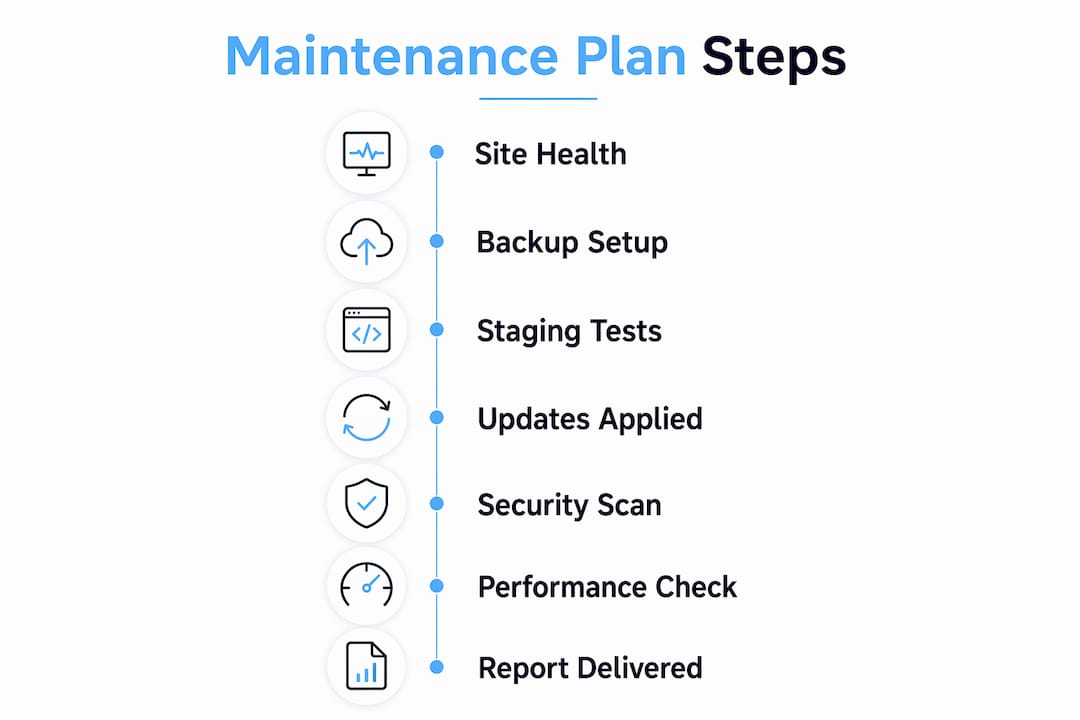
Table of Contents
-
Which UK providers offer a solid WordPress maintenance plan?
-
TTOY Digital: WordPress maintenance for South Yorkshire businesses
Which UK providers offer a solid WordPress maintenance plan?
TTOY Digital
TTOY Digital is a Derbyshire based digital agency offering managed WordPress maintenance as part of a broader service that includes hosting, local SEO and CRM setup. Their plans cover staging-tested updates, daily off-site backups, security monitoring and a named contact who knows your site. For small businesses that want one team handling everything from the website to Google visibility, that joined-up approach saves a lot of back-and-forth.
WP Tech Support
WP Tech Support publishes some of the clearest trust signals in the UK market: daily off-site backups with 90-day retention and ISO 27001-aligned security practices. Their 24/7 support makes them a strong choice for WooCommerce stores where every hour of downtime costs real money. Pricing is not publicly listed at entry level, so you will need to request a quote.

Pixelish
Pixelish focuses on bespoke WordPress design and ongoing care plans for UK businesses. With a 5.0 Google rating from 19 reviews, they have a tight, loyal client base. Best suited to smaller brochure sites where the relationship with the designer matters as much as the technical spec.
Howfen Studio
Howfen Studio bundles hosting, domain management, e-commerce development and SEO into a single agency relationship. If you need a provider who can build and then maintain, they are worth a conversation. Their marketing-plus-maintenance model suits businesses that want Google Business setup and SEO alongside the upkeep.
A note on onboarding: whichever provider you choose, ask them upfront how long the site audit takes and when the first staging-tested update will run. A professional team should be able to give you a clear answer within 48 hours of your first call.
Pro Tip: Ask every provider to show you a sample monthly report before you sign. A good report lists actual updates applied, uptime percentage, threats blocked and backup confirmations, not just a generic “your site is healthy” summary.
What does a WordPress maintenance plan usually include?
WordPress.com guidance describes care plans as a safety net that protects sites from downtime and security threats. In practice, a well-structured plan covers:
-
Core, plugin and theme updates tested in a staging environment before going live
-
Daily off-site backups with a published retention window (90 days is the benchmark to ask for)
-
Uptime monitoring with alerts, typically checking every 1–5 minutes
-
Malware and vulnerability scanning with incident response included (not billed separately)
-
Performance checks: database optimisation, broken link checks, image compression
-
Security hardening: SSL management, login protection, firewall rules
The distinction that catches most buyers out is proactive versus reactive support. Proactive work runs on a schedule and is what every plan should include. Reactive support, fixing a broken checkout or resolving a plugin conflict, is where plans diverge sharply. Many entry-level plans bill reactive work separately, even when the problem was caused by an update the provider applied.
Typical UK monthly price bands:
-
Entry-level plans typically provide automated updates and basic backups without staging or developer time.
-
Standard plans add staging for updates, bug-fix hours, and security monitoring.
-
Premium plans include full staging workflows, priority support, developer hours, and malware cleanup.
For context, WP Care publishes starting plans at a low entry-level price for basic work, rising to a moderate amount for more advanced tiers, offering a useful Ireland/UK reference for typical plan costs.
Pro Tip: When a plan advertises “unlimited edits,” check the small print. Most providers cap individual tasks at 20–30 minutes. Anything beyond that, new pages, functionality changes, custom code, is usually billed separately or excluded entirely.
For marketing-driven sites, pairing your maintenance plan with WordPress SEO automation helps protect the organic performance your upkeep work supports.
How do you pick the right plan for your site?
Step-by-step checklist
-
Classify your site: brochure (low risk), WooCommerce store (medium-high risk), membership or LMS site (high risk).
-
Confirm staging is included, not an optional add-on. Updating production without staging is the most common cause of avoidable downtime.
-
Check backup retention: ask for the exact retention window and how long a restore takes.
-
Read the SLA: get the emergency response time in writing, not just “we aim to respond quickly.”
-
Clarify developer hours: how many are included, what counts as billable, and what happens when you exceed them.
-
Ask about security plugins and hardening. For Elementor-based sites, reviewing top security plugin options before your provider call gives you sharper questions to ask.
Questions to ask on first contact
-
Do you test every update in a staging environment before pushing to my live site?
-
Where are backups stored, and how long do you retain them?
-
What is your emergency SLA if my site goes down at 10pm on a Friday?
-
Are malware cleanup and restore costs included, or billed separately?
-
How many developer hours are in the plan, and how are they tracked?
Red flags to watch for
-
No staging environment mentioned, or staging is only available on the highest tier
-
Vague backup descriptions (“regular backups”) with no retention window stated
-
Restore costs billed separately as an incident fee
-
No written SLA, only informal assurances
-
One-size-fits-all pricing with no distinction between a five-page brochure site and a 500-product WooCommerce store
How this shortlist was selected
Providers were included based on four criteria: UK or South Yorkshire presence, explicit staging and backup policies, published trust signals (Google reviews or ISO-aligned security), and clear pricing bands or published starting prices. Sources used include Google Places business entries, provider websites and authoritative guidance from WordPress.com and Pantheon. The shortlist focuses on local and UK providers because small businesses benefit from a named contact who understands their market, not a faceless ticket queue.
What you need to know about contracts and cancellation
Most UK WordPress maintenance providers operate on a rolling monthly basis, which is the model to prefer. A rolling contract means you can leave with 30 days’ notice if the service does not meet expectations, without penalty.
Some providers offer a small discount for paying annually upfront. That can be worth it once you have tested the service for two or three months and are confident in the relationship. Signing a 12-month contract before you have seen a single monthly report is a risk not worth taking for most small businesses.
Watch for clauses that tie your site’s hosting to the maintenance contract. If the provider hosts your site and you cancel, you need clarity on how the site is migrated to a new host and who owns the backups. Get that in writing before you sign.
TTOY Digital: WordPress maintenance for Derbyshire and South Yorkshire businesses
TTOY Digital works with small businesses across Derbyshire and South Yorkshire that want their website looked after properly, without the stress of chasing a support ticket into a void. Our maintenance retainers include staging-tested updates, daily off-site backups, security monitoring and a named contact who picks up the phone.
Onboarding is straightforward. We run a free site health check first, flag any immediate issues, and agree a plan that fits your site’s complexity and budget. Most brochure sites are fully onboarded within a week. WooCommerce stores take a little longer because we test the checkout and payment flow in staging before anything goes live.
If you are ready to stop worrying about your site and start trusting it, get your free site health check from TTOY Digital today.
Key takeaways
A managed WordPress maintenance plan with staging-tested updates, daily off-site backups and a written SLA is the minimum any revenue-generating small business site should have.
| Point | Details |
|---|---|
| Staging is non-negotiable | Updates pushed live without staging testing are the leading cause of avoidable site downtime. |
| Backup retention matters | Ask for at least 30-day retention and confirm restore time before signing anything. |
| Price bands guide expectations | Entry plans (£30–£80/month) automate only; standard (£80–£200) adds staging and bug fixes; premium (£200–£500+) includes full oversight. |
| Match plan to site type | WooCommerce stores need a standard or premium plan; simple brochure sites can start at entry level. |
| TTOY Digital | Offers managed maintenance with staging, daily backups and a named contact for South Yorkshire and Derbyshire based small businesses. |
Why maintenance is worth taking seriously
Maintenance is not a nice extra you bolt on when the budget allows. It is the thing that keeps your site from quietly falling apart while you are busy running your business. The scenario we see most often is a plugin update that conflicts with a theme, breaking the homepage layout or, worse, the checkout. With a staging environment, that conflict is caught before any customer sees it. Without one, you find out when a customer emails to say they could not complete their order.
The peace of mind from knowing someone is watching your site, running tests and keeping backups current is genuinely underrated. We would encourage any business owner reading this to at least request a site health check, even if you are not ready to commit to a full plan yet. You might be surprised what is quietly ticking away under the surface.
Useful sources and further reading
-
WordPress.org site maintenance documentation, the official WordPress maintenance calendar and task guidance; useful for understanding what a DIY checklist looks like.
-
WordPress.com blog: WordPress maintenance plans (2025), frames maintenance as a business safety net; good for understanding what agencies should include.
-
Pantheon: WordPress maintenance plans guide, the clearest breakdown of proactive versus reactive support and the staging workflow; authoritative technical reference.
-
WP Tech Support, provider page with published backup retention and ISO 27001-aligned security details.
-
TTOY Digital, Derbyshire based agency offering managed maintenance retainers; internal reference for onboarding and service details.
Pricing and SLAs change. Always check provider pages directly for current figures before making a decision.
FAQ
What does a WordPress maintenance plan typically include?
A standard plan covers core, plugin and theme updates, daily off-site backups, uptime monitoring, malware scanning and security hardening. Mid-tier and premium plans add staging-tested updates and included developer hours.
How much does a WordPress maintenance plan cost in the UK?
Entry-level plans start around £30–£80 per month for automated updates and basic backups. Standard plans with staging and bug fixes run £80–£200 per month, and premium managed plans with full oversight cost £200–£500 or more monthly.
Why is a staging environment so important?
Staging lets your provider test updates on a copy of your site before anything goes live, catching plugin conflicts or layout breaks before your customers see them. Without it, problems are discovered after the fact.

Can I cancel a WordPress maintenance plan at any time?
Most reputable UK providers operate on a rolling monthly contract, meaning you can cancel with 30 days’ notice. Always check whether your hosting is tied to the maintenance contract and confirm your backup portability before signing.
Which plan suits a WooCommerce store?
WooCommerce stores need at minimum a standard plan with staging, daily backups and a clear emergency SLA. TTOY Digital and WP Tech Support both cover this use case, with 24/7 support available from WP Tech Support for higher-risk stores.
Related reading: WordPress vs Wix: which should you choose? · Website design cost UK: a 2026 pricing guide