WhatsApp automation for sales works, but only if you design around the platform’s rules rather than bolting an email sequence onto it. The technical constraints (a 24-hour reply window, pre-approved templates, and slow approval cycles) shape what you can send and when. Get those right and you’re looking at a channel with far higher engagement than email. Get them wrong and you’ll burn your number’s messaging capacity before your first campaign finishes.
- WhatsApp automation is most effective when focusing on specific, high-intent scenarios like cart recovery, onboarding, and renewal reminders, with sequences limited to three or four messages.
- The WhatsApp Business API is required for multi-step automation, offering features like scheduling, branching, and CRM integration, but approval delays depend on template category and can take days.
- Automation costs are based on per-conversation billing per 24-hour window, with sequences potentially incurring multiple charges if contacts do not reply quickly or if multiple stages exist.
- Proper consent and immediate opt-out handling are mandatory to stay compliant with WhatsApp policies and GDPR, using a clear opt-in process and transparent messaging.
- Small businesses often mismanage sequences by running too long, ignoring exit conditions, or launching unapproved templates, so auditing existing sequences for these issues offers quick improvements.
Table of Contents
- How does WhatsApp automation for sales actually work?
- Which sales use cases actually suit WhatsApp?
- What do you need to set up before launching?
- How do you route WhatsApp leads into your CRM?
- How do you write templates that get approved and convert?
- Is WhatsApp automation legal, and how do you stay compliant?
- How much does WhatsApp automation cost to run?
- What should a launch checklist look like?
- Why choose an agency-managed SmartFlowCRM setup?
- What I’ve learned from watching small businesses get this wrong
- Ready to put your WhatsApp sales messages on autopilot?
- Sources
- FAQ
How does WhatsApp automation for sales actually work?
Two very different tools get lumped under “WhatsApp automation” and confusing them is where most small businesses go wrong.
The free WhatsApp Business app lets you save quick replies, set an away message, and label chats. It’s fine for a one-person shop answering ten enquiries a day. It cannot run multi-step sequences, branch based on customer replies, or talk to your CRM. For anything resembling automated sales messages at volume, you need the WhatsApp Business API, accessed through a Business Solution Provider (BSP), a platform layer that sits between your business and Meta’s infrastructure.
A BSP or automation platform gives you the pieces the raw API doesn’t: a template manager, scheduling tools, and exit conditions so a contact who replies or converts drops out of the sequence automatically.
The rule that changes everything is the 24-hour session window. Once a customer messages you, you can reply freely with any content for 24 hours. Outside that window, every message must be a pre-approved template. This session window is the single biggest difference between a WhatsApp drip sequence and an email one, because it means most of your automated sales messages will be templates, not free-form chat.
Templates fall into three categories:
- Marketing templates (promotions, offers, re-engagement) face the strictest scrutiny and slowest approval.
- Utility templates (order updates, appointment reminders, account notices) approve faster and carry lower Quality Rating risk.
- Authentication templates (one-time passcodes, verification codes) are narrow in purpose but approve quickly.
Approval can take anywhere from minutes to a couple of days, so template category choice directly affects how fast you can iterate a sequence.
Which sales use cases actually suit WhatsApp?
WhatsApp rewards time-bound, high-intent moments and punishes long, exploratory nurture sequences. If a contact hasn’t decided anything yet and just needs educating over weeks, email still does that job better. WhatsApp shines when someone has already shown intent and needs a nudge, a reminder, or a quick answer.
The strongest fits for small business sales teams use appointment reminders like those automated with Altegio’s SMS and email notification software to confirm attendance and reduce no-shows.
- Cart or quote recovery: a contact requested a quote or added something to a basket and went quiet.
- Onboarding: a new customer needs a short sequence of setup steps or welcome information.
- Renewal reminders: a subscription, service contract, or booking is approaching expiry.
- Post-purchase follow-up: checking satisfaction, requesting a review, or upselling a related product.
- Event or appointment reminders: confirming attendance and reducing no-shows.
Each of these is well-scoped and finite, which matters because WhatsApp punishes vague, indefinite messaging far more than email does.
Decide early whether a step needs a scripted template, a branching chatbot flow, or a human. A cart recovery reminder is a template. A qualification question (“Are you still looking for a 3 or 4 bedroom property?”) suits a simple chatbot flow with button replies. A pricing negotiation needs a human, every time.

Pro Tip: Cap any automated sequence at 3 to 4 messages with clear exit conditions. If a contact hasn’t responded by message three, that’s a signal to route them to a person, not to keep messaging.
What do you need to set up before launching?
Multi-step automation genuinely requires the WhatsApp Business API through a BSP. The free app simply doesn’t support scheduling, branching, or the CRM connectors that make sales automation worthwhile at more than a handful of contacts.
When evaluating a platform or briefing an agency, insist on these capabilities:
- A template manager with category tagging and approval status tracking
- Scheduling with time-zone awareness and quiet-hours controls
- Branching logic so replies route contacts down different paths
- Analytics covering delivery, read, and reply rates per template
- CRM connectors (native or via an automation tool) so conversations sync to your pipeline
Platform guides consistently list these five as the baseline, not the premium tier.
The minimum setup sequence looks like this: verify your business with Meta, register and secure your business phone number, choose a BSP, submit your first batch of templates for approval, and connect your CRM before you send a single automated message. Doing template submission last is the most common delay small businesses hit, because approval can take days and every sequence step needs its own approved template before launch.
How do you route WhatsApp leads into your CRM?
A WhatsApp conversation that dies in a chat app instead of a pipeline is a lost lead, full stop. Automation platforms like Zapier demonstrate this constantly with workflows that create HubSpot contacts, log tickets, or trigger tasks the moment a WhatsApp message arrives.
Start by mapping every capture source to a syncing rule:
- Click-to-chat links on your website or Google Business Profile
- Web forms that trigger a WhatsApp opt-in message
- QR codes on packaging, invoices, or in-store signage
Each source should tag the lead with its origin, because a QR code scan from a shop counter behaves very differently from a form fill after reading a pricing page.
Routing then decides who handles the reply: round-robin for evenly split volume, skill-based for product-specific queries, or territory-based if you sell locally. Many small teams now run a lightweight AI-first qualification step before a human ever sees the chat, asking two or three questions and logging answers directly to CRM fields. Set clear handoff triggers (a pricing question, a complaint, three unanswered messages) so leads don’t sit in limbo, and log every automated touch for reporting. Without that audit trail, you can’t tell what part of the sequence actually closed the sale.
How do you write templates that get approved and convert?
In-session messages can be conversational and free-form. Templates cannot. A template needs a fixed structure with variables clearly marked, and it needs to match the category you’ve assigned it. A “20% off this weekend” message tagged as Utility will get rejected; it’s Marketing content and needs Marketing approval.
Before submitting a template, check it against this list:
- Does the wording match the assigned category (Marketing, Utility, Authentication)?
- Are variables ({{1}}, {{2}}) used only where content genuinely changes per contact?
- Is there a clear, single call to action rather than several competing ones?
- Have you avoided language that reads as generic spam (“Act now”, “Limited time”)?
- Does it include an obvious way to opt out or stop?
Interactive elements (quick-reply buttons, list menus) convert better than plain text because they reduce the effort needed to respond. Use them for anything with two or three possible answers, like “Yes, still interested” versus “No, not right now”.
Pro Tip: Keep your first few templates conservative and utility-focused. A clean approval history and a healthy Quality Rating make your later, punchier marketing templates far more likely to get approved quickly.
Approval latency and Quality Rating risk both punish sloppy template design, so treat this step as worth the extra ten minutes.
Is WhatsApp automation legal, and how do you stay compliant?
Yes, provided you have proper consent and honour opt-outs. WhatsApp automation for UK contacts sits under both Meta’s own business messaging policy and UK GDPR, and the two overlap more than most business owners expect.
Acceptable opt-in sources include a checkbox on a web form, a customer texting your number first, or a verbal agreement recorded at point of sale, provided you can show a record of it. A pre-ticked box or a purchased contact list is not consent under GDPR, and Meta’s policies treat unsolicited outbound messaging the same way.
Your first automated message should state clearly who you are and why they’re hearing from you, something like: “Hi, this is [Business Name]. You’re getting this because you enquired about [product/service]. Reply STOP anytime to opt out.” That single line covers both platform requirements and the transparency GDPR demands.
- Record the opt-in source and timestamp for every contact
- Honour “STOP” or equivalent immediately, not within a grace period
- Keep a suppression list synced across every tool that can send messages
- Review consent records periodically, especially for contacts added months ago
How much does WhatsApp automation cost to run?
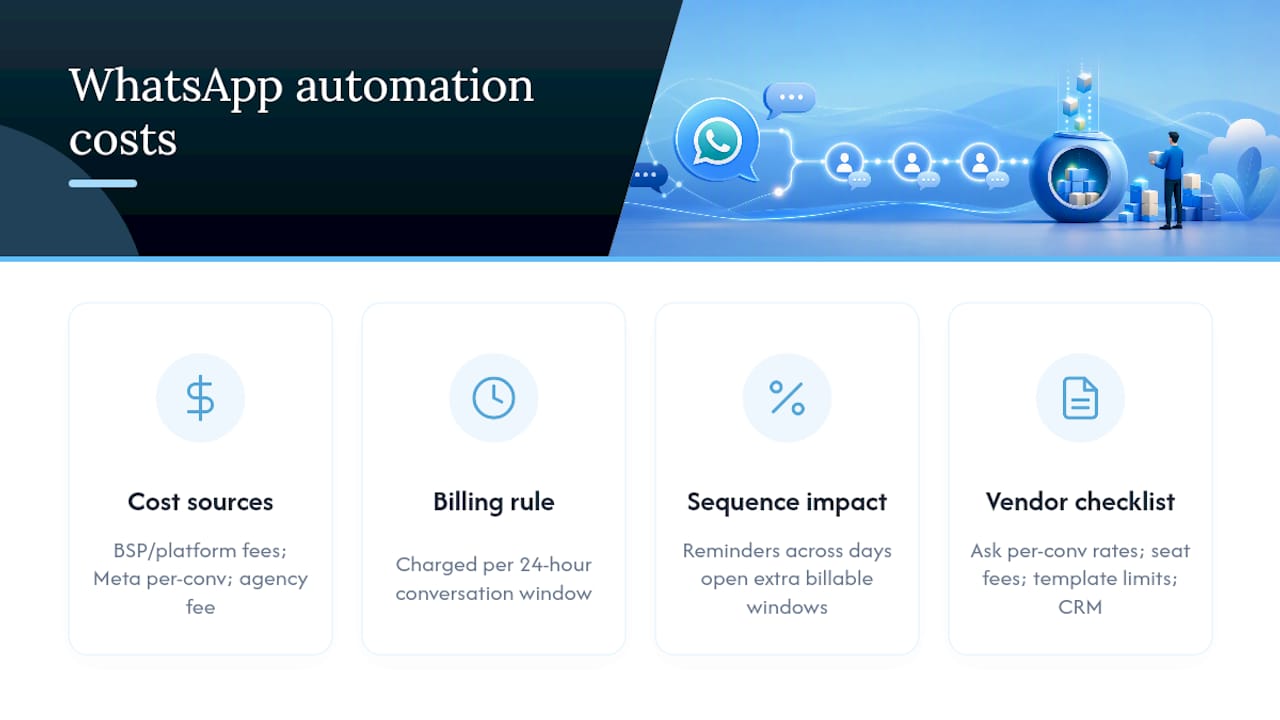
Costs come from three places: BSP or platform subscription fees, per-conversation charges from Meta, and any agency setup or management fee. The part that catches small businesses out is per-conversation billing: you’re charged per 24-hour conversation window opened, not per message sent, so a sequence with several gaps can open multiple billable windows even if the contact never replies.
Take a cart recovery sequence with multiple reminders spaced over several days can open multiple billable conversations for each contact, so the total cost can scale with the number of contacts and stages in the sequence. If even a third of contacts reply and consolidate messages into a single open window, your real cost drops noticeably, which is why testing with a small batch before scaling matters more here than with email.
When requesting quotes, ask vendors for: cost per conversation by category, monthly platform or seat fees, template submission limits, and whether CRM integration is included or billed separately. Some platforms bundle Marketing-category conversations at a materially higher rate than Utility, and that difference alone can double your bill if you’ve mis-categorised templates.
What should a launch checklist look like?
Run a short pilot before switching on a full sequence. WhatsApp messages typically show far higher open rates than email, often cited as very high in platform studies, well above typical email benchmarks, which is exactly why a badly designed sequence can do damage fast: people see it, and if it’s wrong, they notice.
Pre-launch:
- Send every template to yourself and a colleague to check formatting and variable rendering.
- Test the full opt-in path end to end, including the confirmation message.
- Map every CRM field the sequence needs to update before the first contact enters it.
- Confirm exit conditions actually remove a contact when they reply or convert.
Launch-day and first 30 days:
- Watch reply rates and opt-outs daily for the first week; a spike in either signals a template or timing problem.
- Track delivery failures, which often point to number formatting or opt-in issues rather than platform faults.
- Monitor your Quality Rating inside the BSP dashboard and pause any sequence if it drops.
Why choose an agency-managed SmartFlowCRM setup?
DIY makes sense if you have the time to learn template categories, chase approvals, and rebuild your CRM mappings every time something changes. Most small business owners don’t have that time, which is exactly the gap TTOY Digital’s SmartFlowCRM was built to close.
SmartFlowCRM brings WhatsApp, email, and lead capture into a single pipeline, handling template submission, sequence building, and CRM sync as one connected system rather than separate tools you have to stitch together yourself. For a small business running its first cart recovery or onboarding sequence, that means launching with templates already approved and routing already mapped, instead of discovering the gaps mid campaign.
A managed setup suits businesses that want the engagement WhatsApp offers without absorbing the platform’s learning curve, and it typically gets a compliant, tested sequence live faster than a DIY build with no prior BSP experience.
What I’ve learned from watching small businesses get this wrong
The mistakes are almost always the same three. Sequences run too long because someone copied an email nurture flow wholesale. Exit conditions get forgotten, so customers who already replied or bought keep getting reminders. And businesses launch before every template step is approved, then scramble when message three in the sequence has nowhere to go.
None of these are hard to fix once you see them. If you take one thing from this article, audit an existing sequence today for exit conditions. It’s the fastest win available and the one most owners never check.
— Chris
Ready to put your WhatsApp sales messages on autopilot?
If you’ve read this far, you already know the honest trade-off: DIY WhatsApp automation is achievable, but it eats weeks in template approvals, platform comparisons, and CRM plumbing that could go into actually selling. TTOY Digital’s SmartFlowCRM is built specifically to remove that weight from small business owners, handling discovery, template writing and approval, CRM integration, and ongoing monitoring as one managed service rather than a pile of separate subscriptions.
It suits businesses that want a working cart recovery, onboarding, or reminder sequence live within weeks, not a DIY project competing for your evenings. If capturing leads through your website is part of the plan too, pairing SmartFlowCRM with a mobile-first website built to convert closes the loop from click to conversation. Get in touch with TTOY Digital to scope your first sequence and see what a managed setup would look like for your business.
Sources
For the technical detail behind session windows, template categories, and BSP setup, see WhatsApp Drip Campaign: How They Work, Examples & Setup and Wati’s platform guide.
- WhatsApp Drip Campaign: How They Work, Examples & Setup
- WhatsApp Drip Campaign: How They Work, Examples & Setup
- 4 ways to automate WhatsApp Business
- WhatsApp Drip Campaign: 2026 Guide to Automated Nurture Sequences
FAQ
How can I use WhatsApp for sales effectively?
Focus on time-bound, high-intent moments such as cart recovery, onboarding, and renewal reminders, keep sequences to three or four messages, and always include a clear exit condition once a contact replies or converts.
Can WhatsApp be used for business automation?
Yes, but multi-step automation requires the WhatsApp Business API through a BSP rather than the free Business app, which only supports basic quick replies and away messages.
Is WhatsApp automation legal?
It’s legal provided you have documented opt-in consent and honour opt-out requests immediately; for UK contacts this sits alongside GDPR requirements around consent records and transparency.
How much does WhatsApp automation cost?
Costs depend on per-conversation charges billed by 24-hour window, plus BSP or platform subscription fees; a 4-step sequence with no replies can open four separate billable conversations per contact, so request category-specific pricing before committing to a platform.
Recommended
- Effective Marketing Automation Strategies for Small Business Growth
- The Essential Small Business Guide to Automating Your Marketing Efforts
- Keap vs HubSpot: which CRM suits UK small businesses?
- Top 10 Marketing Automation Mistakes Small Businesses Make and How to Avoid Them
Related reading: Pipedrive vs HubSpot: which CRM suits UK SMEs? · Google Business Profile optimisation