
If you’re building a sales pipeline from scratch, use this: Prospecting → Qualification → Discovery/Demo → Proposal → Negotiation → Close (Won/Lost) → Post-sale/onboarding. That’s a compact six or seven-stage model, and it’s the version most effective pipelines converge on because it strikes the right balance between clarity and completeness.
You can rename stages to fit your language, your industry, your team’s habits. What matters is that each one marks genuine buyer progression, not busywork on your side. Here’s the skeleton:
- Prospecting: you’ve identified a potential fit
- Qualification: they’ve confirmed budget, authority, need, timeline
- Discovery/Demo: they’ve seen your solution against their specific problem
- Proposal: they have pricing and terms in front of them
- Negotiation: they’re working through objections or procurement
- Close (Won/Lost): the decision is made
- Post-sale/onboarding: the relationship properly starts
Key Takeaways
A six-stage pipeline with clear exit criteria and a lean CRM field set consistently outperforms complex, unenforced pipeline structures for small teams.
| Point | Details |
|---|---|
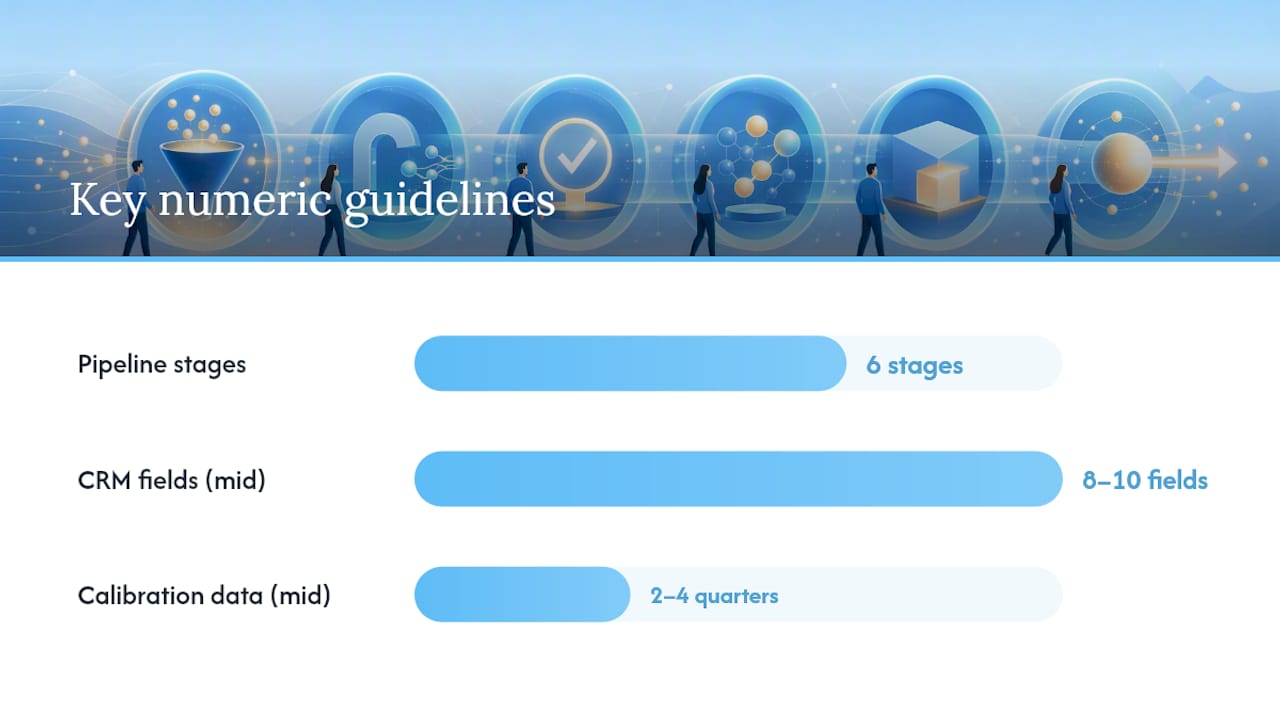
| Use six core stages | Prospecting, Qualification, Discovery/Demo, Proposal, Negotiation, and Close cover most sales motions. |
| Write outcome-based exit criteria | Define what the buyer must do, not what the rep did, before a deal advances. |
| Limit CRM fields to 8–10 | Deal name, stage, value, close date, probability, owner, next action, and last activity are the essentials. |
| Separate pipeline from funnel | Use the funnel for conversion analysis and the pipeline for individual deal forecasting. |
| Calibrate probabilities from real data | Adjust default stage percentages using two to four quarters of actual win rates. |
| Automate the structure with SmartFlowCRM | TTOY Digital’s SmartFlowCRM applies these field templates and stage automation for small business teams. |
Table of Contents
- What are the sales pipeline stages, in practice?
- Is a sales pipeline the same as a sales funnel?
- How should you customise pipeline stages for your business?
- What CRM fields and exit criteria keep your pipeline accurate?
- Which pipeline metrics actually deserve a weekly review?
- How do you put a pipeline into daily use?
- How does TTOY Digital apply this in real client setups?
- A practitioner’s view on keeping pipelines lean
- Turn this into a working pipeline with SmartFlowCRM
- Sources
- FAQ
What are the sales pipeline stages, in practice?
Most guides list five to seven stages, and the number matters less than what each stage represents. We’ve watched small business owners build 11-stage pipelines because it felt thorough, only to abandon the CRM three months later because nobody could remember what “Stage 6: Internal Alignment” actually meant. Fewer, clearer stages beat many vague ones every time.
Here’s what each stage should mean, what a rep does inside it, and what proves it’s time to move a deal forward.
-
Prospecting. This is where a lead enters your world, whether through a cold call, an inbound form, a referral, or an event contact. Record the source, the contact details, and the initial reason for interest. The entry signal is simple: someone matching your ideal customer profile has been identified and contacted. Exit happens when they respond and agree to a conversation.
-
Qualification. Here you’re deciding whether this is worth your time. Frameworks like BANT (Budget, Authority, Need, Timeline) remain the most commonly used shorthand for this, though CHAMP (Challenges, Authority, Money, Prioritisation) works better for teams selling problem-first rather than budget-first. You need confirmation of at least three of the four BANT elements before a lead earns “opportunity” status. Guessing at budget because the prospect seemed keen is how forecasts turn fictional.
-
Discovery/Demo. This is the meatiest stage in terms of information gathering. You need to capture the specific pain point, who else is involved in the decision, what timeline they’re working to, and what budget range is realistic. A good discovery call leaves you able to answer “why would this person buy, and why now?” without guessing.
-
Proposal. A proposal isn’t just a price sheet, it should state scope, pricing, timeline, and what happens next. The acceptance indicator isn’t enthusiasm, it’s a specific next meeting booked or a procurement contact introduced. If a prospect goes quiet after a proposal, that’s an exit criteria failure, not a stage success.
-
Negotiation. Expect procurement reviews, legal redlines, or a straightforward ask for a discount. Track what’s actually being negotiated, because “just checking in” isn’t a negotiation milestone. A verbal commitment with a specific start date is.
-
Close (Won/Lost). Record the outcome and, critically, the reason. “Lost to competitor” tells you nothing useful in six months’ time. “Lost, budget frozen until Q3” tells you when to circle back. This single habit is what turns a pipeline into a genuine learning tool rather than a graveyard of dead deals.
-
Post-sale/onboarding. Handoff to whoever owns delivery or customer success, with a checklist covering what was promised, who the primary contact is, and any expansion signals worth flagging six months down the line.
Pro Tip: Write your stage names as things the buyer has done, not things you did. “Proposal sent” tells you what you did. “Proposal reviewed by decision maker” tells you where the buyer actually stands, and that’s the version that keeps your forecast honest.
Is a sales pipeline the same as a sales funnel?
No, and mixing the two up is one of the most common reasons pipeline reports feel unreliable. A pipeline is deal-centric and operational: it tracks individual opportunities, their value, and where each one sits right now. A funnel is population-centric: it tracks how many leads move from one stage to the next as a group, and it’s built for conversion analysis rather than deal management.
In practice, the funnel feeds the pipeline. Marketing generates leads, nurtures them until they’re marketing-qualified (MQLs), and hands the ones showing buying intent to sales as sales-qualified leads (SQLs). That’s the moment a lead enters your pipeline proper.
- Use the funnel to answer: “What percentage of website visitors become leads?”
- Use the pipeline to answer: “Will Sarah’s £40,000 deal close this quarter?”
A team that only watches funnel metrics will miss that three of its biggest deals have gone quiet for six weeks. A team that only watches the pipeline will miss that its top-of-funnel lead volume dried up two months ago. You need both, tracked separately, reviewed by different people asking different questions.
How should you customise pipeline stages for your business?
There’s no universal right number. What’s right depends on how many genuinely distinct decisions your buyer makes before handing over money.
- High-velocity B2C or transactional sales: collapse to four or five stages. If someone can buy from you in a single call, “Negotiation” as a separate stage is often theatre.
- Complex B2B or enterprise sales: five to seven stages usually covers it, occasionally more when procurement genuinely adds a distinct step (security review, legal sign-off, multi-department approval).
- Small business sales pipeline: most owner-operators do better with six stages and strict discipline than eight stages nobody updates.
The test for every stage: does it represent something the buyer has decided, not something you’ve done? If a stage only exists because your process requires an internal approval, it belongs in a task list, not a pipeline stage.
Where teams split roles, between a business development rep (BDR) who prospects and an account executive (AE) who closes, it’s worth inserting a distinct handoff stage between qualification and discovery. Making that ownership change explicit in the CRM, rather than assuming it happens smoothly, measurably improves conversion at the handoff point.
Pro Tip: If a stage sits empty for months or reps consistently skip it, that’s a signal to collapse it into a neighbouring stage rather than nagging people to use it properly.
What CRM fields and exit criteria keep your pipeline accurate?
A pipeline is only as trustworthy as the data behind it, and vague exit criteria are the single biggest cause of inflated forecasts. Without an observable condition for moving a deal forward, deals drift between stages on optimism rather than evidence, and by the time a manager notices, the quarter’s already gone.
Keep your CRM fields to the essentials. Practitioner guidance consistently points to eight to ten fields as the ceiling before extra data starts going unused:
- Deal name
- Current stage
- Deal value
- Expected close date
- Probability
- Owner
- Next action
- Last activity date
- Primary contact
- Record source
| Stage | Observable exit signal |
|---|---|
| Prospecting | Contact has responded and agreed to talk |
| Qualification | Budget, authority, and timeline confirmed |
| Discovery/demo | Demo delivered and pain points documented |
| Proposal | Proposal sent and next meeting booked |
| Negotiation | Procurement engaged or verbal commitment given |
Review field adoption monthly.
Which pipeline metrics actually deserve a weekly review?
Most teams track too much and act on too little. Four numbers do the heavy lifting.
- Per-stage conversion rate: what percentage of deals move from Discovery to Proposal, and so on.
- Average days in stage: a deal sitting in Negotiation for 60 days when your average is 12 is a warning, not a coincidence.
- Pipeline coverage: total pipeline value versus target, usually expressed as a multiple (3x coverage against quota is a common benchmark).
- Win rate and velocity: how many deals close, and how fast they move through the whole pipeline.
Weighted forecasting multiplies each deal’s value by its stage probability, then sums the total. The trap is treating default percentages as gospel. Stage probabilities should be calibrated against two to four quarters of your own historical win rates, not copied from a generic template. A “70% at Proposal” figure means nothing if your actual close rate from that stage has been running at 40% for a year.
How do you put a pipeline into daily use?
- Run a 15 to 20-minute weekly review focused only on deals that haven’t moved in longer than your stage-age limit.
- Require a documented “next action” before any deal can advance a stage, and set automatic alerts when a deal sits too long.
- Start in a spreadsheet or Notion board if you’re unsure your stages are right, then migrate to a CRM once the structure survives a few weeks of real use.
- Avoid the two most common failures: too many stages, and exit criteria so vague (“prospect is interested”) that any deal qualifies at any time.
How does TTOY Digital apply this in real client setups?
Chris has walked enough small business owners through their first proper CRM build to know the same mistake shows up repeatedly: too many custom fields, not enough clarity on what moves a deal forward. SmartFlowCRM captures leads from WhatsApp, email, and web forms into a single record, mapped straight against the essential field checklist above.
The pipelines that survive contact with a busy sales week aren’t the cleverest ones. They’re the ones where a rep can glance at a deal and know exactly what happens next, without asking anyone.
Enforcing simple stage definitions from day one, rather than layering complexity in later, tends to produce faster handoffs between sales and delivery and forecasts that hold up when someone actually checks them against results.
A practitioner’s view on keeping pipelines lean
Complexity creeps in fast, and it rarely helps. Instrument the basics properly first: six clear stages, ten fields, one weekly review with a named owner. Add anything else only once that foundation is genuinely being used.

Turn this into a working pipeline with SmartFlowCRM
Building the pipeline structure described here is one thing. Getting a small team to actually use it, consistently, without a spreadsheet quietly dying in a shared drive, is the harder part. That’s where TTOY Digital’s SmartFlowCRM earns its keep: it pulls WhatsApp, email, and web enquiries into one view, applies stage automation so deals don’t sit forgotten, and starts with the eight to ten field templates covered above rather than fifty fields nobody fills in.
- Multi-channel lead capture from WhatsApp, email, and web forms in one place
- Automated stage progression tied to the exit criteria your team actually agrees on
- Ready-built field templates so you’re not designing a CRM from a blank screen
If you’d rather have this built and configured than build it yourself, book a SmartFlowCRM demo and TTOY Digital will map your existing sales process onto a working pipeline before your next quarter starts.
Sources
- Sales pipeline stages: a complete guide for teams
- Sales funnel vs sales pipeline | ORM
- Sales pipeline, ZoomInfo pipeline guide
- Free sales pipeline template (2026) + benchmarks
FAQ
How many stages should a sales pipeline have?
Most effective pipelines use between five and seven stages, with six being a common middle ground that balances clarity against completeness.
What’s the difference between a sales pipeline and a sales funnel?
A pipeline tracks individual deals and their value for forecasting; a funnel tracks conversion rates across a population of leads for marketing analysis.
What CRM fields does every deal record need?
Eight to ten fields cover it: deal name, stage, value, expected close date, probability, owner, next action, last activity, primary contact, and record source.
How do I know when a deal should move to the next stage?
It should move only when it meets an observable exit criterion, such as a demo delivered or budget confirmed, never on optimism alone.
Can TTOY Digital set up this pipeline structure for my business?
Yes. SmartFlowCRM from TTOY Digital captures multi-channel leads and applies stage automation built around the same field checklist and exit criteria covered in this guide.
Recommended
- Pipedrive vs HubSpot: which CRM suits UK SMEs in 2026? | TTOY Digital
- Effective Marketing Automation Strategies for Small Business Growth | TTOY Digital
- Build vs buy software: the 2026 guide for small businesses | TTOY Digital
- Template Websites Are Killing Small Business Success | TTOY Digital
Related reading: Pipedrive vs HubSpot: which CRM suits UK SMEs? · Build vs buy software: the 2026 guide