
Found two versions of your business on Google Maps? Identify which profile is the authoritative one, then act: merge if you control both, claim and remove if one is unclaimed, or escalate with evidence if a stranger owns the other. Do not delete anything until you’re certain the listing you’re removing isn’t your only verified profile.
- Merging duplicate listings is the best way to preserve reviews, but it requires control over both profiles and specific profile IDs.
- Claiming an unclaimed duplicate before requesting a merge prevents third-party hijacking, especially for listings managed by others or from previous owners.
- Submitting documentation such as leases or utility bills is necessary for contested duplicates verified by someone else or marked as spam, which may take two to four weeks to resolve.
- Regular quarterly audits of your business name, address, and phone number help catch new duplicates early before they impact reviews and local rankings.
- Avoid creating new profiles for existing locations; update current listings to prevent automatic duplication from Google’s data scraping and automated processes.
Table of Contents
- How to find every duplicate listing for your business
- Merge, claim, close, or flag: which action fits your situation?
- Step by step: what to actually do in each scenario
- What happens next: timelines, review risk, and suspension danger
- How to stop duplicates coming back
- When is it worth hiring help for duplicate listings?
- Why do duplicate listings happen in the first place?
- Does having duplicate listings actually hurt your Google ranking?
- How much does a duplicate listing actually cost you in trust?
- Which tools help you spot and manage duplicates?
- How often should you audit your Google listings?
- What does a successful duplicate resolution actually look like?
- What a local SEO specialist wants you to know
- How TTOY Digital can help you clean up and protect your listings
- Sources
- FAQ
How to find every duplicate listing for your business
You can’t fix what you can’t see, and duplicate Google Business Profiles hide in more places than most owners expect. Start with the obvious search: type your exact business name into Google Maps, then try variants (with and without “Ltd”, old trading names, common misspellings). A carpet cleaner in Chesterfield might find three versions of themselves under “ABC Carpets,” “ABC Carpet Cleaning,” and “A B C Carpets” without ever having created two of them.
Once name searches are exhausted, widen the net:
- Search your full phone number on Google, including with and without the country code.
- Search your exact street address, since Google sometimes lists a business twice under slightly different address formatting.
- Log into your Google Business Profile manager and check for listings you don’t recognise. Old franchise locations, previous owners, or a well-meaning employee who “helped” by adding a new profile are common culprits.
- Record every listing’s URL, its profile ID, and its review count in a simple spreadsheet before you touch anything.
Pro Tip: Grab the profile ID straight from the dashboard URL before you make a single change. It’s the one detail that lets you prove, later, exactly which listing you were editing if a merge goes wrong.
Merge, claim, close, or flag: which action fits your situation?
Not every duplicate needs the same fix, and picking the wrong one can cost you reviews you’ve spent years earning. Match your situation to the action below.
- You manage both listings. Request a merge through Google Business Profile support. This is the only route that reliably preserves review history on the surviving profile, and it’s the outcome Google’s own guidance recommends for genuine duplicates.
- You manage one listing; the other sits unclaimed. Claim the duplicate first, then request a merge or removal. Claiming stops a random third party from grabbing it while you’re mid-process.
- You manage neither. Use “Suggest an edit” to flag the listing as a duplicate. If Google doesn’t act, escalate with the Business Redressal Complaint Form.
- Two separate businesses genuinely share an address (a shared office, a market stall, a building with multiple tenants). Gather evidence, such as signage photos or a tenancy agreement, and appeal if Google wrongly merges you together.
Step by step: what to actually do in each scenario
The action matrix above tells you which lane you’re in. Here’s what happens inside each one.
Case A: You control both listings.
- Screenshot both profiles in full, noting review counts and profile IDs.
- Sign into Google Business Profile manager and open a support case requesting a merge, citing both profile IDs.
- Ask explicitly whether reviews will consolidate onto the surviving listing, since this isn’t always automatic.
Case B: You control the primary listing only.
- On the duplicate, select “Suggest an edit,” then “Close or remove.”
- Choose the correct reason (duplicate of an existing business), which speeds up Google’s review.
- If the option to claim appears at any point, take it immediately rather than waiting for the edit to process.
Case C: The duplicate is verified by someone else, or looks like spam.
- Gather documentary proof: a lease, a recent utility bill, or your business licence, anything tying you to the address.
- Submit the Business Redressal Complaint Form, attaching an annotated screenshot showing both listings side by side.
- If your documents contain sensitive details (account numbers, other tenants’ names), redact them with a simple image editor before uploading. Google’s reviewers only need the business name, address, and date to line up.
Pro Tip: Never submit a document with financial details left visible “just to be safe.” Black out everything except the three facts Google actually needs to verify.
What happens next: timelines, review risk, and suspension danger
Patience matters more than persistence here. “Suggest an edit” typically resolves in a week to a fortnight; anything escalated through support or the redressal form tends to run two to four weeks. Build that into your expectations before you start chasing Google support daily.
- Merging usually carries review totals over to the surviving profile, but reply history to those reviews can be lost in the process.
- Deleting a listing outright can permanently wipe its reviews. There’s no undo button here.
- Unresolved duplicates raise your account’s chances of a manual review, and in worse cases, suspension. Treating a duplicate as background noise instead of a task tends to backfire.
Keep your screenshots and profile IDs filed somewhere you can find them in three weeks, not just today, in case you need to appeal.
How to stop duplicates coming back
Fixing a duplicate once feels like a win, right up until a new one appears six months later. Break that cycle with a few habits:
- Claim and verify every listing you have across Google and other platforms, keeping your name, address, and phone number identical everywhere.
- After a move or rebrand, update your existing profile rather than creating a fresh one. A new listing starts from zero reviews and often triggers Google to flag both as duplicates anyway.
- Set a Google Alert for your business name, and run a manual phone number and address search every few months.
- If you use an agency or have multiple staff managing your online presence, write down a one-line policy: nobody creates a new Google listing without checking for an existing one first.
Pro Tip: Put a recurring date in your calendar, once a quarter is plenty, to search your own business name on Google Maps. It takes two minutes and catches problems before they cost you reviews.
When is it worth hiring help for duplicate listings?
Some cases you can clear up in an afternoon. Others, particularly contested duplicates or a suspension triggered by duplicate activity, benefit from someone who’s filed the paperwork before.
An agency handling this for you should typically deliver:
- A full audit of every listing tied to your business name, phone number, and address.
- Claiming and verification of the listings you’re entitled to control.
- Redressal form submissions and ongoing correspondence with Google Business Profile support on your behalf.
- Citation cleanup across other directories where duplicates often mirror each other.
- A written action log and recovery plan you can keep for your own records.
Hiring in makes the most sense when another party has already verified the duplicate, when Google has flagged your account following duplicate activity, or when you simply don’t have the hours to chase a four-week escalation.
Why do duplicate listings happen in the first place?
Most business owners assume a duplicate means someone made a mistake. Often, nobody did anything wrong at all. Google’s systems auto-generate profiles from data scraped across the web, from directory listings, from customer-submitted map edits, even from delivery apps that list a restaurant without ever asking the owner. A business can end up with a phantom listing it never created.
Relocations are the second big cause. Move premises and set up a brand new listing instead of updating the old one, and you’ve just created a duplicate with a history split across two profiles. Google’s own guidance on changing your business information exists specifically because this happens so often.
The third cause is more human: multiple people claiming the same business independently. A previous owner who never released the listing when they sold up. A marketing agency that created a “clean” profile without checking for an existing one. A franchise where head office and the local manager both set one up. None of these people intended to cause a mess, but Google’s automated systems don’t always catch overlapping claims before they go live.
Rebrands compound all of it. Change your trading name and keep the old profile live under the previous name, and you’ve effectively built a duplicate that shares your address but not your current branding, confusing customers and Google’s algorithm in equal measure.
Does having duplicate listings actually hurt your Google ranking?
Yes, and the mechanism is straightforward once you see it. Google’s local ranking system weighs relevance, distance, and prominence, and prominence draws heavily on reviews and overall signals tied to one profile. Split those signals across two listings, and neither one looks as strong as a single, consolidated profile would.
A business with 60 reviews on its main listing and 15 scattered across a forgotten duplicate isn’t a 75-review business in Google’s eyes. It’s two weaker businesses. Duplicate listings split review authority and can suppress local rankings, which is why treating any duplicate carrying more than a handful of reviews as a merge candidate, rather than something to simply delete, protects the ranking strength you’ve already built.
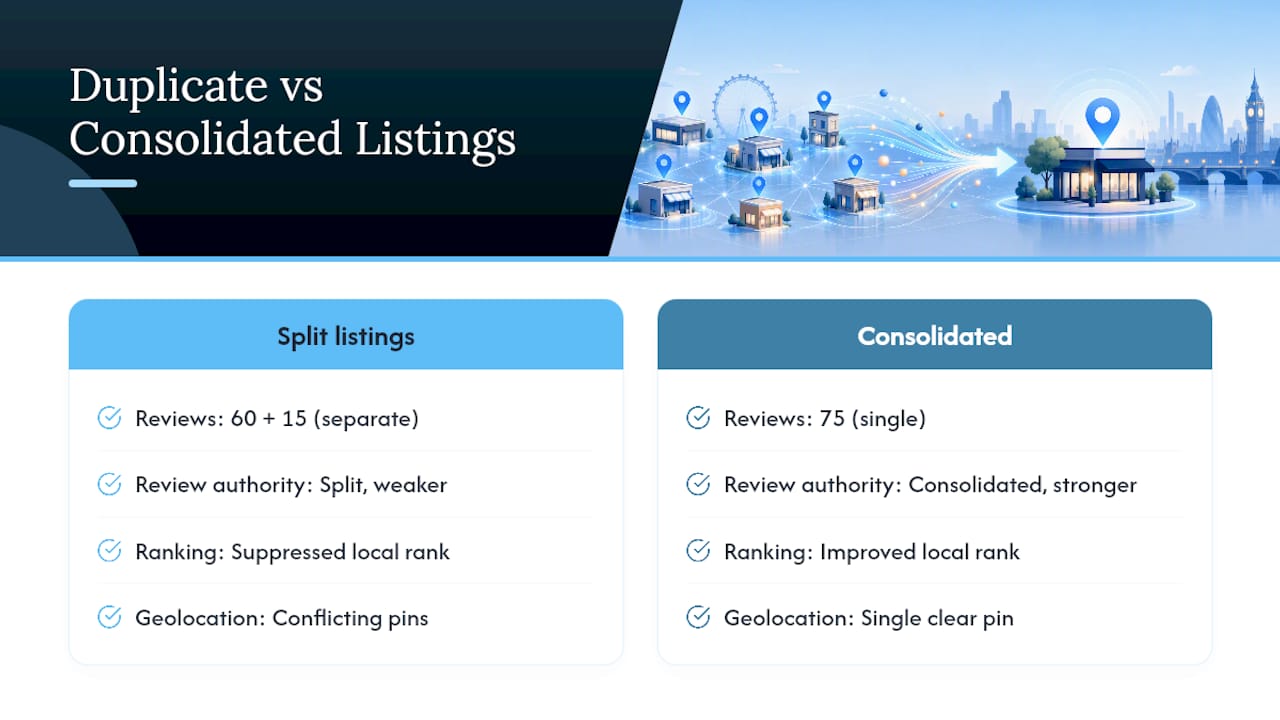
There’s a second, quieter cost: confused geolocation signals. If your duplicate lists a slightly different address, even by a house number, Google can struggle to decide which pin represents your actual trading location for “near me” searches. That uncertainty tends to dilute visibility for both listings rather than boosting either.
Fixing duplicates isn’t purely a housekeeping exercise, then. It’s closer to consolidating a scattered marketing budget into one account that can actually compete. Businesses that resolve their duplicates often see a lift in local pack visibility within weeks, simply because Google finally has one clear signal to rank instead of two competing ones.
How much does a duplicate listing actually cost you in trust?
Put yourself in a customer’s position for a second. They search for your business, and two nearly identical listings appear, one with slightly different opening hours, one with an old phone number that rings out, one with three reviews and one with forty. Which do they trust?
The honest answer is neither, fully. Confusion is the real damage here, more than any single wrong detail. A customer who calls the wrong number, gets no answer, and assumes you’ve closed down doesn’t usually try the other listing. They move to your competitor instead.
Split reviews make this worse. A business with genuinely strong service can look mediocre if half its five-star reviews sit on a duplicate nobody’s checking. Prospective customers weighing you against a competitor see a thinner review count and a shorter history than you actually have, and that’s often the deciding factor in a crowded local search result.
There’s also a reputational risk that’s easy to miss: outdated information on an abandoned duplicate (old hours, an old menu, a discontinued service) reads to customers as neglect, even when the business behind it is thriving under a different, correctly maintained profile. Nobody assumes “oh, that must be their old listing.” They assume the business hasn’t kept up.
Consolidating everything onto one accurate, actively managed profile fixes more than a technical SEO problem. It removes the small frictions, wrong numbers, stale hours, split reviews, that quietly push undecided customers toward whoever looks more put together online.
Which tools help you spot and manage duplicates?
You don’t need enterprise software to catch most duplicates; a disciplined manual routine covers the majority of cases described earlier in this guide. That said, a few tool categories genuinely speed things up for businesses managing several locations or a heavier review volume.
Citation-tracking tools scan directories beyond Google itself (Bing Places, Apple Maps, Yelp, and dozens of smaller local directories) and flag inconsistent name, address, or phone data across all of them at once. This matters because a duplicate on a minor directory can sometimes feed back into Google’s auto-generation system, recreating a problem you thought you’d solved.
Rank-tracking platforms built for local SEO often include a duplicate-detection layer, comparing your registered profile data against what’s actually live and surfacing mismatches automatically rather than requiring a manual search every quarter.
For reputation and review management specifically, a step-by-step approach to managing reviews and online reputation is worth reading alongside your duplicate cleanup, since split review authority and reputation management are closely tied together.
For most small businesses, though, the highest-value “tool” is simply the spreadsheet described earlier in this guide: listing URL, profile ID, and review count for every profile you find. It costs nothing, takes twenty minutes to build, and gives you the paper trail Google’s support team actually asks for when you escalate a case.
How often should you audit your Google listings?
A quarterly check is realistic for most small businesses; monthly makes sense if you operate multiple locations or have recently moved, rebranded, or been through a change of ownership.
The audit itself doesn’t need to be elaborate. Search your business name, phone number, and address as outlined earlier, note anything unfamiliar, and compare it against your spreadsheet from the last audit. New entries jump out immediately once you have a baseline to check against.
Build the habit around trigger events rather than the calendar alone. Moved premises? Audit within a week, since this is when duplicates are most likely to spring up. Brought in a new marketing agency? Ask them directly whether they’ve created any new listings, and check yourself regardless. Noticed a sudden dip in call volume or website clicks from Google? A duplicate siphoning off search traffic is worth ruling out before you assume it’s a ranking algorithm change.
Multi-location businesses face a sharper version of this problem: one duplicate slipping through at a single branch can be hard to spot amid a dozen legitimate profiles. A local SEO checklist built around your specific location count, reviewed at the same cadence as your audit, keeps this from becoming an annual scramble to work out which of forty listings are real.
Whatever cadence you choose, write it down somewhere your team can see it. An audit that lives only in your head stops happening the first time you get busy, and duplicates have a habit of reappearing exactly when nobody’s watching.
What does a successful duplicate resolution actually look like?
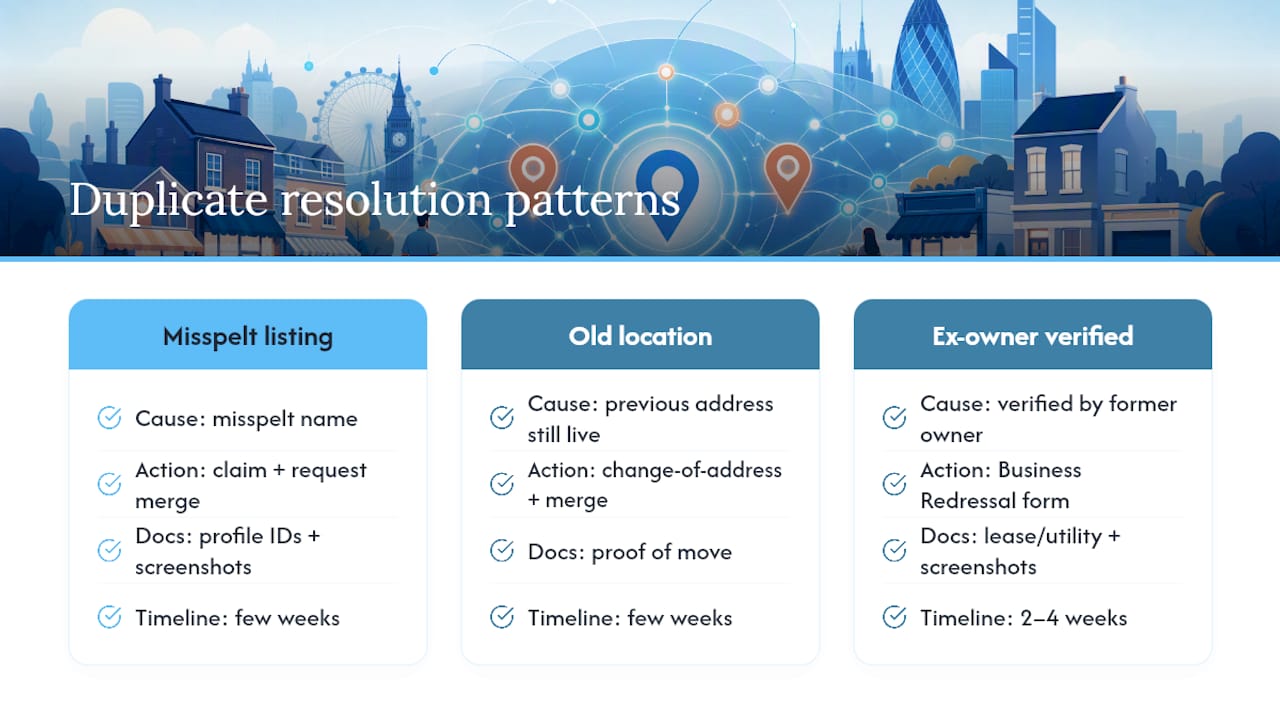
The pattern that works, across the cases practitioners see repeatedly, follows the same shape regardless of business size. A tradesperson finds two listings after a Google Maps search turns up a version under a slightly misspelled name, dating back to before they registered their current trading name. They claim the duplicate, request a merge citing both profile IDs, and within a few weeks the reviews consolidate onto the primary profile.
A retail business that moved premises eighteen months earlier discovers their old location is still live as a separate listing, complete with outdated hours and a disconnected phone number, quietly splitting their review count in two. Rather than deleting the old listing outright, they update it through Google’s change-of-address process and request a merge, preserving the review history that had built up under the old address.
The trickier pattern involves a listing verified by someone who no longer has any connection to the business, a previous tenant, a former franchisee, an old owner who sold up years ago and never released the profile. These cases rarely resolve through “Suggest an edit” alone. They need the documentation route: a lease or utility bill proving current occupancy, an annotated screenshot showing both listings, submitted through the Business Redressal Complaint Form. Resolution here typically takes the full two to four weeks rather than the faster edit-based timeline, but it does resolve, provided the paperwork is complete and the business name, address, and date line up cleanly across every document submitted.
What separates a clean resolution from a drawn-out one usually isn’t luck. It’s whether the business documented everything, profile IDs, screenshots, review counts, before they submitted a single form.
What a local SEO specialist wants you to know
Most duplicates I see aren’t malicious. They’re leftovers, an auto-generated profile, a previous owner who never let go of a listing, an agency that didn’t check before creating a new one. That distinction matters for how calmly you handle it.
Pause before you delete anything. My checklist is short: identify the authoritative profile first, document everything (screenshots, profile IDs, review counts) second, and only escalate once you’ve done both. Skip step one and you risk deleting your only verified presence. Skip step two and you’ve got nothing to show Google if a merge goes wrong.
If someone else has verified your business name, don’t wrestle with it alone for weeks. That’s exactly the scenario worth bringing in help for.
— Chris
How TTOY Digital can help you clean up and protect your listings
Sorting duplicates yourself is entirely possible with the steps above, but chasing Google support through a four-week escalation isn’t every business owner’s idea of a good afternoon. Some agencies handle time-consuming parts of the process: claiming and verifying listings, filing redressal forms with supporting evidence, and cleaning up citations across directories to prevent duplicate listings from reappearing.
Clients typically receive a full audit of every listing tied to their business, an evidence pack ready for submission, copies of filings with Google, and a plan for maintaining clean profiles going forward. It pairs naturally with ongoing Google Business Profile optimisation, since a consolidated listing is only worth as much as the work you put into it afterwards.
If duplicates or a suspicious suspension are costing you calls right now, get in touch through TTOY Digital’s local SEO services and ask about a listings diagnostic.
FAQ
Can I merge two Google Maps lists?
Google Maps’ saved lists (the ones you personally curate) can’t be merged directly, but business profile duplicates can be merged through Business Profile support once you’ve confirmed which listing is the authoritative one.
How do I duplicate an existing Google Business Profile?
You shouldn’t. Creating a second profile for the same business is exactly how duplicates happen in the first place; update your existing listing instead, whether you’ve moved, rebranded, or added a service.
Is there a way to merge two Google business profiles?
Yes, if you control both, contact Google Business Profile support with both profile IDs and request a merge, which typically preserves the combined review total on the surviving listing.
How do I duplicate a location on Google Maps for a second branch?
Don’t duplicate an existing listing for a new branch. Create a genuinely new, separate profile with its own accurate address, since Google treats each physical location as its own entity.
What happens if I delete the wrong listing by mistake?
Deletion can permanently remove that profile’s reviews and history, so always confirm the profile ID and verification status of both listings before removing anything, and keep screenshots in case you need to appeal.



