
Sign in to the Google Account that manages your listing, open the official appeals tool, and submit your appeal with supporting evidence attached. If that account itself is restricted, sort that out first, because an appeal will not succeed while the managing account is in trouble. Prepare matching documents, keep calm, and whatever you do, don’t create a second profile while you wait.
- Most suspensions are caused by address issues, fake reviews, or policy violations related to business name and category, which require precise corrections and matching documentation.
- Google typically reviews appeals within five business days, but restricted accounts or incomplete evidence can cause delays or repeated cycles.
- Confirm whether the suspension is at the profile or account level before proceeding, as account restrictions affect all profiles managed under that login.
- During suspension, maintain communication through other channels and ensure consistent online information to retain customer trust and minimise operational impact.
- Fixing account restrictions, preparing a tight package of verification documents, and timing appeals properly greatly increase the chances of quick reinstatement.
Table of Contents
- What is a business profile suspension, exactly?
- How do I check why my business profile was suspended?
- Common causes of suspension and how to fix each
- Preparing and submitting an appeal: the exact steps
- Account restrictions, manager standing and related fixes
- What happens after you appeal, and when to escalate
- After reinstatement: locking things down
- Prevention checklist: keeping your listing out of trouble
- How TTOY Digital supports businesses through suspension and beyond
- What suspension actually costs your business while it’s live
- How suspension policies differ across Google, Yelp and Facebook
- Talking to customers while your listing is down
- Legal considerations and your rights during a suspension
- Why most advice on this topic misses the real problem
- Sources
- FAQ
What is a business profile suspension, exactly?
Not every suspension is the same animal, and knowing which one you’re dealing with saves you days of guessing. Google splits its enforcement into two broad tiers, and the difference between them changes what you do first.
A soft suspension leaves your listing visible but throttled. Your profile might still appear in Google Maps and Search, but your visibility drops, your ability to post updates or respond to reviews may be limited, and your dashboard often shows a warning banner rather than a full lockout.
A hard suspension is the sharper version. Your Business Profile disappears from Search and Maps entirely, and you often lose the ability to make any edits at all until the matter is resolved.
Then there’s a separate distinction that trips up a lot of owners: profile suspension versus account restriction. A profile suspension affects one listing. An account restriction affects the Google Account that manages it, which can knock out every profile attached to that login in one go. This matters because account-level problems have to be fixed before any profile appeal will go anywhere.
Where does Google actually tell you which one you’re facing?
- The appeals tool itself, which usually states whether the action is at profile or account level.
- An email notification sent to the address linked to your Google Account, often the first sign something’s wrong.
- The Business Profile dashboard, where a banner or restriction notice typically appears at the top of the screen.
Check all three before you do anything else. Owners who skip this step often waste an appeal cycle addressing the wrong problem, which is a frustrating way to lose a working week.
How do I check why my business profile was suspended?
Before you touch the appeals tool, gather what it actually needs to see. This is the boring bit, but it’s the bit that decides whether your appeal gets approved on the first pass or bounces back with no explanation.
- Sign into the managing Google Account and open the appeals tool directly, then copy the exact policy reference or link it shows you. This tells you which rule Google believes you’ve broken.
- Check your verification status on the dashboard. An unverified or partially verified profile behaves differently in appeals than a verified one.
- Review the list of managers and owners attached to the profile. Unexpected names here are a red flag worth investigating before you appeal.
- Screenshot the appeal message or suspension email, with the date and time visible, plus how the profile currently behaves in a live Google search.
- Save supporting documents as PDFs, not photos on your phone. Business registration certificates, licences, and utility bills should be legible, dated, and named clearly.
Pro Tip: Do this evidence gathering in one sitting rather than piecemeal over several days. The appeals tool has a strict submission window once you open the evidence form, so having everything ready beforehand means you’re not scrambling when the clock starts.
Treat this checklist as your case file. A scattered appeal with vague attachments reads very differently to Google’s reviewers than one where every document lines up with the name and address on the listing.
Common causes of suspension and how to fix each
Most suspensions trace back to a short list of recurring triggers. Google’s own policy documentation names prohibited content, inaccurate business information, unauthorised details in the business name, and managing-account restrictions as the most common causes. Here’s how each plays out in practice, and what actually fixes it.
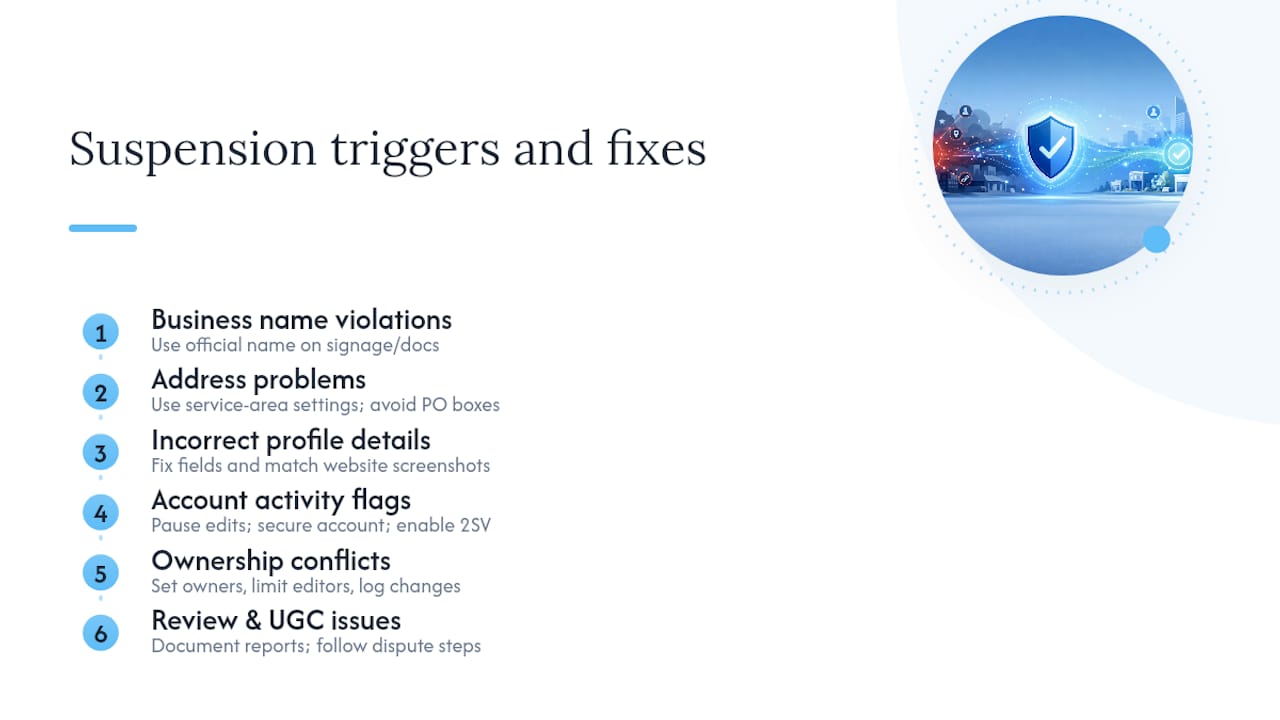
Business name violations. Stuffing your business name with extra keywords, such as “Sarah’s Bakery Best Cakes Chesterfield Wedding Cakes,” is one of the fastest routes to suspension. Fix it by trimming the name back to what appears on your signage and registration documents, then be ready to show that paperwork if challenged.
Address problems. PO boxes and virtual-only addresses are explicitly not permitted on Business Profiles. If you work from a serviced office or don’t want your home address public, switch to service-area settings instead of trying to disguise a non-qualifying address as a storefront.
Incorrect category, phone number, website, or service descriptions. These sound minor, but mismatches between what your profile claims and what your actual website or premises show are a common flag. Update the fields, then corroborate them with screenshots of your live website showing matching details.
Account activity flags. A sudden burst of edits, sign-ins from unfamiliar locations, or unusual admin behaviour can trigger automated review. Stop making further edits, check your Google Account’s recent security activity, and secure the account with a strong password and two-step verification before appealing.
Ownership conflicts and frequent edits. Frequent or conflicting edits to core fields often trigger algorithmic sweeps, and unresolved disputes over who owns a listing make things worse. Stabilise ownership first, agree internally who is allowed to edit what, and keep a simple log of who changed what and when.
Fake reviews or user-generated content issues. Sometimes the flag isn’t something you did but content posted by others. Google has separate guidance for disputing reviews and content, and documenting your moderation attempts (reported reviews, dates, ticket numbers) strengthens any related appeal. If you’re dealing with review manipulation specifically, a step-by-step approach to removing a problematic Google review is worth working through alongside your suspension appeal.
The pattern across nearly all of these: Google wants your listing to represent a real, verifiable, accurately described business. Every fix above is really the same fix wearing different clothes.
Preparing and submitting an appeal: the exact steps
An appeal isn’t a form you fill in and forget. It’s a small, structured case, and treating it that way gets better results than firing off a rushed message the moment you notice the problem.
- Confirm your managing account is in good standing. If it’s restricted, reinstate the account first. Account-level problems have to be resolved before content-decision appeals will be considered.
- Gather primary evidence. Business registration certificates, trading licences, tax documents, and utility bills work best. Every name and address on these documents must match what’s shown on your Business Profile exactly, down to abbreviations.
- Open the appeals tool, select the specific decision you’re disputing, write your appeal, and attach your evidence. This is the step where timing matters most.
Here’s the detail that catches people out: once you open the evidence form, you have 60 minutes to submit it, or your files won’t attach to the appeal. Have every PDF ready on your desktop before you click through. Don’t go hunting for a scanned utility bill halfway through the process.
When writing the appeal message itself, keep it factual and brief. State plainly what the profile is, reference the specific policy link the appeals tool showed you, list what you’ve attached, and avoid emotional language or lengthy backstory. Reviewers are working through a queue, not reading a letter.
What to avoid while your appeal is pending:
- Don’t create a new Business Profile for the same business. Google explicitly warns against this, and it can complicate or delay reinstatement of the original.
- Don’t submit repeated appeals while one is still under review. Multiple simultaneous appeals aren’t reviewed any faster and can confuse the queue.
- Don’t make further edits to the suspended profile. Changes made mid-review are often read as an attempt to bypass moderation rather than a genuine correction.
Google states that appeal decisions can take up to five business days, and if your first appeal is denied, there’s an option to request an additional review with new supporting evidence rather than starting from scratch.
Account restrictions, manager standing and related fixes
A restricted Google Account is the hidden root cause behind a surprising number of profile suspensions, and it’s the one owners overlook most often. If the account managing your Business Profile gets restricted, every profile attached to that login can go down with it, regardless of whether the listings themselves did anything wrong.
- Check your Google Account status separately from your Business Profile dashboard; the two aren’t always flagged at the same time.
- If the account is restricted, work through Google’s account reinstatement process before touching the profile appeal at all.
- Only the primary owner can remove profile content or managers, so confirm you’re actually the primary owner before assuming you have full control.
- If ownership needs transferring, new owners and managers must wait seven days before they’re permitted to remove profile content or other managers, so plan any handover with that delay in mind.
Use the account-level appeal route when the restriction notice names your Google Account rather than the listing itself. Use the Business Profile route when the notice is clearly about the listing’s content, category, or address. Getting this distinction right the first time avoids a wasted appeal cycle.
What happens after you appeal, and when to escalate
Google’s own guidance sets appeal review at up to five business days, which feels slow when your listing has vanished from Maps, but chasing it with repeat submissions only muddies the queue. The appeals tool typically shows a status update, and automated confirmation messages usually just mean your submission was received, not that a decision has been made.
If the appeal comes back denied, don’t panic and don’t resubmit the same evidence. Google allows an additional review request with new supporting evidence, so use the denial to work out what was missing or unclear the first time. If a second denial follows, or the reasoning given feels genuinely unclear, that’s the point to bring in agency support or, for anything touching defamation or contractual disputes, proper legal advice.
After reinstatement: locking things down
Getting your listing back is only half the job. The businesses that get suspended twice are usually the ones that treat reinstatement as the finish line rather than a checkpoint.
- Double check every core field, name, address, category, phone number, website and opening hours, for accuracy the moment access returns.
- Re-verify the profile if Google asks for it, and keep a dated record of when verification was completed.
- Tighten account security: enable two-step verification, review who has manager access, and remove anyone who shouldn’t be there.
- Keep an eye on performance for a few weeks and note anything odd, a sudden edit you didn’t make, a review that looks manufactured, so you have a paper trail if trouble returns.
This is also the moment to think about who’s allowed to touch the listing going forward. A profile edited by four different people with no coordination is exactly the pattern that triggered the algorithmic review in the first place.
Prevention checklist: keeping your listing out of trouble
A little routine hygiene beats another appeal cycle every time. Build these into a monthly or quarterly habit rather than something you only think about after a suspension notice lands.
- Keep your name, address, and phone number consistent everywhere your business appears online, and resist the temptation to pack extra keywords into the business name field.
- Limit who can edit the listing, and audit manager access every few months so former staff or old agency logins don’t linger.
- Keep registration certificates, licences, and a recent utility bill somewhere accessible, not buried in an old email thread, so you can move fast if an appeal ever becomes necessary.
- Avoid making rapid, repeated edits to core fields. If several people manage the profile, agree who does what rather than everyone tweaking it independently.
- Schedule a periodic profile audit, even a rough one, checking category accuracy, opening hours, and photo quality every quarter.
Pro Tip: If you manage more than one location, keep a shared document listing exactly what the business name, address, and phone number should read for each listing. It sounds basic, but inconsistent NAP details across locations are one of the quietest causes of repeat suspensions.
How TTOY Digital supports businesses through suspension and beyond
Working through a suspension while also running the business day to day is genuinely hard, and it’s exactly the kind of problem we help small business clients untangle. TTOY Digital’s local SEO work includes checking documentation against what a profile currently shows, helping remediate account standing issues, formatting evidence for appeals, and handling the submission itself so an owner isn’t juggling policy language between customer calls.
Once a profile is back, the job shifts to optimisation and prevention, correcting fields, tidying categories, and building the kind of steady, well-documented management history that Google’s systems seem to trust. Our Business Profile optimisation work sits alongside broader local SEO, and for businesses juggling leads across WhatsApp, email, and web forms during a stressful suspension period, SmartFlowCRM keeps customer communication in one place rather than three inboxes and a notebook.
We won’t pretend every case is simple. Some suspensions resolve in days; others involve genuine ownership disputes or historical policy breaches that take longer to unpick. What we can offer is a steady, methodical pair of hands on the paperwork while you keep running the business itself.
What suspension actually costs your business while it’s live
The visible damage is obvious: no listing in Maps, no listing in local search, and a noticeable drop in calls or footfall almost immediately. But the quieter costs matter just as much.
Your review history, star rating, and accumulated photos don’t disappear during a suspension, but customers searching for you often can’t find any of it, which pushes them straight to a competitor who is still showing up. Booking links, click-to-call buttons, and driving directions all go dark at once, and if you rely on Google as your primary discovery channel, that’s a real gap in new customer flow, not just a cosmetic problem.
There’s also a trust cost that outlasts the technical fix. Regular customers who search for you and find nothing sometimes assume you’ve closed down, and that perception can linger even after reinstatement. This is one reason communicating proactively with customers during the outage, covered below, matters as much as the technical appeal itself.
Internally, suspension tends to eat staff time disproportionate to the size of the problem. Someone has to gather documents, monitor the appeals tool, field customer questions about why the business “vanished,” and often redirect marketing spend away from channels that assumed the listing would be live. None of this shows up on the suspension notice itself, but it’s the real operational drag.
How suspension policies differ across Google, Yelp and Facebook
Each major platform enforces its own rules, and treating them as interchangeable is a mistake that costs owners time. Google’s system, covered throughout this guide, centres on its dedicated appeals tool, policy-specific rejection reasons, and a stated review window of up to five business days.
Yelp’s moderation leans more heavily on automated content filtering, particularly around reviews it suspects are incentivised or fake, and its appeal channels are generally routed through business support rather than a standalone appeals tool. Turnaround times aren’t published with the same specificity Google offers.
Facebook (Meta) Business Pages face restrictions tied more often to advertising policy violations or reports from other users, and enforcement can affect a Page’s ability to run ads long before the Page itself is removed. Meta’s appeal process typically runs through its Business Help Centre and can involve identity verification steps that Google’s process doesn’t require in most cases.
The practical takeaway: don’t assume a fix that works on one platform transfers to another. A PO box address might cause a Google suspension but pass unnoticed on a different platform’s checks, while review-related flags tend to hit Yelp faster than they hit Google. If your business operates across all three, keep separate, platform-specific notes on what each one requires rather than a single generic compliance checklist.
Talking to customers while your listing is down
Silence is the worst option. If regular customers notice you’ve vanished from search and hear nothing from you, some will assume you’ve closed permanently, and that assumption is hard to undo later.
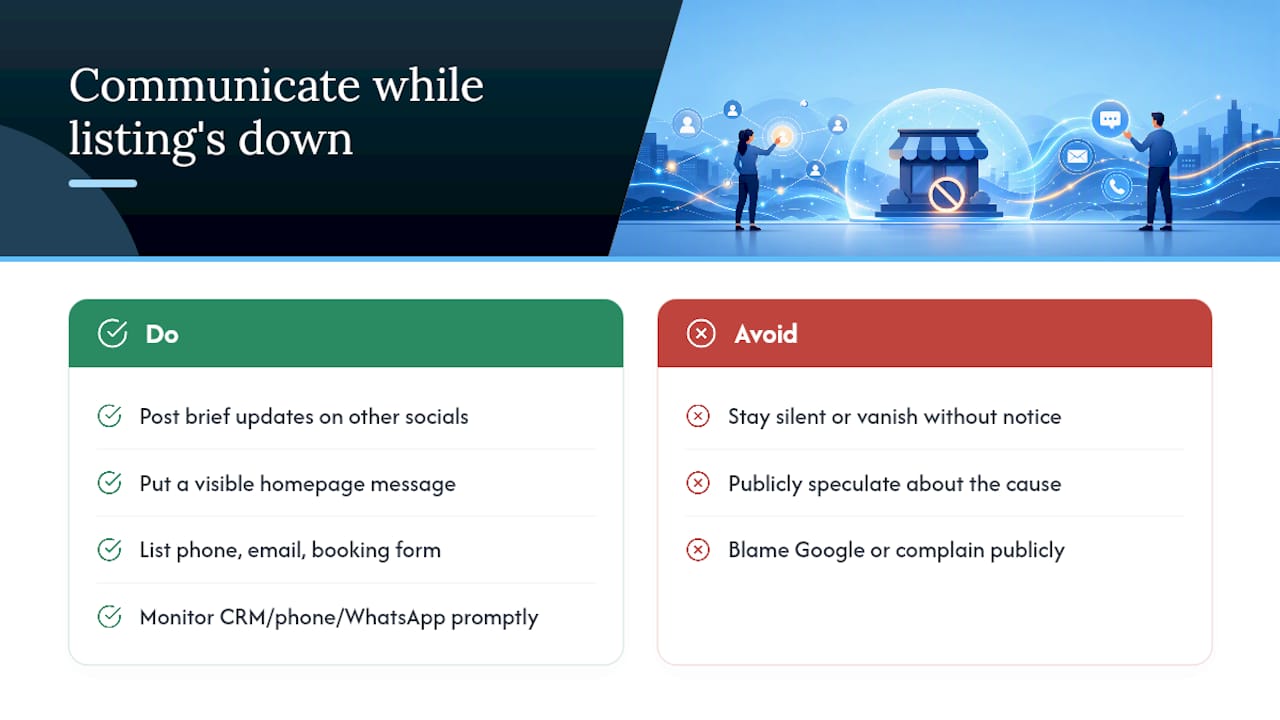
Use every channel you still control. Post an update on your other social profiles explaining, briefly and without oversharing internal details, that you’re addressing a temporary listing issue and remain open for business. A short, honest line works better than a vague or anxious-sounding one: something like “Our Google listing is temporarily unavailable while we resolve an administrative issue; we’re open as normal and taking bookings by phone.”
Your website should carry the same message somewhere visible, ideally the homepage, along with clear contact details that don’t depend on Google at all: phone number, email, and a booking or contact form. If you use a CRM or shared inbox to manage enquiries, this is a good moment to make sure phone and WhatsApp messages are actually being picked up promptly, since some customers will default to calling rather than searching once they notice the listing gone.
Avoid publicly speculating about why the suspension happened, especially anything implying Google made an error, since you don’t yet know the actual cause and a public complaint rarely speeds up an appeal. Keep the tone calm and factual, update customers again once you’re reinstated, and treat the whole episode as a short blip rather than a crisis, because that’s usually closer to the truth.
Legal considerations and your rights during a suspension
A Business Profile suspension is a private platform decision, not a legal action, and Google’s terms of service give it broad discretion over what listings it displays. That means there’s generally no statutory right to have a listing reinstated, and no regulator that will intervene simply because your visibility dropped.
That said, a few situations do carry genuine legal weight. If a suspension stems from defamatory reviews rather than a policy breach on your part, you may have separate legal grounds against the reviewer, distinct from your appeal to Google. If a former employee or business partner falsely claims ownership of your listing and triggers a suspension through a fraudulent dispute, that can shade into a civil matter worth raising with a solicitor, particularly if it causes measurable financial loss.
Contracts also matter here. If you’ve engaged an agency or freelancer to manage your Business Profile and their actions caused the suspension, whether through negligence, unauthorised edits, or policy violations, your service agreement with them may give you recourse separate from anything Google offers. It’s worth reviewing what any digital marketing contract says about liability for account or listing issues before assuming you have no options.
For most owners, though, the practical path is the appeals process itself rather than legal action, since Google’s stated position is that appeal decisions and any additional review happen through its own tool, not through external dispute resolution. Treat legal advice as the exception for genuinely exceptional cases, not the default first move.
Why most advice on this topic misses the real problem
Most guides treat suspension as a documentation problem: gather your paperwork, submit it, wait. That’s true, but it skips the part that actually determines whether owners get stuck for weeks, which is the account layer sitting underneath the profile. We’ve seen more confusion caused by restricted Google Accounts than by any single policy violation, because owners keep appealing the profile without realising the account itself is the blockage.
The conventional advice also underplays patience. Five business days feels agonising when you’re losing bookings daily, but firing off repeat appeals doesn’t speed anything up; it just adds noise to a queue that’s already working through your case. The businesses that recover fastest aren’t the ones who appeal the most. They’re the ones who check account standing first, prepare tight, matching evidence once, and then leave the profile untouched while the review runs its course.
If you take one thing from this guide, make it that sequencing matters more than speed. Fix the account, then the evidence, then the appeal, in that order, every time.
— Chris
FAQ
How do I appeal a Google Business Profile suspension?
Sign into the Google Account that manages the profile, open the official appeals tool, select the decision you’re disputing, and submit your appeal with matching evidence such as business registration documents attached.
How long does a Google Business Profile suspension last?
Appeal decisions can take up to five business days, though a restricted managing Google Account or missing evidence can extend that if a second review becomes necessary.
What’s the difference between a soft and hard suspension?
A soft suspension reduces visibility but usually keeps the listing live with some editing limits, while a hard suspension removes the profile from Search and Maps entirely and locks most management functions.
Can I create a new listing while my appeal is pending?
No. Google explicitly advises against creating a new Business Profile for the same business while an appeal is under review, as it can complicate or delay reinstatement of the original.
What evidence works best for a suspension appeal?
Business registration certificates, trading licences, tax documents, and dated utility bills work best, provided every name and address matches exactly what appears on the suspended profile.



