You can put your business on Apple Maps for free, through Apple’s own business tool, and the whole job usually takes an afternoon plus a short wait for approval. The bit that catches people out is not the form. It is the verification, the details you type in, and the fact that Apple Maps shows a business’s address very differently from Google. We set up and tidy listings for small businesses, so this is the routine we would walk you through at the kitchen table, with the places it tends to go wrong.
TL;DR
- Any business, from a sole trader to a large company, can manage its Apple Maps presence through Apple Business, and it is free to get started.
- Sign in at business.apple.com, go to Brands then Locations, and either claim the existing place or add a new one.
- You have 60 days to verify your organisation after sign-up, and review can take up to five working days.
- Pick one specific primary category, use the name on your signage and website, and put the pin on the building.
- Keep your name, address and phone number identical everywhere, or Apple Maps and everything else that reads your details will disagree about who you are.
Table of Contents
- Why an Apple Maps listing is worth an afternoon
- Before you start: what to have to hand
- Step 1: Sign in to Apple Business
- Step 2: Verify your organisation
- Step 3: Claim your place, or add a new one
- Step 4: Fill in the details properly
- A note for trades and home-based businesses
- What if your business does not show up?
- Does Apple Maps help your local SEO?
- A quick worked example
- Where we come in
- Our view: treat listings as part of your shopfront
- FAQ
- Sources
Why an Apple Maps listing is worth an afternoon
If a customer has an iPhone, Apple Maps is already on it. Someone searching for “barber near me” or tapping an address in a text message may land on your place card without ever opening Google. That card is whatever Apple has on record for you: sometimes right, sometimes years out of date, sometimes missing entirely.
Apple says details you update in Apple Business appear in Maps, Siri, Safari, Calendar and more. So one accurate listing feeds several places, and a wrong one (an old phone number, a pin on the neighbour’s building) quietly sends customers to the wrong door.
It is also cheap compared with most marketing. You are not buying anything. You are claiming a record that probably exists already and making sure it is correct. For a small business, that is one of the best returns on an hour you will find.
Before you start: what to have to hand
The form goes quickly if you gather these first.
- Your legal business name, exactly as it appears on official paperwork.
- Your trading name, the one on your shopfront, van or website.
- The address customers use to reach you, with a postcode.
- A phone number with the country code (+44 for the UK).
- Opening hours, matching your website.
- Your website, or a Facebook, Instagram or TikTok page if you do not have one.
- Something to prove you are who you say you are: a company number lookup, access to your domain’s DNS settings, or an official document.
That last item is where people stall. We will come back to it, because it decides how smoothly the rest goes.
Step 1: Sign in to Apple Business
Go to business.apple.com and sign in with an Apple Account. Use an account tied to the business rather than your personal one if you can, because it is easier to hand over to a colleague or an agency later. If you use a personal Apple Account and then leave the business, you can end up locked out of your own listing.
You will be asked to create an organisation, which is Apple’s word for your business entity. Type the name carefully. A tiny mismatch between the name you enter and the name on the document you upload is a common reason for a rejected verification, and it is the kind of problem that costs days when you only have 60.
Step 2: Verify your organisation
Once you have signed up, Apple gives you 60 days to verify the organisation. If it has not been approved in that window, Apple deletes the organisation, its data and any Managed Apple Accounts attached to it, so you start again.
Apple’s UK guide says verification needs two methods from this list:
- A Business ID, such as a D-U-N-S number (a free nine-digit identifier for companies) or an EIN (a US tax number, so unlikely to apply to you).
- Domain validation, where you add a DNS TXT record (a short line of text in your domain settings that proves you control the domain).
- App Store Connect, if you publish an app.
- An official document, such as a business licence, lease or property agreement, utility bill, or a food, health or alcohol permit.
The same page says review can take up to five working days, longer when Apple is busy.
For most UK small businesses, the realistic pairing is domain validation plus an uploaded document. Domain validation is the one that makes people nervous, because DNS settings look like a wall of jargon. It is actually a copy-and-paste job: Apple gives you a line of text, and you add it as a record where your domain is managed. If you are not sure who controls your domain, or you bought it years ago through someone who has since disappeared, that is worth sorting out first. We handle domain names and DNS for clients, so this is the sort of thing we can do in minutes rather than you hunting for old logins.
The side-by-side check
Before you upload a document, put it next to what you typed at sign-up. Does the business name match letter for letter? Is it “Smith & Sons Ltd” on one and “Smith and Sons Limited” on the other? Is the address the same? Spending a minute on this protects your 60-day window.
Step 3: Claim your place, or add a new one
Inside Apple Business, go to Brands, then Locations. Apple’s UK guide says you can search for an existing location and select it, or add a new one.
Most established businesses already have a place on the map, built from data Apple has gathered from elsewhere. Search for yours first. Creating a duplicate is the quickest way to end up with two cards, one right and one wrong, competing against each other.
You can also start from the Maps app itself. Apple says that if your business already appears, you can search for it, tap Claim This Place and sign in to Apple Business.
How phone verification works
For an existing location, Apple can verify you by phone. It calls the number it has on record and you enter a four-digit code. If you do not recognise that number, Apple says to contact Apple Business support. This happens a lot with older listings, where the number belongs to a previous owner or a landline that was cancelled years ago.
If someone else already manages your location
Sometimes the place is already claimed, perhaps by a previous owner, a former web designer or a franchise head office. You can request a transfer from the location’s status in Apple Business, explain why and attach supporting documentation such as a business licence or utility bill. Apple says the review can take up to five working days.
Step 4: Fill in the details properly
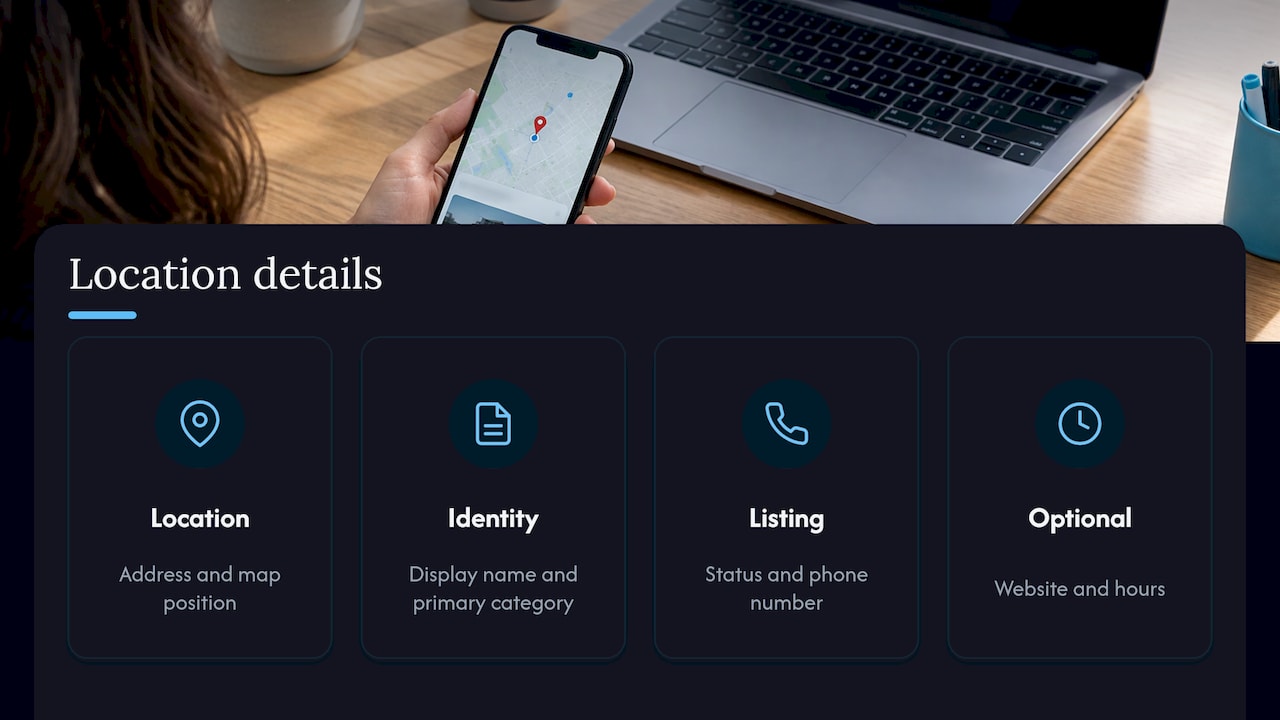
This is the section that decides whether your card helps customers or confuses them. Apple lists what it expects for a location: address, map position, display name, primary category, status, phone number, and optionally website and hours. The detail is in Apple’s location attribute guidance, and here is what it means in practice.
Display name
Use the name shown on your storefront, signage or official website. Not a keyword-stuffed version (“Best Cheap Plumber Chesterfield”), not a nickname. If customers see one name on the door and another on the map, they hesitate.
Address and pin
The address should be the one officially listed on your website that customers use to find you. Apple also asks for the coordinates to sit on top of the building, centred over it, and not on the pavement, the road, a junction, the front door or the car park entrance. Zoom in and nudge the pin until it sits in the middle of the roof outline. On a shared unit or an industrial estate this is worth a careful minute, because delivery drivers and customers navigate to the pin, not the postcode.
Categories
Choose exactly one primary category, as specific as you can make it, plus up to 19 optional ones. Apple’s guidance is the source for those limits.
The practical rule: the primary category describes what you mostly are, and the extras describe what else you genuinely do. A bakery that also serves coffee picks “Bakery” as primary and adds a café category. A solicitor picks the specific kind of legal practice rather than a vague business-services label. Do not add categories for things you would only do if asked nicely.
Phone, website and hours
The phone number must include the country code, so write +44 and drop the leading zero. For the website, Apple accepts your primary site or a Facebook, Instagram or TikTok page. Match normal hours to your official website where possible, and add special hours for bank holidays, events or seasonal changes. Hours that disagree with your website are one of the most common reasons customers turn up to a locked door.
A note for trades and home-based businesses
If you are a plumber, electrician, mobile groomer or consultant working from home, think before you type your address. Apple Business asks for an address customers use to reach you. It is not set up around “hide my address and list the areas I cover” the way you may have seen on other platforms. Do not publish a home address on a public map unless you are happy for strangers to see it.
If you do not have a shopfront or office, talk to us before submitting. We can look at what your website, your other listings and your service area say, and agree an approach that works for you rather than guessing and leaving a home address on the map.
What if your business does not show up?
Work through these in order.
- Search Maps for your exact name and postcode. If a place appears, claim it rather than adding a new one.
- Check your verification status in Apple Business. An organisation left unverified for 60 days is deleted, and a location that is not approved will not appear as you expect.
- Check the phone number Apple holds. If the verification call goes to a dead number, use Apple Business support.
- Look for a duplicate. An old listing under a previous name, or one created by a customer, can split attention.
- Be patient with review. The five-working-day figure Apple gives is a maximum in normal conditions, not a promise, and busy periods run longer.
Does Apple Maps help your local SEO?
In a word, yes, but not in the way people sometimes hope. Nobody outside Apple knows its ranking formula, so beware anyone promising a secret trick. What you can control is the quality and consistency of what you give it.
That means a complete place card with accurate hours, a specific category, a working website and a phone number that gets answered. It also means your details match across your website, Google Business Profile, directories and social pages. We call this NAP consistency (name, address, phone), and we wrote a guide on how to check and fix your business details. Our local SEO checklist puts Apple Maps alongside the other listings that matter, and if Google is your bigger concern, our piece on Google Business Profile optimisation covers that side.
A word on ads. Apple’s Ads on Maps are available in the United States and Canada, with eligible advertisers needing business locations and an organisation address in those countries. UK businesses should treat their free listing as the thing to get right.
Accurate listings also matter for the newer ways people find businesses. Assistants and AI answers draw on public business data, so tidy details help you there too. We cover this in how AI search is changing local SEO.
A quick worked example
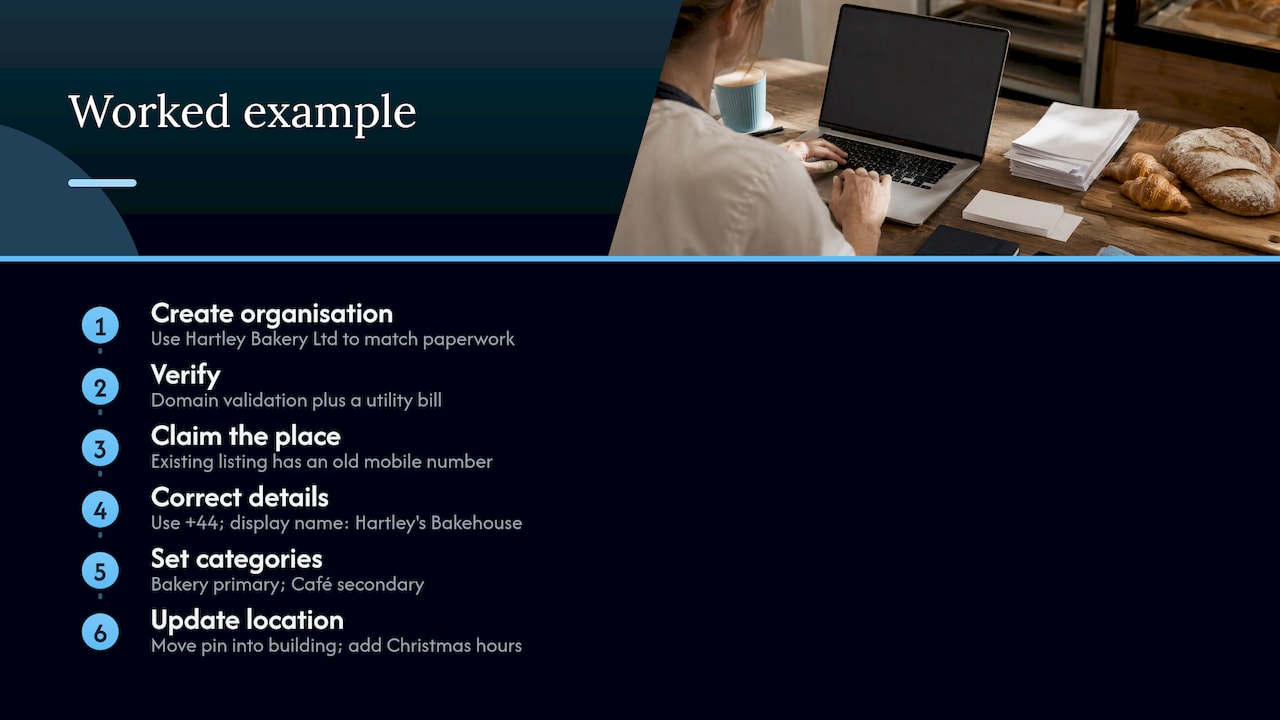
Imagine a small bakery on a high street in Derbyshire, trading as “Hartley’s Bakehouse”, registered as Hartley Bakery Ltd. The owner signs in, creates the organisation as “Hartley Bakery Ltd” to match the paperwork, and verifies with domain validation plus a utility bill in the company name. In Locations, she finds the existing place, which has an old mobile number. She claims it, corrects the number to +44 format, sets the display name to “Hartley’s Bakehouse” as on the shop sign, chooses “Bakery” as primary and “Café” as a secondary category, and drags the pin from the pavement to the middle of the building. She adds Christmas hours as special hours. Total time: under an hour, plus the review wait. That is the whole job.
Where we come in
Most owners can do the form. The part that eats time is the surrounding mess: a domain nobody can log into, a website without a clear address and opening hours, details that differ across six directories, and nobody checking any of it after the first month.
We are a Derbyshire team, and our local SEO service starts from £150 per month. Listings, consistent business details and ongoing optimisation are part of making you easy to find, and we can work in person if you would rather sit down together. If reviews on your place card and elsewhere are your worry, we also offer reputation management. And if your website itself is the weak link, our web design plans start at £120 per month with Starter.
Our view: treat listings as part of your shopfront
Small business owners tell us the same thing about listings: it is one more login, one more job, and it never reaches the top of the list. Then a customer rings to say they went to the wrong street, and suddenly it is the only job.
Our view is that Apple Maps, Google and your website are three windows into the same shop. If the sign over the door says one thing and the window display says another, people walk past. The work is not clever. It is making the name, address, phone number and hours the same everywhere, then keeping them the same when something changes.
That is why we do not treat it as a one-off project. Opening hours change, phone numbers change, you move or rebrand, and each change needs to reach every listing. We would rather look after that for you as part of ongoing optimisation than hand over a tidy listing that is out of date by spring.
If you are a trade working from home, or you are not sure which address to publish, that is a conversation worth having before you press submit. We are local, and we are happy to talk it through.
Chris
FAQ
Is it free to add my business to Apple Maps?
Yes. Apple says any business, from a solo entrepreneur to a large enterprise, can use Apple Business to manage its presence on Apple Maps, and that it is free to get started. You pay nothing to claim or edit a listing.
How long does verification take?
Apple says organisation review can take up to five working days, and longer at high volume. Separately, you have 60 days from sign-up to get verified before the organisation is deleted, so submit clean documents the first time. Both figures are in Apple’s UK sign-up guide.
How many categories can I choose?
One primary category and up to 19 optional ones, according to Apple’s location attribute guidance. Make the primary one as specific as you can, and add the others only for things you genuinely offer.
Can I fix a listing that was set up by someone else?
If the location is managed by another organisation, you can request a transfer from its status in Apple Business, with an explanation and supporting documents such as a licence or utility bill. Apple’s UK guide says review can take up to five working days.
Do I need a website to be on Apple Maps?
The website field is optional. Apple accepts your primary website or a Facebook, Instagram or TikTok page. A proper website still helps, because the domain can be used for verification and gives customers somewhere to check your details.
Sources
- Support Guides & FAQ, Apple Business
- Add a location in Apple Business, Apple Support (UK)
- Sign up for Apple Business, Apple Support (UK)
- Configure location attributes in Apple Business, Apple Support
- If Maps isn’t working on your Apple device, Apple Support (UK)
- Promote your business on Apple Maps with Apple Business, Apple Support
Recommended
- How to Get More Reviews for Your Small Business
- Google Business Profile optimisation for small businesses
- NAP Consistency: How to Check and Fix Your Business Details
- Local SEO checklist for small businesses: 2026 action plan
Related reading: Local SEO checklist for small businesses · Google Business Profile optimisation · Best small business CRM for UK firms