
Service-area SEO means building a properly configured Google Business Profile and a small set of genuinely useful service-area pages, so your business ranks for “[service] + [town]” across every place you cover, without a shopfront anywhere. Start with your Google Business Profile, then publish three to five well-built city pages for your best territories, not fifty thin ones.
That’s the whole game in one sentence. Everything else is execution.
If you do nothing else this week, work through this:
- Set up or fix your Google Business Profile: correct category, hidden address, service areas listed by town or postcode.
- Build three service-area pages for your highest-value towns, each with unique local content.
- Add LocalBusiness schema with
areaServedto every page. - Get five recent, geographically specific reviews rolling in.
- Set up basic tracking: GBP Insights, Google Search Console, and call tracking.
- Check your NAP (name, address, phone) matches everywhere you’re listed.
A business without a shopfront doesn’t need more web pages. It needs fewer, better pages that prove it actually shows up and does the work in each town it claims to serve.
Expect early movement in Google Business Profile visibility within four to six weeks if your setup was previously broken, and three to six months for organic rankings on new service-area pages to settle. If you’re juggling more than six towns, multiple job types, or you simply don’t have the hours, this is where bringing in specialist help pays for itself faster than DIY trial and error.
Key Takeaways
Ranking a service-area business across multiple towns depends on a correctly configured Google Business Profile paired with a small number of genuinely unique, locally proven service-area pages.
| Point | Details |
|---|---|
| Fix GBP before building pages | Hide your address if you don’t serve customers there, and list service areas accurately rather than broadly. |
| Quality beats quantity in SAPs | Three well-built town pages with real local proof outperform a dozen templated ones. |
| Use schema on every SAP | Add LocalBusiness schema with the areaServed property so pages reinforce your GBP’s declared coverage. |
| Localised reviews carry real weight | Reviews mentioning a specific town are among the strongest proof-of-work signals available. |
| Track by town, not just overall | Break GBP Insights, Search Console queries, and conversions down by location to see what’s actually working. |
| TTOY Digital handles this end to end | Its local SEO retainers combine GBP management, SAP builds, and SmartFlowCRM lead handling for multi-town service businesses. |
Table of Contents
- What is a service area business (SAB) in SEO terms?
- How does Google Business Profile work for service-area businesses?
- What are service-area pages and how do they differ from location pages?
- How do you optimise a service-area page for local search?
- How should your site be structured for multiple locations?
- How do citations and reviews improve service area rankings?
- How do you track service area SEO performance across towns?
- What common mistakes trigger GBP suspensions or spam flags?
- How TTOY Digital approaches service-area SEO for real businesses
- When should you handle service area SEO yourself?
- How TTOY Digital can help you rank across every town you serve
- Sources
- FAQ
What is a service area business (SAB) in SEO terms?
A service-area business is any company that travels to the customer rather than the customer coming to it. Plumbers, mobile dog groomers, HVAC engineers, locksmiths, home cleaners, mobile IT support, pest control, and courier services all fit this mould. Google’s own definition is precise on this: an SAB is a business that visits or delivers to customers directly and doesn’t serve customers at a business address, even if you technically have an office or a van depot somewhere.
That distinction matters because it changes how you structure your entire SEO approach. A storefront business (a café, a dental surgery, a retail shop) needs one strong local page tied to one physical address. An SAB needs to prove relevance across a territory, which means service-area pages instead of, or alongside, a single location page.
Use this quick checklist to decide which model fits you:
- Do customers ever visit your premises for the service itself? If yes, you likely need a location page too.
- Do you deliver or perform the work at the customer’s address? If yes, service-area pages are your priority.
- Do you cover more than one distinct town, borough, or postcode cluster with real, regular job volume? If yes, build one SAP per genuine market, not per postcode.
- Is your delivery-only or mobile-only setup consistent across every town? If yes, a single well-built template adapted with real local detail per town works well.
Mixed models exist too. A mobile grooming business with a small studio for drop-offs might need one location page for the studio and several SAPs for the surrounding towns it drives to.
How does Google Business Profile work for service-area businesses?
Your Google Business Profile is the single most important asset in service-area business SEO. Get this wrong and no amount of clever content will compensate. Here’s the exact setup sequence:
- Claim or create your profile with your registered business name, no keyword stuffing in the name field.
- Choose the most accurate primary category first (e.g., “Plumber”, not “Home Services”), then add relevant secondary categories.
- Go to the “Service area” setting and list the specific cities, postcodes, or counties you cover.
- Hide your business address if you don’t serve customers there, a standard toggle Google provides specifically for SABs.
- Add every genuine service you offer under the “Services” section, using clear, customer-facing language.
- Upload recent, real photos of jobs completed in different towns.
- Complete verification via postcard, phone, or email, whichever Google offers for your profile.
Google calculates relevance for hidden-address profiles by weighing your declared service areas against user location and search intent, not by physical proximity alone. Google’s own guidance is that a service area shouldn’t stretch beyond roughly a two-hour drive from your base, and you can list up to 20 separate service areas per profile. Claiming 20 towns you rarely work in will dilute your signals rather than strengthen them.
The fields that carry the most local weight are your primary category, your services list, your photos, and how often you post updates. A dormant profile with a generic category and stock photos tells Google (and customers) nothing.
Pro Tip: Photograph the actual job, in the actual town, with a visible local landmark or street sign where possible. A van outside a recognisable local pub does more for your credibility than any amount of written copy. For the full mechanics, Google’s own support documentation on business profiles is worth bookmarking, alongside our own walkthrough on configuring GBP.

What are service-area pages and how do they differ from location pages?
A service-area page (SAP) is a landing page built for one town or region you serve, designed to rank for searches like “boiler repair Sheffield” or “mobile dog groomer Chesterfield.” A location page, by contrast, represents one physical address where customers actually visit you. Search Engine Land’s guide to service-area pages draws this line clearly: SAPs promote the locations a business serves, while location pages promote where a business physically sits.
Every SAP you build should do three jobs at once. First, it needs to rank for that specific town’s search queries. Second, it needs to convert the visitor who lands there, not just inform them. Third, and this is the one most businesses skip, it needs to prove you actually work in that town, not just that you’d technically drive there if asked.
That third job is where most service-area pages fail. A page that says “We proudly serve Mansfield with the same great service” and nothing else is a doorway page dressed up as content. Google’s guidance on helpful, people-first content explicitly warns against low-value, repetitive pages, and a search engine that’s crawled a hundred near-identical town pages from one domain will treat every one of them with suspicion.
Build each SAP around genuinely local material instead:
- A short paragraph naming the specific neighbourhoods, estates, or landmarks you cover within that town.
- One or two real job examples or mini case studies from that area, described specifically rather than generically.
- A testimonial from a customer in that town, if you have one, named where the customer’s consented.
- A clear call to action, whether that’s a phone number, a booking form, or a WhatsApp link.
- A photo or two taken during actual work in that location.
Pro Tip: Write the “why us in [town]” paragraph last, after you’ve gathered the specific local detail. Trying to write generic “we love serving X” filler first is exactly how doorway pages get made.
Link every SAP from your Google Business Profile description or website field, and from your site’s main services navigation. A page that only Google can find, with no obvious route from your homepage, sends a weak trust signal.
How do you optimise a service-area page for local search?
On-page optimisation for a SAP follows a pattern, but the pattern only works if you fill it with real substance rather than swapping one town name for another.
URLs and title tags. A clean pattern like /plumber-sheffield/ or /boiler-repair/mansfield outperforms vague structures. Title tags should combine the service and the town naturally: “Emergency Plumber in Sheffield | 24/7 Callout” beats a generic “Plumbing Services” repeated across every page with only the town swapped.
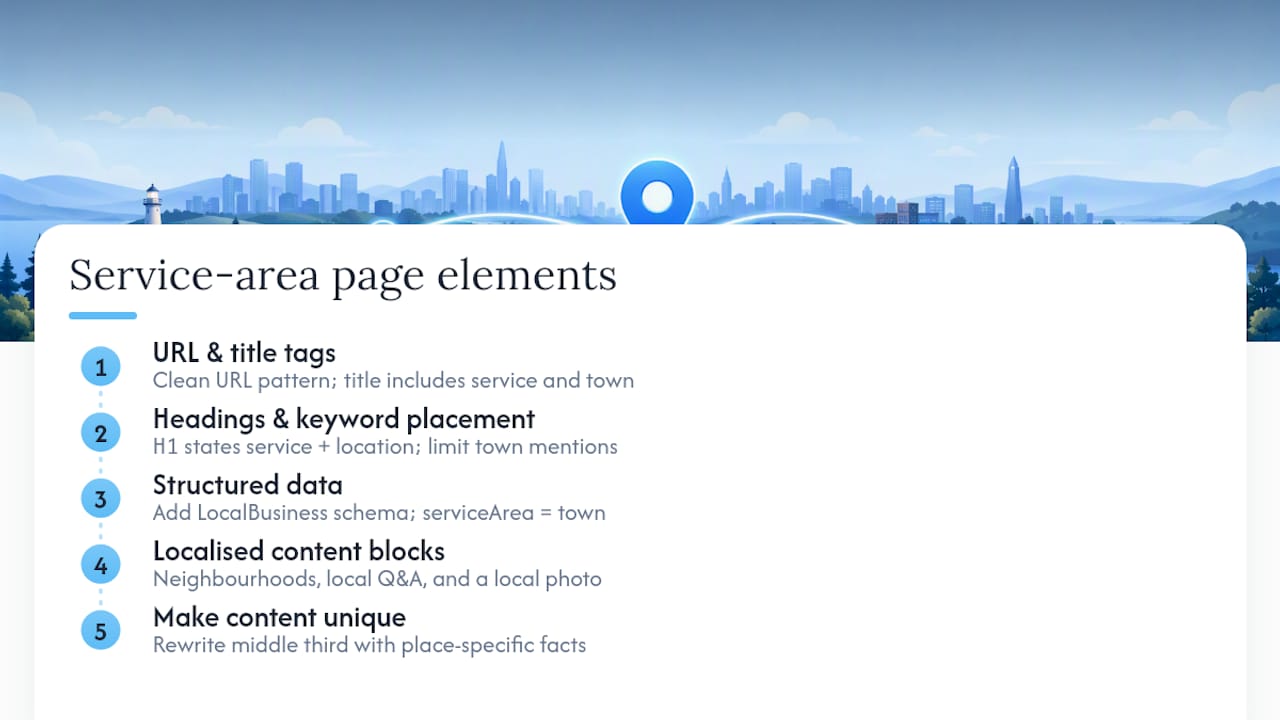
Headings and keyword placement. Your H1 should state the service and location plainly. Subheadings can then branch into specifics: areas covered, pricing guidance, FAQs for that town, and recent work. Repeating the town name in every second sentence reads as stuffing and actively puts customers off, so use it naturally, in the H1, one subheading, the meta title, and once or twice in the body.
Structured data. Add LocalBusiness schema with the areaServed property set to the relevant town or region. This helps search engines connect that specific page to your Google Business Profile’s declared service area, rather than treating your site and your profile as separate, unrelated signals. A minimal example for a Sheffield-focused plumbing page would declare the business type, name, service area, and the specific services offered on that page, structured as LocalBusiness markup per schema.org’s specification. Our practical UK guide to local business schema walks through the exact fields worth including.
Localised content blocks. Every page needs something that couldn’t be copied to a different town without editing. Name the neighbourhoods you actually cover. Answer one or two questions specific to that area (parking restrictions, common local issues, typical response times). Include a photo taken there.
Pro Tip: If you can swap the town name on a page and the content still makes sense word for word, the page isn’t unique enough yet. Rewrite the middle third with something specific to that place before publishing.
How should your site be structured for multiple locations?
Scaling from three towns to fifteen without your site turning into a wasteland of thin pages comes down to architecture, not just content quality.
A sensible URL structure groups service-area pages under a clear parent, such as /service-areas/sheffield/ or /plumbing/mansfield/, rather than scattering them loosely across the site. Keep them visible in your main navigation, either directly or via a “Service Areas” hub page that links out to each town.
Internal linking matters more than most business owners assume. A hub page that lists every town you serve, linking to each SAP, funnels authority downward and helps Google understand the relationship between pages. Your homepage and main services pages should link to that hub, not to individual town pages directly, keeping the hierarchy clean.
On sitemap and indexation:
- Only include a service-area page in your XML sitemap once it has genuine unique content, not the moment it’s created as a placeholder.
- Use
noindexon any page that’s still a stub, rather than letting Google crawl and judge a half-finished page. - Monitor Google Search Console’s coverage report monthly for any pages flagged as “duplicate without user-selected canonical”, a common symptom of templated SAPs.
If you cover a large rural footprint with many small villages, don’t build a page for every hamlet. Group smaller places under a regional hub page (a “North Derbyshire villages” page, for instance) and reserve dedicated SAPs for towns with genuine search volume. Industry guidance consistently favours starting with a handful of high-value areas over mass-producing pages for every postcode you’d technically drive to.
How do citations and reviews improve service area rankings?
Consistency in your business name, address, and phone number (your NAP) across directories, trade bodies, and chamber of commerce listings still carries real weight in local rankings. Check yours on the major UK directories, your trade association listing, and any industry-specific sites you’re registered with. A mismatched phone number on one directory is a minor annoyance; a mismatched one on ten is a trust problem.

Your Google Business Profile categories should map directly to what’s on your website. If your GBP lists “Boiler installation” as a service but your site never mentions it, that gap works against you.
Reviews do double duty here. They build trust with potential customers, but geographically specific reviews also reinforce which towns you genuinely operate in. Localised reviews and photos showing proof of work in a given town are among the strongest signals you can offer to demonstrate real coverage, not just claimed coverage.
Practical tactics that actually move the needle:
- Ask customers to mention their town in the review, even loosely (“great service out in Bakewell”).
- Request a review within 24 to 48 hours of job completion, while it’s still front of mind.
- Respond to every review, positive or negative, and mention the town in your reply where it fits naturally.
- Prioritise local backlinks (trade bodies, local news mentions, community sponsorships) over generic industry directories, since local links carry more geographic relevance for SAB rankings than a national directory listing ever will.
How do you track service area SEO performance across towns?
You can’t tell whether three months of work is paying off without a baseline and a few consistent metrics.
The core numbers worth watching: GBP impressions, calls, and direction requests (all inside Google Business Profile Insights); organic queries broken down by town inside Google Search Console; organic clicks and conversions per service-area page in GA4; and, ultimately, form submissions and phone calls tied back to each page or profile.
For tools, GBP Insights and Search Console cost nothing and cover the fundamentals. A local rank tracker or rank grid tool adds visibility into how you rank across a spread of postcodes within one town, which matters because ranking well at the town centre and poorly at its edges is common and fixable.
Check performance monthly for the first six months, then move to quarterly once things stabilise. A healthy trend by month three to six looks like rising GBP impressions in your declared service areas, a growing spread of “service + town” queries appearing in Search Console, and a steady increase in calls or form fills, not necessarily a dramatic spike.
Pro Tip: Set up call tracking before you launch new SAPs, not after. Without it, you’ll never know whether a jump in phone enquiries came from the new Mansfield page or from word of mouth.
DIY setup, done properly, typically takes several weeks of consistent effort per town when you’re learning as you go. Agency-led service-area SEO work generally runs as a monthly retainer, with most of the visible movement in GBP happening faster than the organic ranking gains on new pages, which take longer to mature regardless of who builds them.
What common mistakes trigger GBP suspensions or spam flags?
The mistakes that get profiles suspended or pages quietly buried are almost always the same handful, repeated across the industry.
- Templated service-area pages with only the town name changed trigger Google’s duplicate and thin-content detection, and can drag down the whole domain’s trust, not just the offending pages.
- Listing a fake or virtual office address to appear as a storefront business, when you’re genuinely an SAB, is one of the fastest routes to a suspended profile.
- Running multiple Google Business Profiles for the same business without genuinely staffed, distinct locations violates Google’s guidelines outright.
- Declaring service areas so broad they cover half the country dilutes every local signal you’re trying to build.
If a profile gets suspended, the recovery path is: correct the violation first (remove the fake address, merge duplicate profiles, or rewrite the offending pages), then submit a reinstatement request through Google’s support channel with clear evidence of the fix, and expect the review to take days rather than hours.
Pro Tip: Keep your declared service area to what you can genuinely reach within about two hours and actually service regularly. A shorter, honest list outperforms an ambitious, padded one.
How TTOY Digital approaches service-area SEO for real businesses
The process we follow with service-area clients is deliberately unglamorous: audit the existing Google Business Profile and site first, fix whatever’s broken in GBP, build three genuinely useful service-area pages for the highest-value towns, launch a structured review campaign, then put tracking in place before calling it finished.
One recurring pattern across clients who’d previously tried DIY service-area pages: the fix usually wasn’t more pages, it was fewer, better ones, paired with a Google Business Profile that had been left half-configured for months. Once the profile was corrected and three solid town pages replaced a dozen thin ones, GBP impressions and call volume both moved upward within the first couple of months, a pattern consistent with how proximity, relevance and prominence drive local rankings generally.
Multi-town businesses rarely lose to bigger competitors on ad spend. They lose because their Google Business Profile was set up once, three years ago, and never touched again.
Lead handling matters just as much as ranking. A service-area business fielding enquiries from six different towns needs those calls, WhatsApp messages, and web forms landing somewhere organised, which is exactly the gap SmartFlowCRM is built to close.
When should you handle service area SEO yourself?
If you’re covering two or three towns, have a spare few hours a week, and don’t mind a learning curve, DIY is workable, especially for the Google Business Profile setup itself. Complexity past five or six towns, limited time, or a profile that’s already been flagged tips the balance towards hiring help.
If you do bring in an agency, ask directly for examples of service-area pages they’ve built, evidence they’ve recovered a suspended GBP before, and how often they report on results. Content production at scale, ongoing citation building, and review campaign management are usually the tasks most worth outsourcing first.
How TTOY Digital can help you rank across every town you serve
There’s a version of this work you can do entirely yourself with a spreadsheet, a weekend, and patience, and a version where you hand it to specialists who’ve fixed dozens of half-broken Google Business Profiles before yours. TTOY Digital sits firmly in the second camp, built specifically for small businesses that don’t have a marketing department to spare. Our local SEO retainers cover exactly what this article walks through: full GBP correction and management, service-area page design for your priority towns, and ongoing review and citation work, all reported on in plain English rather than jargon.
Where this genuinely saves you time is lead handling. Enquiries from six different towns, arriving by phone, WhatsApp, and web form, get funnelled into one place through SmartFlowCRM, so nothing sits unanswered in a separate inbox while you’re out on a job. If you’d rather see the full picture of what’s included, our services overview covers web design, SEO, and CRM setup together, and it’s the natural next step if you want someone else carrying the technical load. Book a call and we’ll audit your current Google Business Profile for free before you commit to anything.
Sources
For readers who want to check the official rules directly rather than take a summary at face value, these are worth bookmarking:
- Service area pages: Boost local SEO across locations
- GBP for service-area businesses
- Creating helpful, reliable, people-first content, Google Search Central
- Represent your business on Google, service area guidance
FAQ
What is a service area in business?
A service area is the geographic territory, defined by towns, postcodes, or counties, where a business travels to perform work or make deliveries, rather than serving customers at a fixed premises.
What is an example of a service area business?
Mobile plumbers, HVAC engineers, pest control technicians, mobile dog groomers, and courier or delivery-only operators are all classic examples, since none of them require the customer to visit a physical location.
How many service areas can I list on Google Business Profile?
Google allows up to 20 service-area entries per Google Business Profile, though listing that many only helps if you genuinely and regularly work in each one.
What are the three main areas of SEO?
Technical SEO (site structure, crawlability, schema), on-page SEO (content, titles, headings), and off-page SEO (citations, reviews, backlinks) are the three pillars, and service-area businesses need all three working together across every town they serve.
Should I hire an agency or build service-area pages myself?
DIY works reasonably well for two or three towns with a modest time investment, but once you’re covering five or more locations, or your Google Business Profile has already been flagged, agencies like TTOY Digital typically deliver faster, more consistent results.