Enable missed call text back and every unanswered call gets an instant SMS reply, so a caller who might have hung up and rung a rival gets a reason to stay in touch. It costs almost nothing to set up, and it recovers leads you’re currently losing without even knowing it. If you’re missing calls during busy periods, after hours, or when your team is out on jobs, this is the single easiest fix on your list this month.
- Most missed calls are warm leads that expect quick responses, with an ideal reply time within five minutes to maximise engagement.
- Setting up automated SMS replies within 15 to 30 seconds of a missed call is crucial, especially during peak times or after hours.
- Using a CRM or VoIP platform’s workflow simplifies integration, with testing recommended to ensure sender ID and timing are correct.
- Messages should be concise, under 160 characters, including your business name, apology, and a clear call to action such as booking or replying.
Table of Contents
- How does missed call text back actually work?
- Why bother? The benefits for small businesses
- How do you set up missed call text back?
- What should the message actually say?
- Best practices and the pitfalls that catch people out
- How do you measure whether it’s working?
- How TTOY Digital sets this up: SmartFlowCRM in practice
- A simple auto-reply or an AI receptionist: which one do you need?
- Get missed call text back running properly, without the guesswork
- Sources
- FAQ
How does missed call text back actually work?
The mechanic is simple: a call goes unanswered, either because nobody picks up within a set number of rings or because it’s diverted somewhere nobody’s listening, and that triggers an automatic SMS to the caller’s number. That’s the whole loop, but where it lives matters. It might sit inside a CRM or VoIP platform’s workflow builder, run through a third-party call-forwarding service that layers SMS on top, or live as an app on the business owner’s own phone. WhatsApp can play a similar role, but it needs the caller to already have your number saved or to message first, so it’s a different flow, not a straight swap for SMS.
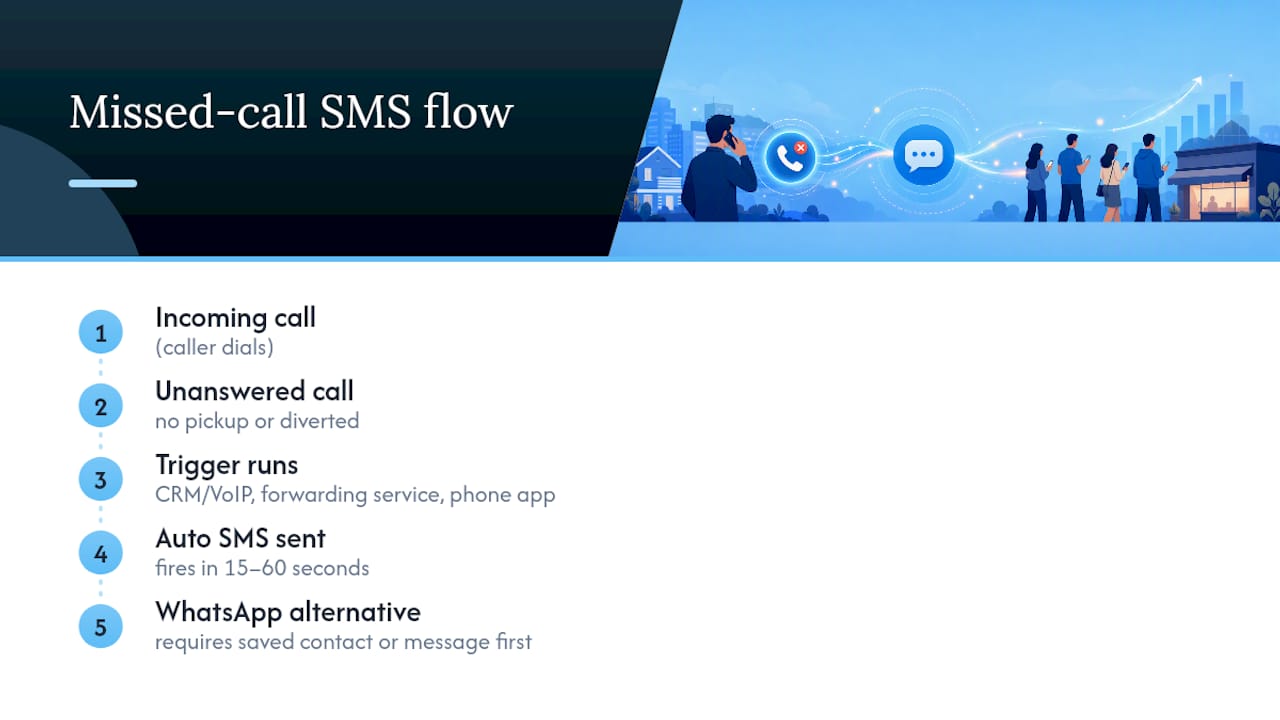
Timing is what separates a good setup from a wasted one. Most platforms fire the text within 15 to 60 seconds of the missed call, and that speed isn’t cosmetic. Responses cluster heavily in the first five minutes after a text lands, then drop off fast. Delay the reply and you’ve lost most of your shot at a conversation.
Why bother? The benefits for small businesses
The honest answer is that most missed calls are warm leads, not wrong numbers. Someone rang because they wanted something now, and if you don’t answer, they’re already dialling the next name on their list. A text that lands within a minute buys you back into the conversation before they’ve moved on.
This matters most in three situations: after hours when nobody’s near a phone, during peak times when every line is busy, and when your team is out on site and can’t stop to answer. In all three, the caller assumes silence means “not interested” unless you prove otherwise, fast.
Pro Tip: Don’t just apologise for missing the call. Give the caller a reason to reply immediately, like a link to book or a direct question, so the conversation restarts rather than fizzles.
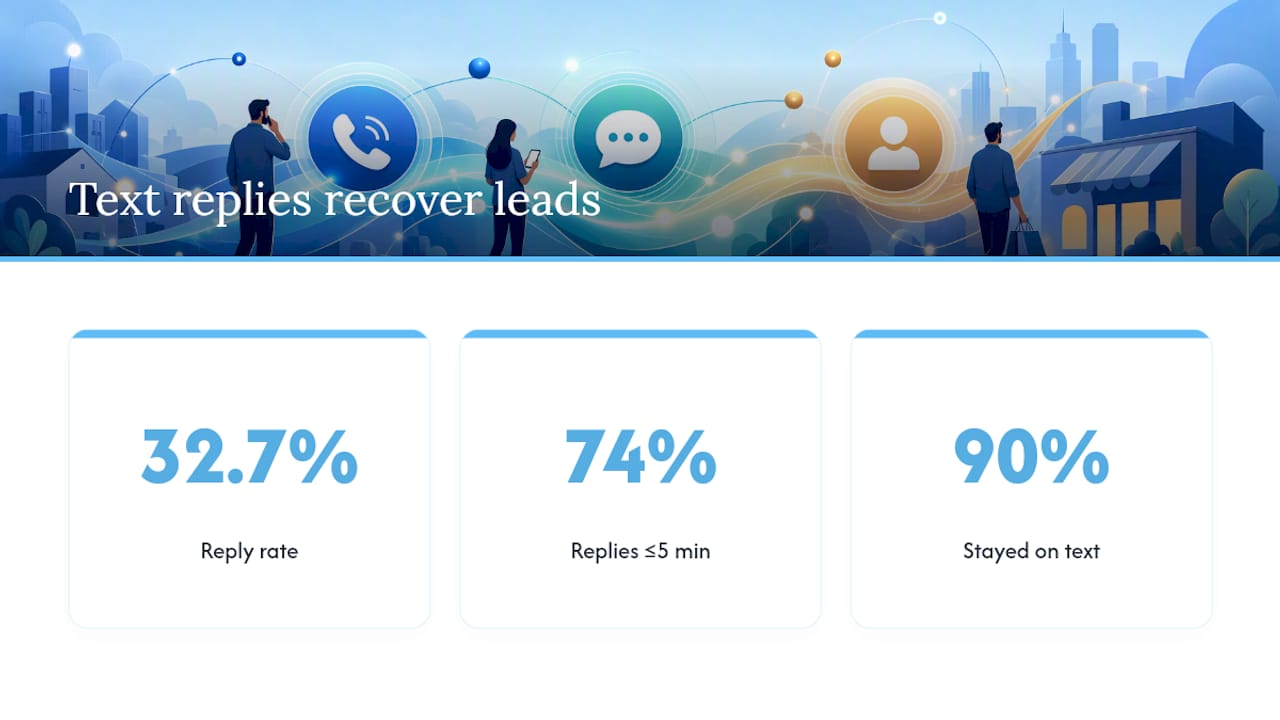
An analysis of 14,354 missed call text messages across 192 home-service businesses found a 32.7% reply rate, with 74% of those replies arriving within five minutes. Around 90% of the recovered conversations stayed entirely over text, meaning most leads never needed a phone call at all to move forward.
How do you set up missed call text back?
There’s no single “correct” route. It depends on what you already run and how many calls you’re missing.
Route A: Built-in CRM or VoIP workflow. This is the strongest long-term option if you already use a CRM.
- Find the “missed call” trigger in your workflow builder.
- Add an SMS action beneath it and write your message.
- Set the ring timeout (most businesses use somewhere between 15 and 30 seconds).
- Test-send to your own mobile before going live, and check the reply routes back into the CRM.
Documentation for platforms like HighLevel shows this exact enable, customise, and test flow, including a dedicated test-send tool.
Route B: Third-party service with call forwarding. Some services use conditional call diversion, forwarding only unanswered calls, and pair that with AI-driven follow-up that produces a lead summary by email or SMS. When onboarding one, check exactly which calls get diverted and where lead summaries land.
Route C: Phone-based auto-reply apps. Fastest to start, best for solo operators. Android options like IFTTT applets or dedicated apps trigger on missed calls directly from the handset. iOS is more locked down, so options here are thinner. Either way, you’ll need to grant call and SMS permissions, and messages send from your personal number.
Testing checklist before you switch it on:
- Confirm the ring timeout matches your actual answer speed
- Place a genuine test call and time the reply
- Check the sender ID shows your business number, not a generic short code
- Verify replies land somewhere someone actually checks
- Count your message’s characters to avoid it splitting into two texts
What should the message actually say?
Keep it short. Most guides recommend staying under 160 characters so the message sends as one SMS rather than splitting (and doubling your cost) or getting delayed. Every message needs three things: your business name, a quick acknowledgement, and a clear next step.
- General: “Hi, this is [Business Name]. Sorry we missed your call! Reply here and we’ll get back to you shortly.”
- Booking-focused: “Thanks for calling [Business Name]. Want to book instead? Reply with a day that suits you or click [link].”
- After-hours: “Sorry we missed you, we’re closed until 9am. We’ll call you back first thing, or reply here now.”
- Urgent/emergency: “We missed your call. If this is urgent, please call [emergency number] directly. Otherwise, reply and we’ll respond ASAP.”
Add an opt-out line (“Reply STOP to opt out”) if your provider doesn’t add one automatically, and adjust wording for local phrasing rather than translating word for word.
Best practices and the pitfalls that catch people out
The most common mistake is building a system with no memory. If the same person calls three times in an hour, do they get three identical texts? Without a cooldown, yes, and that looks like spam fast.
- Add a wait step or tag filter so the same number can’t trigger a fresh text within roughly 20 minutes
- Set a daily send cap to protect both your messaging budget and your sender reputation
- Route every reply into your CRM and assign it to a named person, not a shared inbox nobody owns
- Keep the message strictly transactional (acknowledging the call), not promotional, to stay compliant
Pro Tip: A missed-call text with nobody watching the replies is worse than no text at all. It raises the caller’s expectation of a fast response, then breaks it.
For more on avoiding these traps in wider automation, our guide to common marketing automation mistakes covers the same failure patterns in other channels.
How do you measure whether it’s working?
Track three numbers from day one: reply rate, median reply time, and how many replies actually convert into a booked lead. A 32.7% reply rate is a reasonable early benchmark to judge your own results against, though your sector will shift that figure up or down.
Alongside those, watch delivery rate (are texts actually arriving?), opt-out rate (are people annoyed?), and rough cost per recovered lead. Most of this data sits inside your SMS provider or CRM dashboard already, so pull it weekly for the first month, then monthly once the setup settles. If reply rate is low, check your message copy before touching the technology.
How TTOY Digital sets this up: SmartFlowCRM in practice
A missed call trigger, an SMS action, and a CRM record sound simple until you’re the one juggling five different tools trying to make them talk to each other. That’s the gap SmartFlowCRM closes for the small businesses we work with: it fires the text-back automatically, then drops the entire reply thread straight into the customer’s record alongside their email and WhatsApp history.
Onboarding typically runs through call routing, message templates, and CRM field mapping in a single setup pass, so nothing gets left as a “we’ll fix that later” job. The result is one owner, one record, one place to see whether a missed call actually turned into paying work.
A simple auto-reply or an AI receptionist: which one do you need?
A basic text-back template costs little and covers most small businesses fine, especially under fifty calls a day. Once missed-call volume climbs, or urgency is high (emergency trades, bookings with tight windows), the case for an AI-driven follow-up service that qualifies and summarises leads gets stronger. For most small operators starting out, get the basic version working properly first. Upgrade only once you can prove the volume justifies it.
— Chris
Get missed call text back running properly, without the guesswork
Setting up the trigger is the easy part. Making sure replies land somewhere useful, that nobody’s chasing five inboxes to find out who replied to what, is where most small businesses get stuck. TTOY Digital builds this as part of a wider CRM setup rather than a bolt-on gadget, which means your missed-call texts, WhatsApp threads, and email enquiries all sit in the same customer record from day one.
Our managed setup covers the trigger configuration, message templates matched to your sector, and the CRM routing that turns a reply into an assigned lead rather than an unread text. SmartFlowCRM is built specifically to unify these channels for small businesses that don’t have time to manage four separate apps. If you’re ready to stop losing calls to voicemail, get in touch through our services page to book a setup consultation.
Sources
For step-by-step settings guidance, see the HighLevel support article on configuring missed call text back. For reply-rate data, see the 99Calls analysis of 14,354 messages. For a broader workflow reference, see the WorkflowStack AI guide, and for automation planning generally, our partner’s marketing automation checklist is worth a read.
- Does missed call text back actually work? (99Calls analysis)
- Where and How to Configure the Missed Call Text Back Feature
- The Complete Guide to Missed-Call Text Back | WorkflowStack AI
FAQ
How do you text back after a missed call?
Set up an automated trigger that fires an SMS within 15 to 60 seconds of the missed call, acknowledging the call and giving the caller a clear next step, such as booking a link or replying to continue the conversation.
What is the missed call text back feature?
It’s an automation that detects an unanswered inbound call and immediately sends a text message to that caller, typically configured inside a CRM, VoIP platform, or a phone-based app.
How do I text “sorry I missed your call”?
Keep it short and specific: name your business, apologise briefly, and add one clear action, for example: “Hi, this is [Business Name], sorry we missed your call! Reply here and we’ll get back to you shortly.”
Should you always text after a missed call?
Yes for most business calls, since a fast reply keeps you in the conversation before the caller tries someone else, though you should exclude spam numbers and repeat callers within a short cooldown window to avoid looking automated in a bad way.
Recommended
- Top 10 Marketing Automation Mistakes Small Businesses Make and How to Avoid Them
- Lead capture forms that actually generate quality leads
- Generating Leads with Digital Marketing: Practical Strategies for Small Businesses & B2B Teams
- Effective Marketing Automation Strategies for Small Business Growth
Related reading: Lead capture forms that generate quality leads · Best small business CRM for UK firms · Website design cost UK: a 2026 pricing guide



