
Lead routing automation assigns incoming leads to the right salesperson without a human deciding, manually, every single time. The best first move is almost always the simplest: build a round-robin pool, then layer on availability checks so leads never sit waiting for someone who’s out of office. Get that right and you’ll see two things quickly: faster first contact, and a fairer, less resentful sales team.
- Basic round-robin lead routing ensures fairness and keeps lead counts close to parity, improving team morale and avoiding manual bias.
- Incorporating availability checks prevents leads from being assigned to unreachable reps, which is the highest-impact upgrade for scaling teams.
- Native CRM tools handle simple routing but often require additional layers or custom work to support weighting, complex rules, or capacity caps.
- Speed-to-lead metrics, especially median response times under five minutes, directly impact conversion rates and should be monitored regularly.
- Small businesses can implement effective automation using simple pools and availability checks within current CRMs, without needing a dedicated RevOps team.
Table of Contents
- What is lead routing automation and why does it matter?
- How does round-robin lead assignment actually work?
- Best practices for reliable, scalable lead routing
- Which CRM setup handles lead routing best?
- What KPIs prove lead routing automation is working?
- How do you pilot and scale lead routing automation?
- How TTOY Digital approaches lead routing for small business clients
- What most RevOps advice gets backwards about routing
- Get lead routing automation running without hiring a RevOps team
- Sources
- FAQ
What is lead routing automation and why does it matter?
Here’s the bit that trips people up: routing logic and ownership updates are not the same thing. Routing logic is the rulebook. Ownership update is just the CRM field changing hands once that rulebook has made its decision. Confuse the two and you end up debugging the wrong system when leads go missing.
The stakes here are bigger than most sales leaders admit to themselves. Response speed is one of the strongest levers on conversion that exists in sales, and contact within the first minute produces a notable uplift compared with even a short delay, according to practitioner benchmarks cited in RevOps guidance. That’s not a nice-to-have improvement, that’s the difference between a lead who’s still thinking about you and one who’s already filled out a competitor’s form.
Proper lead routing automation delivers benefits that compound over time, not just on day one:
- Fewer leads sitting untouched in an inbox or shared spreadsheet because nobody “owned” them yet
- Consistent service-level agreements that hold regardless of who’s on holiday
- A clear audit trail showing exactly why a lead went to a particular rep, which ends the “why did Dave get all the good ones again” arguments
- Cleaner reporting because every lead follows the same traceable path from capture to first contact
None of this needs to be complicated. A basic rule set, applied consistently, beats a brilliant rule set nobody trusts because it’s a black box. That’s the whole point of automating lead distribution in the first place: not cleverness, reliability.
How does round-robin lead assignment actually work?
Most teams start here, and most teams should. Understanding the mechanics properly, though, saves you from the two mistakes almost everyone makes on their first attempt.
1. Round-robin mechanics and fairness
Round-robin assigns leads sequentially, one rep after another, cycling back to the start once everyone’s had a turn. Done properly, it keeps each rep’s lead count within roughly plus or minus one lead of perfect equality over time, according to mathematical analysis of round-robin assignment. That tight variance is exactly why it’s the default starting point. It’s genuinely fair, and reps can see that it’s fair, which matters more for morale than most sales managers give it credit for.
Statistic in focus: Basic round-robin keeps per-rep lead counts very close to perfect equality over time, a mathematical property of the sequencing itself, not a promise from a vendor, which is why it’s the safest starting rule for teams with no routing history to learn from.
2. Weighted rotation
Plain round-robin treats every rep identically, which stops making sense the moment your team is mixed experience levels. Weighted rotation fixes this by giving each rep a ratio instead of an equal slot. A senior rep weighted at 3 and two newer reps weighted at 1 each means the senior rep gets three leads for every one the juniors get. Simple maths, real impact on ramp time for new starters who aren’t yet ready to be swamped.
3. Availability-aware routing
This is the single highest-impact upgrade most teams can make to basic round-robin. Checking a rep’s calendar or working hours before assigning a lead means nobody gets handed a prospect at 6pm on a Friday when they’re already logged off for the weekend. Vendors and RevOps practitioners alike treat availability-aware routing as close to essential once a team scales past a handful of reps, because stale leads are almost always a symptom of an unavailable rep sitting in the rotation.
4. Pull queues versus push assignment
Push assignment hands a lead directly to a named rep. Pull queues instead surface a pool of unclaimed leads that any available rep can grab. Push suits high-velocity inbound where speed trumps everything. Pull queues work better where reps need to self-select based on fit, territory knowledge, or existing relationships.
5. Hybrid architecture
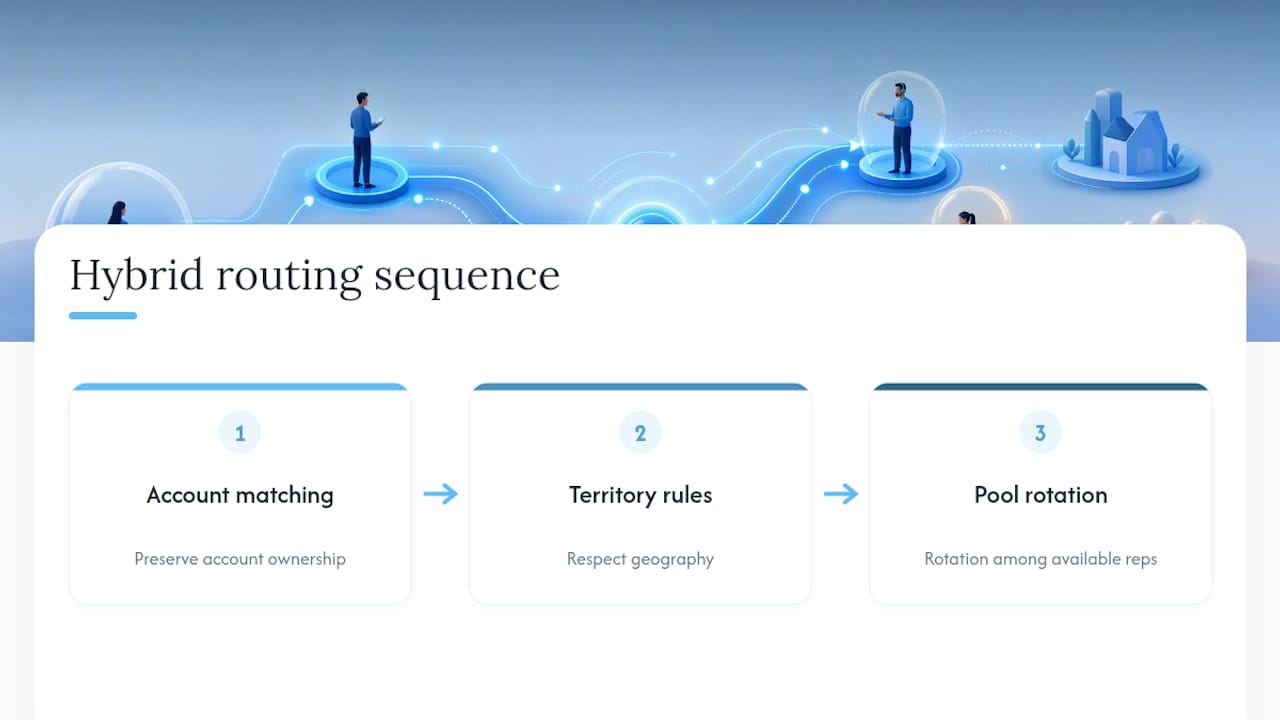
Mature RevOps teams rarely rely on one method alone. A layered pattern, account matching first, then territory rules, then pool rotation among whoever’s left, preserves fairness while still respecting account ownership and geography, a pattern documented across enterprise routing setups. Start simple. Add layers only once you can point to the specific problem each layer solves.
Best practices for reliable, scalable lead routing
Rules that work beautifully on day one tend to quietly fail by month three, usually because nobody planned for the edge cases. A handful of disciplines keep sales lead routing dependable as volume and headcount grow.
- Segment before you route. Split leads by source, lead score, territory, or product line first, then apply routing rules within each segment rather than one giant catch-all pool.
- Set SLAs with teeth. Define a time-to-first-contact target, monitor it, and build automatic reassignment for any lead a rep hasn’t touched within the window.
- Cap and pause. Give each rep a maximum concurrent lead count and a way to pause their queue, otherwise your best closer ends up buried while a quieter rep sits idle.
- Always define a fallback. Every routing rule needs a “what happens if nobody matches” path, or leads vanish into queues nobody’s watching.
- Keep audit logs readable. A log that just says “assigned” is useless. A good one explains why, matched territory, hit weighting, availability check passed, so reps stop arguing with the system and start trusting it.
- Measure pool by pool. A single blended conversion number across your whole routing system hides which specific pool is underperforming.
Pro Tip: Review your routing rules every quarter, not just when something breaks. Rules that made sense with five reps often quietly stop making sense at fifteen, and nobody notices until conversion drops and someone finally asks why.
Segmenting properly before routing also pays off downstream. Feeding routing off clean, well-mapped intake, the sort you get from well-designed lead capture forms, means the segmentation rules have something reliable to key off in the first place.
Which CRM setup handles lead routing best?
The honest answer is: none of the major platforms handle it brilliantly out of the box, and knowing where each one’s native limits sit saves you weeks of frustration.
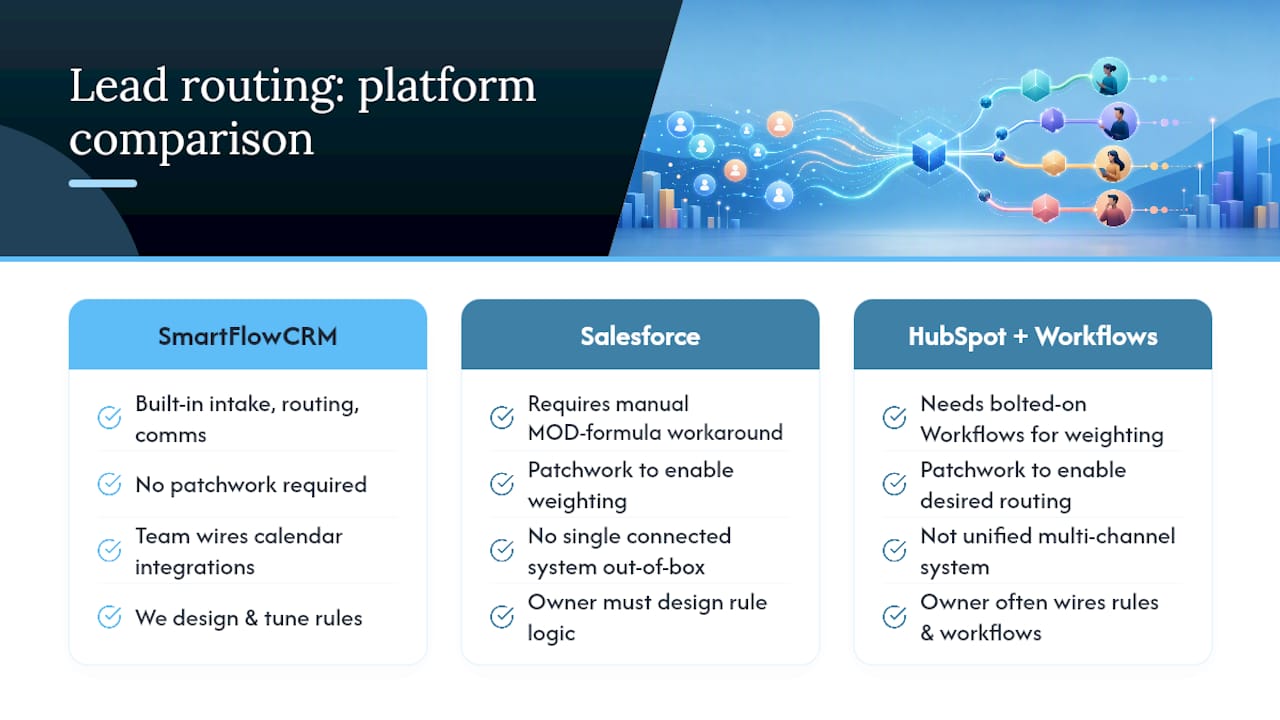
Salesforce has no native round-robin feature that just works. Teams commonly build it manually using an auto-number field combined with a MOD (modulo) formula to cycle assignment across a rep list, a workaround that functions but breaks the moment a rep goes on leave or the list changes, as RevOps practitioners have documented at length. Assignment rules exist, but they’re static and blind to real-time availability.
HubSpot’s native rotation is straightforward for basic even-split assignment, but weighting, capacity caps, and availability checks all require Workflows or a third-party app bolted on top.
Dynamics 365 is the most transparent of the three about its own logic. Microsoft’s documentation explicitly describes both round-robin and load-balancing assignment modes, and treats capacity and availability checks as central to fair assignment rather than an afterthought.
The pattern across all three: native tools handle the simple case adequately, then hit a wall the moment you want weighting, calendar awareness, or multi-step logic. That’s when teams either build heavier flows inside the CRM or add a dedicated routing layer that sits beside it, positioned by routing-specific vendors as stack-agnostic and explainable precisely because it doesn’t inherit the CRM’s native constraints.
Whichever route you take, a few integrations aren’t optional if you want the system to actually work:
- Calendar sync, so availability checks reflect real bookings, not just a static working-hours setting
- Working-hours data per rep, including time zones for distributed teams
- A live capacity signal, current open lead count, so caps mean something
- Notification channels (email, Slack, WhatsApp) so reps know instantly when a lead lands
Plan for rule-count limits too. Most CRMs cap the number of active assignment rules, and every added condition slows evaluation slightly, so tidy rule design matters more as you scale.
What KPIs prove lead routing automation is working?
Numbers settle arguments that opinions never will. Track these consistently and you’ll know within weeks whether your routing rules are helping or quietly costing you deals.
| Metric | What it tells you | Target to aim for |
|---|---|---|
| Speed-to-lead (median) | How fast leads reach a rep after capture | Under 5 minutes for high-intent leads |
| Time-to-first-contact | How fast the rep actually reaches out | Under one hour for standard leads |
| SLA compliance rate | Percentage of leads contacted within target window | Rising trend month over month |
| Distribution balance | How evenly leads spread across reps in a pool | Within a few leads of parity |
| Conversion rate by pool | Whether one segment underperforms others | Compared pool to pool, not blended |
Speed-to-lead distributions matter more than the average alone, because a median that looks healthy can hide a long tail of leads waiting hours. Audit logs that explain each assignment decision, rather than just recording it, build the kind of rep trust that keeps people from routing around the system manually. When reps understand why they got a lead, they stop second-guessing the process, and that trust is worth protecting.
How do you pilot and scale lead routing automation?
Rolling this out properly means resisting the urge to automate everything at once. Start narrow, prove it works, then widen the scope.
- Pick one lead source to pilot with, ideally your highest-volume or highest-intent channel, and leave everything else on manual assignment for now.
- Map the fields that routing rules will actually key off, lead score, source, territory, product interest, before building a single rule.
- Create the pool and rotation logic, starting with plain round-robin unless you already have a clear weighting need.
- Set the SLA and configure automatic reassignment for any breach.
- Test the fallback path deliberately, feed it a lead that matches nothing, and confirm it doesn’t disappear.
- Assign an owner for the rules themselves, someone in RevOps or sales ops who reviews and adjusts them on a fixed cadence, not just when something breaks.
Watch for the signals that tell you it’s time to expand: rising time-to-contact despite no volume change, rep complaints about fairness, or crossing roughly 20 reps or multiple go-to-market motions running in parallel. Any one of those is a reasonable trigger to add territory logic or account matching on top of your base rotation. A practical automation checklist covering adjacent marketing workflows is a useful companion when you’re mapping how leads flow into routing in the first place.
How TTOY Digital approaches lead routing for small business clients
Most small businesses we work with aren’t short on leads, they’re short on a system that gets those leads to the right person before they’ve cooled off. That’s precisely the gap SmartFlowCRM closes: it centralises intake from WhatsApp, email, and web forms into one place, so routing rules have complete context on every lead the moment it arrives, rather than piecing it together from three separate inboxes.
Our approach follows a consistent pattern:
- Discovery, understanding actual lead sources and team structure
- Rules design built around real segments
- Calendar and channel integration for availability checks
- A pilot phase with defined SLAs, followed by tuning based on data
What most RevOps advice gets backwards about routing
The instinct to chase precision first, building elaborate territory maps before you’ve even automated the basics, is usually the wrong order of operations. Speed-to-lead should almost always win the early trade-off, because a fast, fair, imperfect assignment beats a slow, perfect one every time a competitor’s rep gets there first.
Account matching and territory logic earn their complexity only once volume and headcount justify the maintenance burden, typically somewhere past 15 to 20 reps or several distinct go-to-market motions running side by side. Below that, the honest checklist is short: how many reps, how many lead sources, and who actually has time to maintain the rules. Get those three answers right before building anything clever.
— Chris
Get lead routing automation running without hiring a RevOps team
TTOY Digital is the alternative to hiring an in-house RevOps specialist or wrestling with native CRM workarounds yourself. Where Salesforce needs a manual MOD-formula workaround and HubSpot needs bolted-on Workflows just to get basic weighting working, our SmartFlowCRM is built to handle intake, routing, and multi-channel communication as one connected system from day one, no patchwork required.
If you’re a small business owner who’d rather have someone else design the rules, wire up the calendar integrations, and tune the pilot than learn CRM formula syntax at 11pm, that’s exactly the gap our CRM plans (Gold and Silver) are built to close. We also build the lead capture forms and web applications that feed clean data into routing in the first place, so the rules have something reliable to work with.
Get in touch through the CRM services page for a straightforward conversation about what a pilot would look like for your team.
Sources
- Round-robin lead assignment (rework resources)
- Round-Robin lead assignment: The RevOps guide
- Dynamics 365 documentation: understand lead distributions and assignment rules
FAQ
What does lead routing mean?
Lead routing is the process of deciding which salesperson or team receives each new lead the moment it arrives. Automated lead distribution applies that decision through preset rules, rotation, territory, availability, rather than a manager assigning leads by hand.
What is a lead automation system?
A lead automation system captures incoming leads and applies rules to score, segment, and route them to the right rep without manual intervention. It typically pairs lead management software with routing logic and notification tools so reps are alerted the moment a lead lands.
Which CRM is best for lead management?
There’s no single best answer, Salesforce, HubSpot, and Dynamics 365 each handle native routing differently, and all three hit limits once you need weighting or availability checks. For small businesses wanting routing and multi-channel communication built in from the start, SmartFlowCRM is designed specifically to avoid the native workaround problem.
What is the best software for lead generation?
Lead generation software varies by channel, forms, ads, WhatsApp capture, and works best when it feeds directly into a CRM that can route what it captures. Well-built lead capture forms matter as much as the generation tool itself, since messy intake data undermines even the best routing rules downstream.
How do you automate lead routing without a big tech budget?
Start with a simple round-robin pool inside whatever CRM you already use, then add one availability check before spending on anything more advanced. Most small teams see the biggest improvement from that first step alone, long before weighting or account matching become necessary.



